<?xml version="1.0" encoding="utf-8"?>
<feed xmlns="http://www.w3.org/2005/Atom" xml:lang="en-GB">
  <link href="https://participantkit.com/updates/feed.xml" rel="self" type="application/atom+xml"/>
  <link href="https://participantkit.com/whats-new" rel="alternate" type="text/html" hreflang="en-GB"/>
  <updated>2026-10-11T06:01:11+00:00</updated>
  <id>https://participantkit.com/updates/feed.xml</id>
  <title type="html">Participant Kit product updates</title>
  <subtitle>What's new in Participant Kit, including the weekly Friday Drop.</subtitle>
  
  <entry>
    <title type="html">Keep track of incentives, whoever pays them</title>
    <link href="https://participantkit.com/updates/keep-track-of-incentives-whoever-pays-them" rel="alternate" type="text/html" title="Keep track of incentives, whoever pays them"/>
    <link href="https://participantkit.com/updates/keep-track-of-incentives-whoever-pays-them.md" rel="alternate" type="text/markdown"/>
    <published>2026-10-09T00:00:00+00:00</published>
    <updated>2026-10-09T00:00:00+00:00</updated>
    <id>https://participantkit.com/updates/keep-track-of-incentives-whoever-pays-them</id>
    <category term="Friday Drop" />
    <summary type="html"><![CDATA[Friday Drop 007. Keep track of incentives without an incentive provider. Record who you've paid or who's owed, then send finance one report.]]></summary>
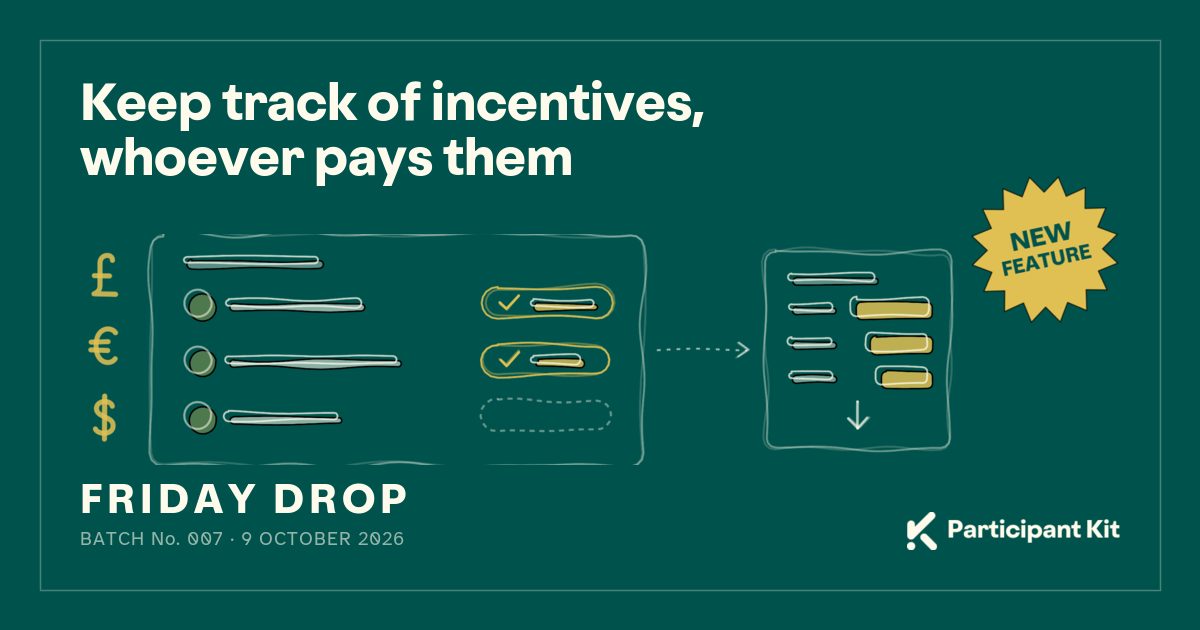
    <content type="html" xml:base="https://participantkit.com/updates/keep-track-of-incentives-whoever-pays-them"><![CDATA[<p><img src="/assets/images/updates/friday-drop-2026-10-09.png" alt="Keep track of incentives, whoever pays them, with a New feature badge. Below it, pound, euro and dollar signs beside a study list where two people have an amount recorded in gold and one is still empty, with a dotted arrow to a report showing a total for each currency and an export arrow. Friday Drop, batch number 007" class="shadow rounded-sm" /></p>

<p>Friday Drop, batch 007. This week is for teams who pay incentives without an incentive provider and teams where someone else does the paying.</p>

<h2 id="two-ways-to-use-it">Two ways to use it</h2>

<p>You don’t need an incentive provider to keep track. You might not have one, you might not be allowed to use one or yours might not connect to Participant Kit. Teams tend to use it in one of two ways.</p>

<p><strong>You pay people yourself.</strong> You send the voucher or the bank transfer, then record it in the study with the date, the amount and the currency. When accounts ask what you’ve spent, the figures are already there.</p>

<p><strong>Someone else pays.</strong> In some organisations, researchers don’t handle money. Finance or another team pays people instead. After a session, record that the person is owed an incentive, using the date of their session. An organisation admin can then send that team the incentives report, so they know who to pay, how much and how long each person has been waiting.</p>

<p>Either way, it’s a record. Participant Kit doesn’t send anyone money or email them about it.</p>

<h2 id="record-an-incentive-in-a-study">Record an incentive in a study</h2>

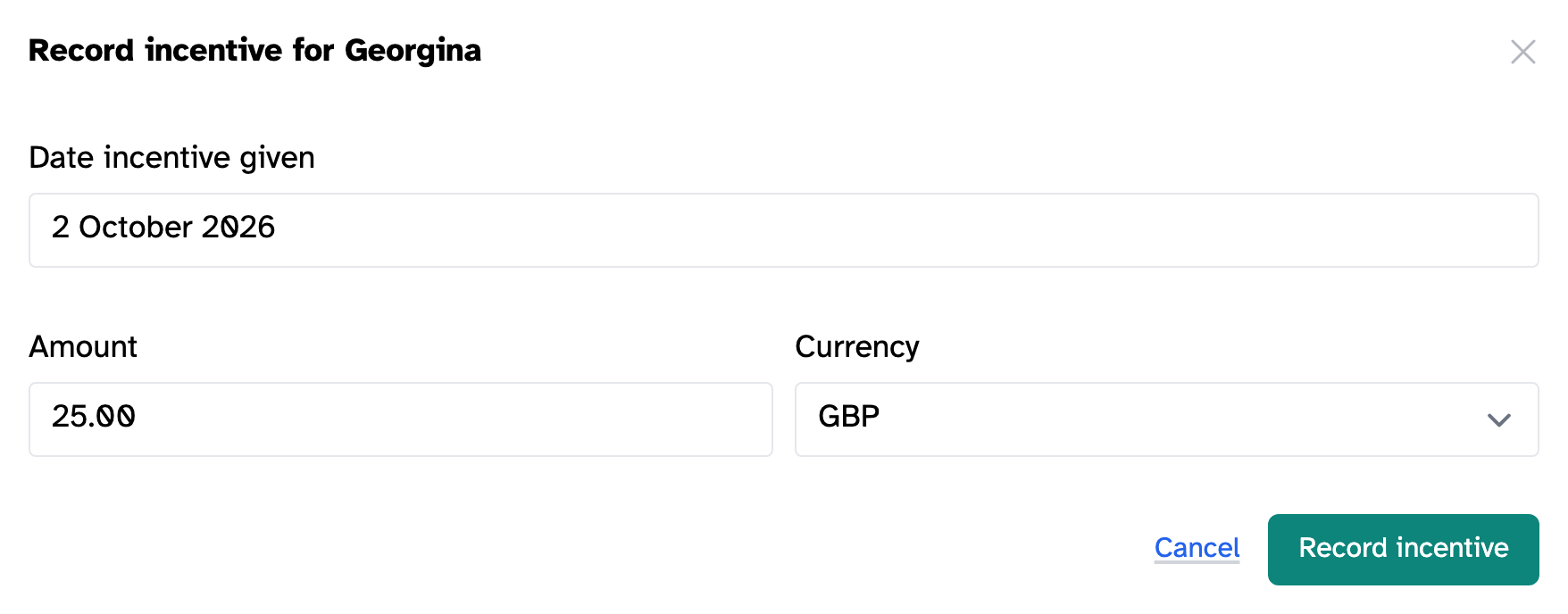
<p>On a study’s <strong>Participants</strong> tab, click <strong>Record incentive</strong> in the <strong>Incentivised on</strong> column. Choose the date you paid them. If someone else is paying, choose the date of their session. Add the amount and currency, then click <strong>Record incentive</strong>.</p>

<p><img src="/assets/images/help/incentives/record-incentive.png" alt="The Record incentive dialog, with Date incentive given, Amount and Currency" class="shadow border border-gray-200 rounded-sm" /></p>

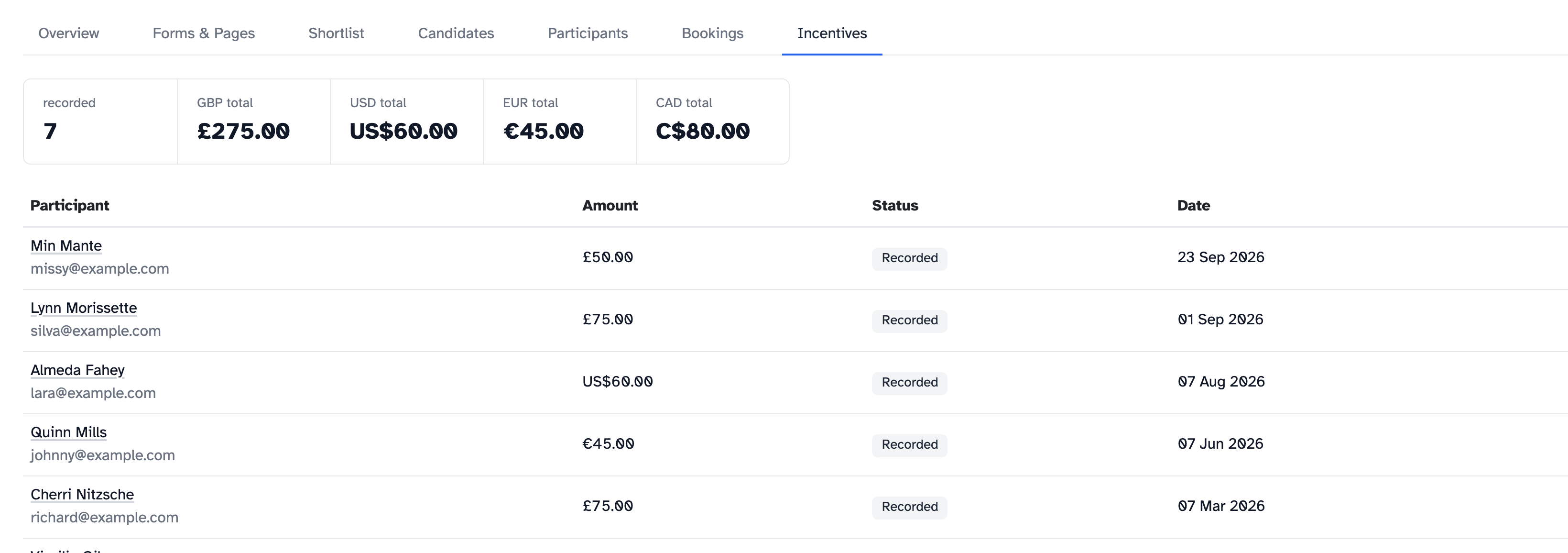
<p>Each study also has an <strong>Incentives</strong> tab. It shows how many incentives have been recorded, the total for each currency and who they’re for.</p>

<p><img src="/assets/images/help/incentives/incentives-tab.png" alt="A study's Incentives tab: 7 recorded and a total for each of GBP, USD, EUR and CAD, above a list of participants with their amount, status and date" class="shadow border border-gray-200 rounded-sm" /></p>

<h2 id="one-report-across-your-organisation">One report across your organisation</h2>

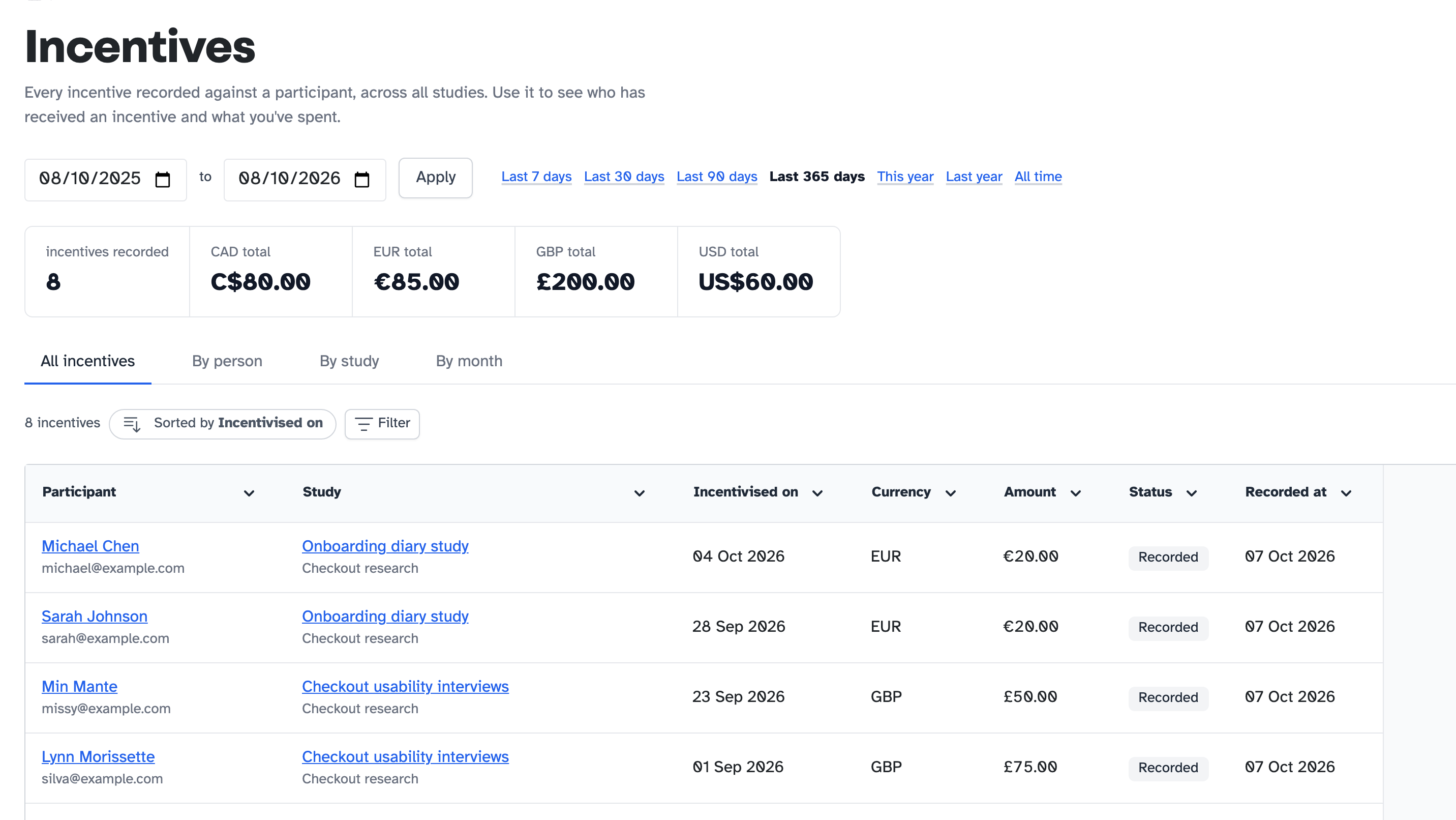
<p>Organisation admins can see every incentive from every study in one place. Go to <strong>Admin dashboard</strong>, then <strong>Incentives</strong>. Choose your dates and look at the totals by person, study or month. Then click <strong>Export CSV</strong> to send the figures on.</p>

<p><img src="/assets/images/help/incentives-report/report.png" alt="The incentives report, with the date range, totals for each currency and the list of incentives" class="shadow border border-gray-200 rounded-sm" /></p>

<h2 id="help-articles">Help articles</h2>

<ul>
  <li><a href="/help/incentives/tracking-incentives">Tracking incentives in a study</a></li>
  <li><a href="/help/incentives/incentives-report">The incentives report</a></li>
</ul>

<p>New to Participant Kit? <a href="/book-demo?utm_source=friday-drop&amp;utm_medium=bottom-cta&amp;utm_campaign=friday-drop-007">Book a call</a> and we’ll show you round.</p>
]]></content>
    <media:thumbnail xmlns:media="http://search.yahoo.com/mrss/" url="https://participantkit.com/assets/images/updates/friday-drop-2026-10-09.png"/>
  </entry>
  <entry>
    <title type="html">Name questions, moving questions and other form improvements</title>
    <link href="https://participantkit.com/updates/name-questions-moving-questions-and-other-form-improvements" rel="alternate" type="text/html" title="Name questions, moving questions and other form improvements"/>
    <link href="https://participantkit.com/updates/name-questions-moving-questions-and-other-form-improvements.md" rel="alternate" type="text/markdown"/>
    <published>2026-10-02T00:00:00+00:00</published>
    <updated>2026-10-02T00:00:00+00:00</updated>
    <id>https://participantkit.com/updates/name-questions-moving-questions-and-other-form-improvements</id>
    <category term="Friday Drop" />
    <summary type="html"><![CDATA[Friday Drop 006. Ask for names the way people actually use them, move questions between pages without breaking your branching and other form features you might have missed.]]></summary>
    <content type="html" xml:base="https://participantkit.com/updates/name-questions-moving-questions-and-other-form-improvements"><![CDATA[<p><img src="/assets/images/updates/friday-drop-2026-10-02.png" alt="Name questions, moving questions and other form improvements, with an Upgrade badge. Below it, a form card with two name boxes side by side in gold, above a short checkbox list and a final checkbox set apart by a divider. Friday Drop, batch number 006" class="shadow rounded-sm" /></p>

<p>Friday Drop, batch 006. This week is a roundup of improvements to forms. Some are new, and some have been around for a while but not everyone has found them.</p>

<h2 id="ask-for-names-the-way-people-use-them">Ask for names the way people use them</h2>

<p>Names don’t work the same way everywhere. Some people put their family name first, and some don’t have a “first name” and a “last name” at all.</p>

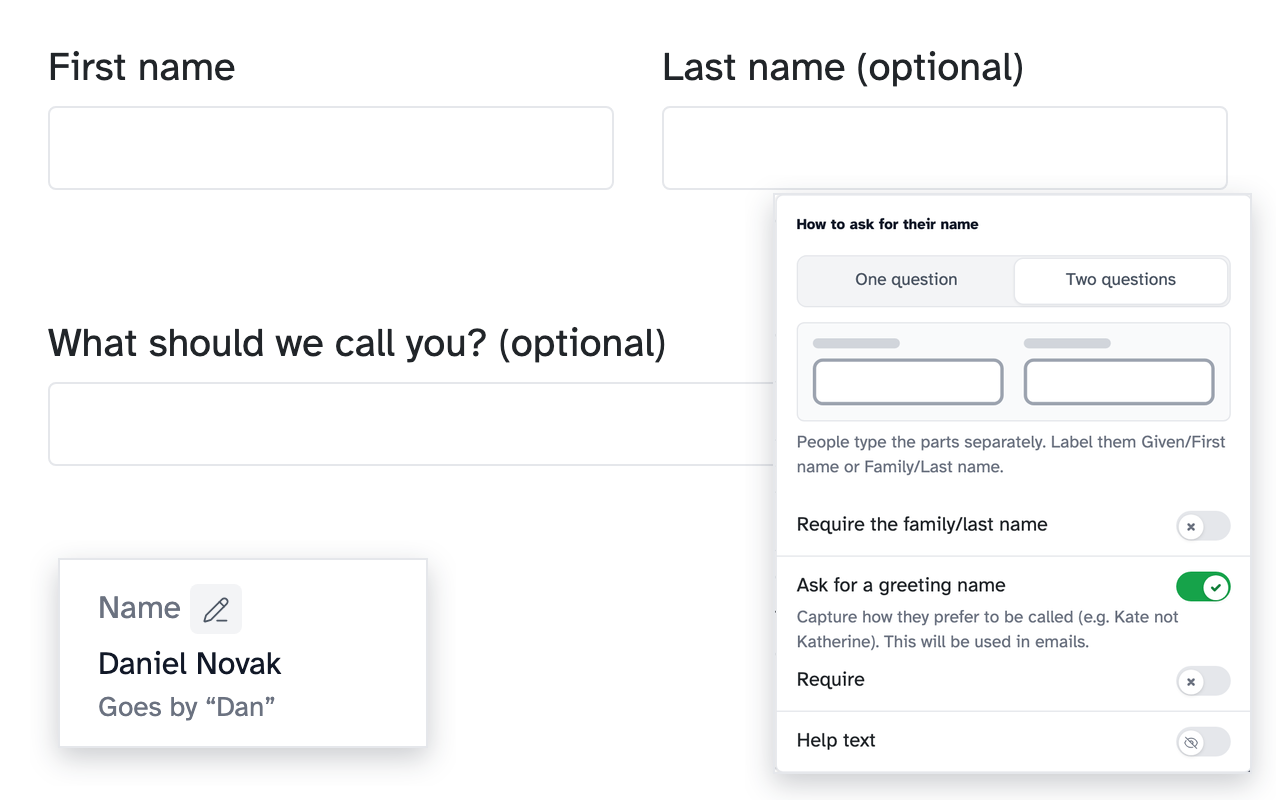
<p>One box for someone’s whole name suits every name, and it’s still the default. If you need the parts separately, the name question on your sign-up forms and screeners can now ask for a first name and a last name instead. The last name is optional unless you make it required, so people with only one name aren’t stuck. To switch it on, open the name question’s settings (the cog) and choose <strong>Two questions</strong>.</p>

<p><img src="/assets/images/updates/friday-drop-006-names.png" alt="The form as people see it, with First name and Last name side by side and What should we call you? underneath. Over it, the name question's settings: One question or Two questions, Require the family/last name, and Ask for a greeting name switched on. In the corner, a person's profile showing Daniel Novak, Goes by &quot;Dan&quot;" class="shadow border border-gray-200 rounded-sm" /></p>

<p>You can also ask what people like to be called, so if Daniel goes by Dan, you’ll know. Confirmation emails then greet him as Dan, and you can use it in your own emails too.</p>

<h2 id="move-questions-between-pages">Move questions between pages</h2>

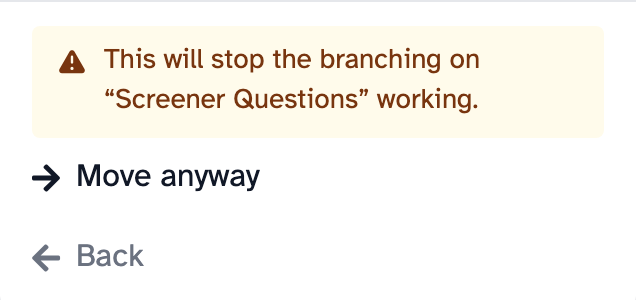
<p>Moving a question to another page could break your branching, so until now we didn’t let you. Now the form builder checks your branching rules as you work, which means you can.</p>

<p>Open a question’s <strong>…</strong> menu and choose <strong>Move to…</strong>. If a move would stop a rule working, the builder tells you before anything happens. It also points out rules that can’t work any more, like one that uses a question you’ve deleted, and tells you how to fix them. And if you forget to replace placeholder text, like “[Organisation]” in a new form, it tells you that too.</p>

<p><img src="/assets/images/help/branching/move-confirm.png" alt="The message This will stop the branching on &quot;Screener Questions&quot; working, with Move anyway and Back" class="shadow border border-gray-200 rounded-sm" /></p>

<h2 id="other-and-none-of-the-above">“Other” and “None of the above”</h2>

<p>A list of answers rarely covers everyone. “Other” and “None of the above” are the standard fix, and good forms use them. They’ve been in the form builder for a while, but they’re easy to miss.</p>

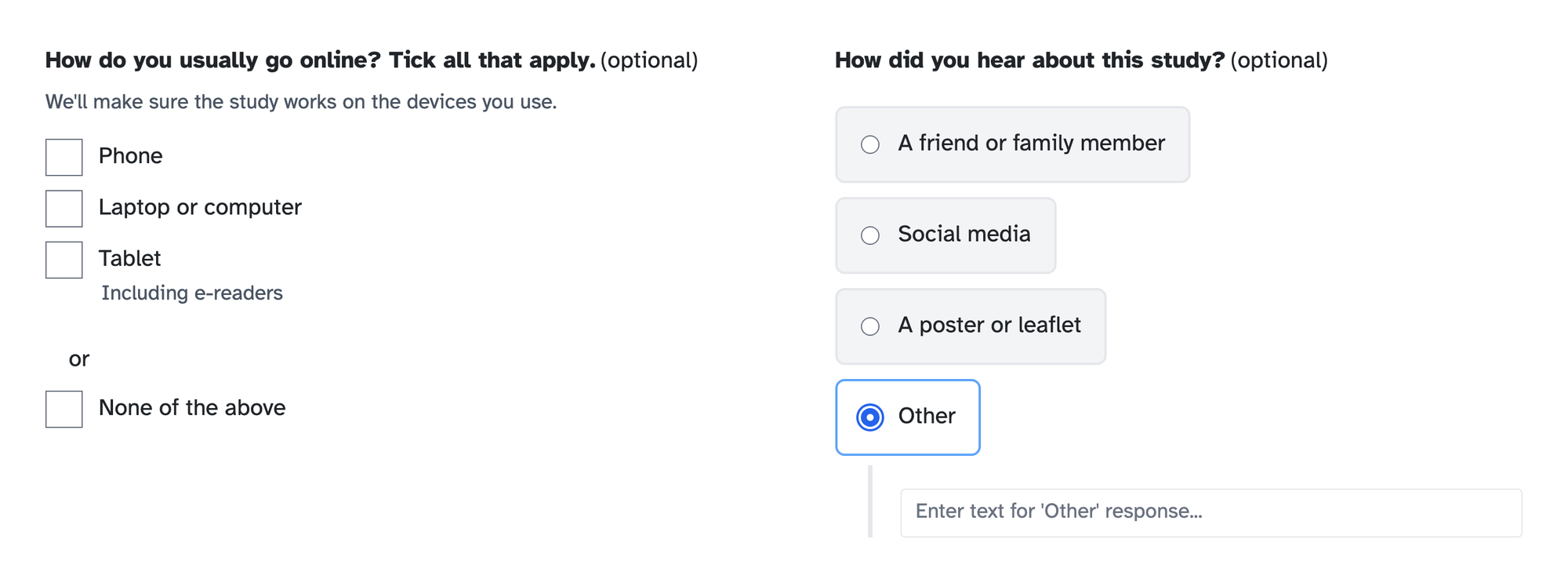
<p><strong>“Other”</strong> lets someone who doesn’t fit your list tell you what does apply, instead of picking the nearest wrong answer. You’ll also find out about answers you didn’t think to list. <strong>“None of the above”</strong> gives people an honest way out, and you can rename it to “Prefer not to say” on sensitive questions.</p>

<p>To add one, open a checkbox or single choice question and click <strong>Add “Other” option</strong> or <strong>Add “Or” option</strong>.</p>

<ul>
  <li>The “Or” option starts as “None of the above”. You can change the wording of either.</li>
  <li>On a checkbox question, ticking “None of the above” clears the person’s other ticks.</li>
  <li>A question can have one or the other, not both.</li>
</ul>

<p><img src="/assets/images/updates/friday-drop-006-other-none.png" alt="Two questions as people see them. A checkbox question with Phone, Laptop or computer and Tablet, then &quot;or&quot; and None of the above. A single choice question with Other picked and a box to type their answer" class="shadow border border-gray-200 rounded-sm" /></p>

<h2 id="help-text-on-questions-and-individual-answers">Help text on questions and individual answers</h2>

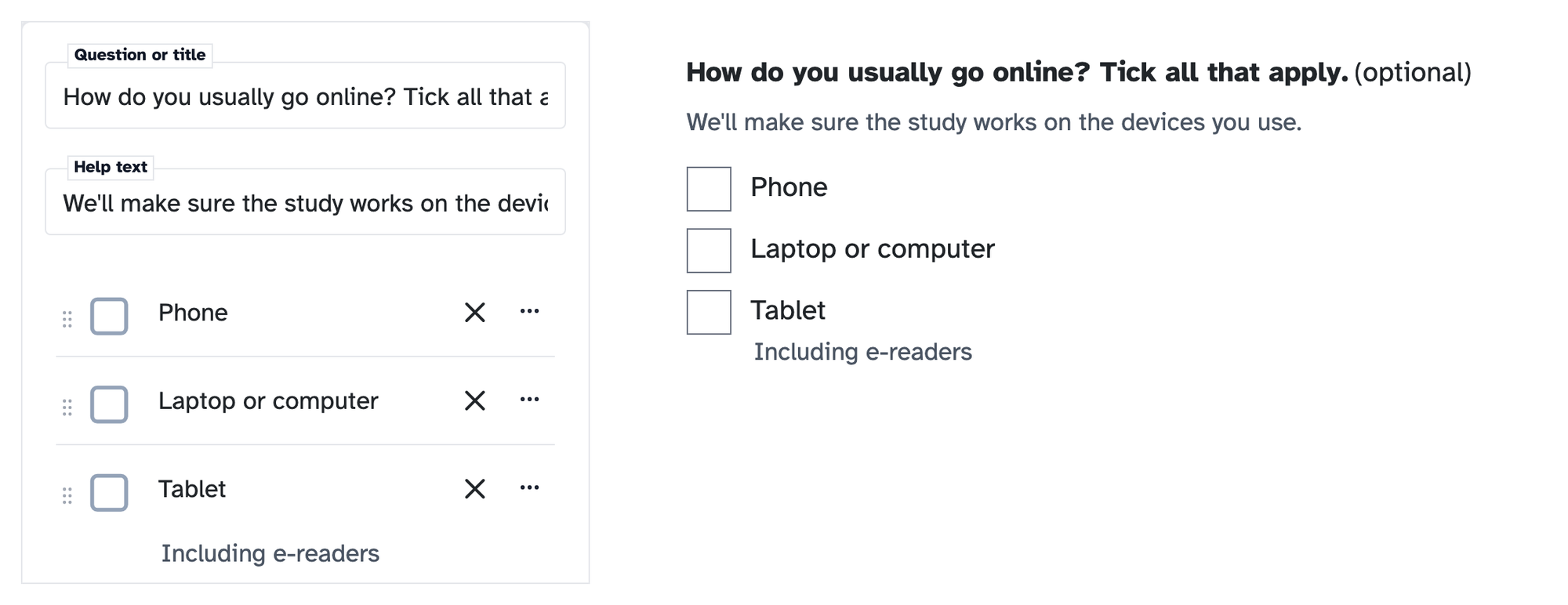
<p>You probably add help text to questions already. You can add it to individual answers too, which is easy to miss. It’s handy when one answer needs a word of explanation, like “Including e-readers” under “Tablet”, so people pick the right one instead of guessing.</p>

<ul>
  <li>For a whole question, open the question’s <strong>…</strong> menu and switch on <strong>Help text</strong>.</li>
  <li>For one answer, open that answer’s <strong>…</strong> menu and click <strong>Add help text</strong>.</li>
</ul>

<p><img src="/assets/images/updates/friday-drop-006-help-text.png" alt="On the left, a question in the form builder with its Help text filled in and &quot;Including e-readers&quot; under Tablet. On the right, the same question as people see it" class="shadow border border-gray-200 rounded-sm" /></p>

<h2 id="number-questions">Number questions</h2>

<p>If an answer should be a number, like how many people live in someone’s home, use a <strong>Number</strong> question rather than a short answer. People can only type a number, so you get answers you can compare, not “two or three” to tidy up later. Choose <strong>Number</strong> when you add a new form block.</p>

<h2 id="help-articles">Help articles</h2>

<ul>
  <li><a href="/help/forms/asking-for-names">Asking for someone’s name on a form</a></li>
  <li><a href="/help/forms/moving-questions-and-branching-warnings">Moving questions and fixing branching warnings</a></li>
  <li><a href="/help/courses/how-to/adding-questions-to-your-form">Adding questions to your form</a>, a short video that includes the “Other” and “Or” options</li>
</ul>

<p>New to Participant Kit? <a href="/book-demo?utm_source=friday-drop&amp;utm_medium=bottom-cta&amp;utm_campaign=friday-drop-006">Book a call</a> and we’ll show you round.</p>
]]></content>
    <media:thumbnail xmlns:media="http://search.yahoo.com/mrss/" url="https://participantkit.com/assets/images/updates/friday-drop-2026-10-02.png"/>
  </entry>
  <entry>
    <title type="html">Finding the right people: more powerful filters, saved as views</title>
    <link href="https://participantkit.com/updates/finding-the-right-people-more-powerful-filters-saved-as-views" rel="alternate" type="text/html" title="Finding the right people: more powerful filters, saved as views"/>
    <link href="https://participantkit.com/updates/finding-the-right-people-more-powerful-filters-saved-as-views.md" rel="alternate" type="text/markdown"/>
    <published>2026-09-25T00:00:00+00:00</published>
    <updated>2026-09-25T00:00:00+00:00</updated>
    <id>https://participantkit.com/updates/finding-the-right-people-more-powerful-filters-saved-as-views</id>
    <category term="Friday Drop" />
    <summary type="html"><![CDATA[Friday Drop 005. Save the columns, sort and filters you use most as a view, filter on what people have done across studies, with more powerful filters.]]></summary>
    <content type="html" xml:base="https://participantkit.com/updates/finding-the-right-people-more-powerful-filters-saved-as-views"><![CDATA[<p><img src="/assets/images/updates/friday-drop-2026-09-25.png" alt="Friday Drop, batch number 005. Three tabs above a table, the middle one picked out in gold, with two of the table's rows in gold beneath it. Underneath: Finding the right people, more powerful filters, saved as views" class="shadow rounded-sm" /></p>

<p>Friday Drop, batch 005. This week is about finding the right people in your panel.</p>

<p>Most recruitment from a panel starts the same way. You open the panel, select the columns you care about, build the same filter you built last month and start reading. Then you do it again for the next study. This week is three changes that take that work off you.</p>

<h2 id="save-a-view-instead-of-rebuilding-the-list">Save a view instead of rebuilding the list</h2>

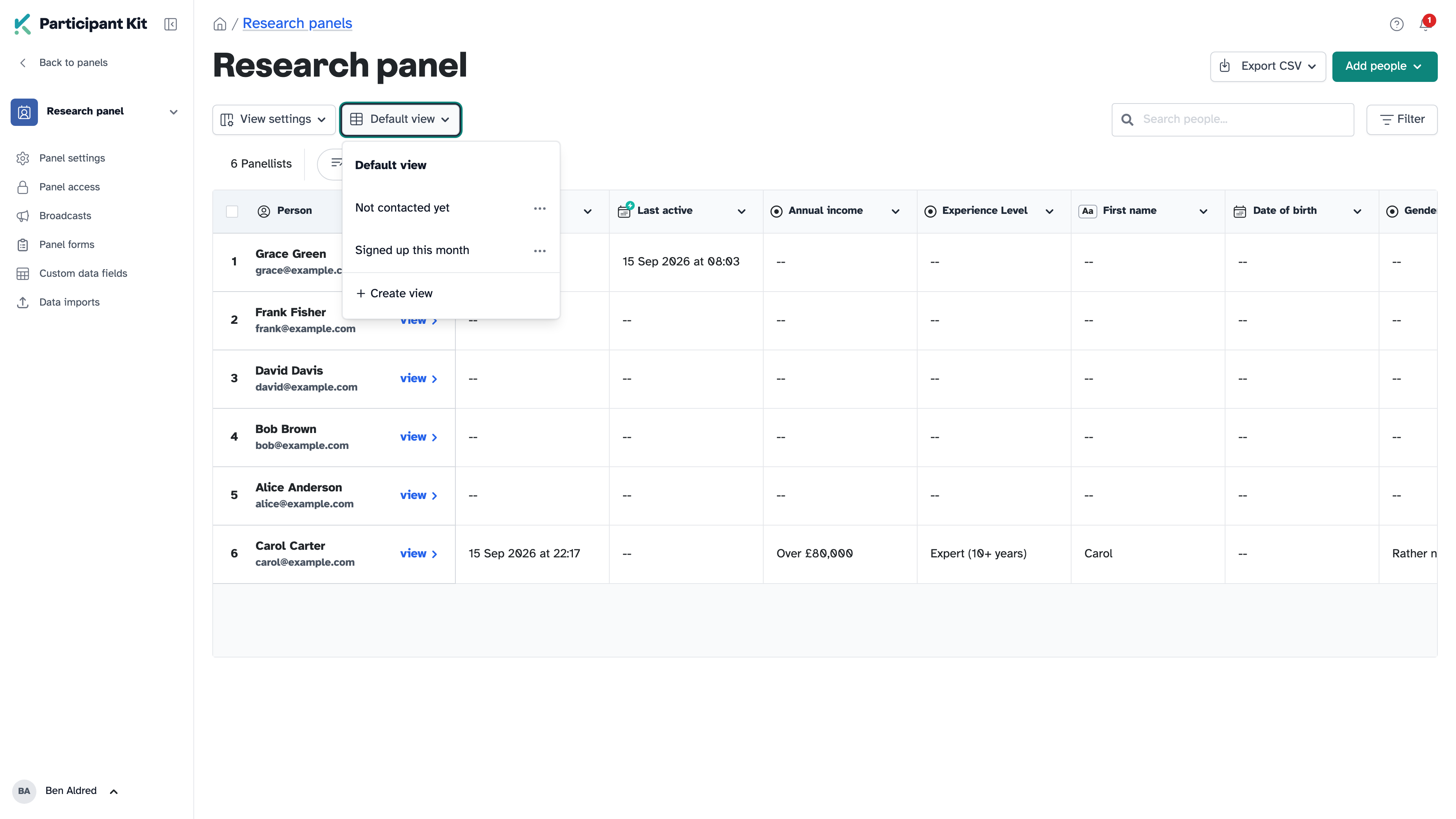
<p>A view remembers which columns you selected, how the table is sorted and the filters you applied. Name it once and it’s a click away, with its own URL you can bookmark.</p>

<p>You might have heard this called a segment, or a saved search. The difference is that you’re not just saving a filter, you’re saving how the information is displayed as well, so the table opens ready to read.</p>

<p>Keep as many as you need. “Not contacted yet” for people who are fresh to ask, one with the fields you check before a round of interviews, one per project if that’s how you work.</p>

<p><img src="/assets/images/help/views/view-menu.png" alt="The view menu open, showing Default view and two saved views" class="shadow rounded-sm" /></p>

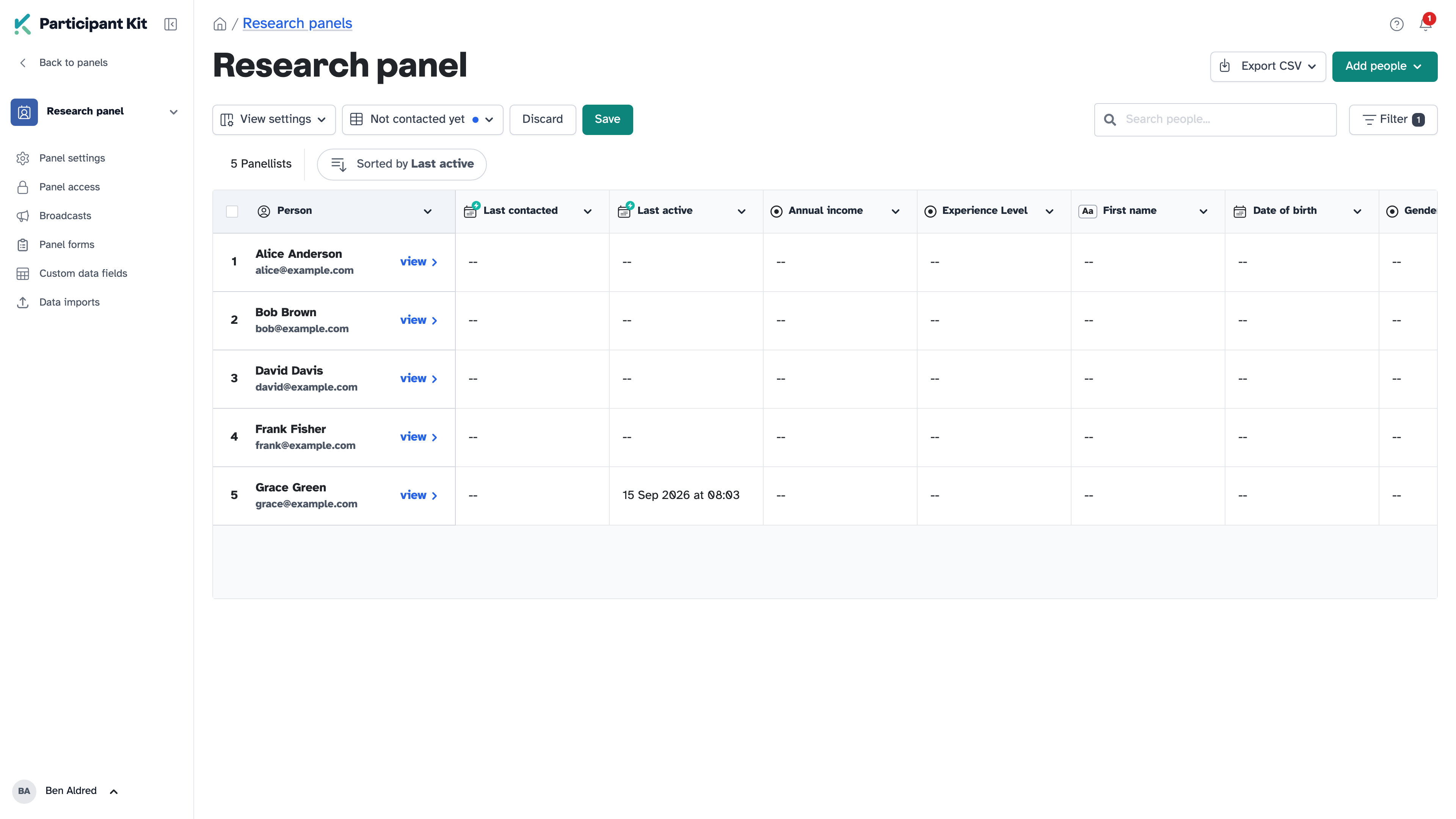
<p>Change the columns, the sort or the filters while a view is open and a blue dot appears next to its name, with <strong>Save</strong> and <strong>Discard</strong> beside it. So you can try something without touching the view you saved, and keep it or throw it away when you’re done.</p>

<p><img src="/assets/images/help/views/unsaved-changes.png" alt="A view with a blue dot next to its name, and the Discard and Save buttons" class="shadow rounded-sm" /></p>

<p>Views are personal. Nobody else on your team sees yours, and you don’t see theirs.</p>

<h2 id="filter-on-what-people-have-done">Filter on what people have done</h2>

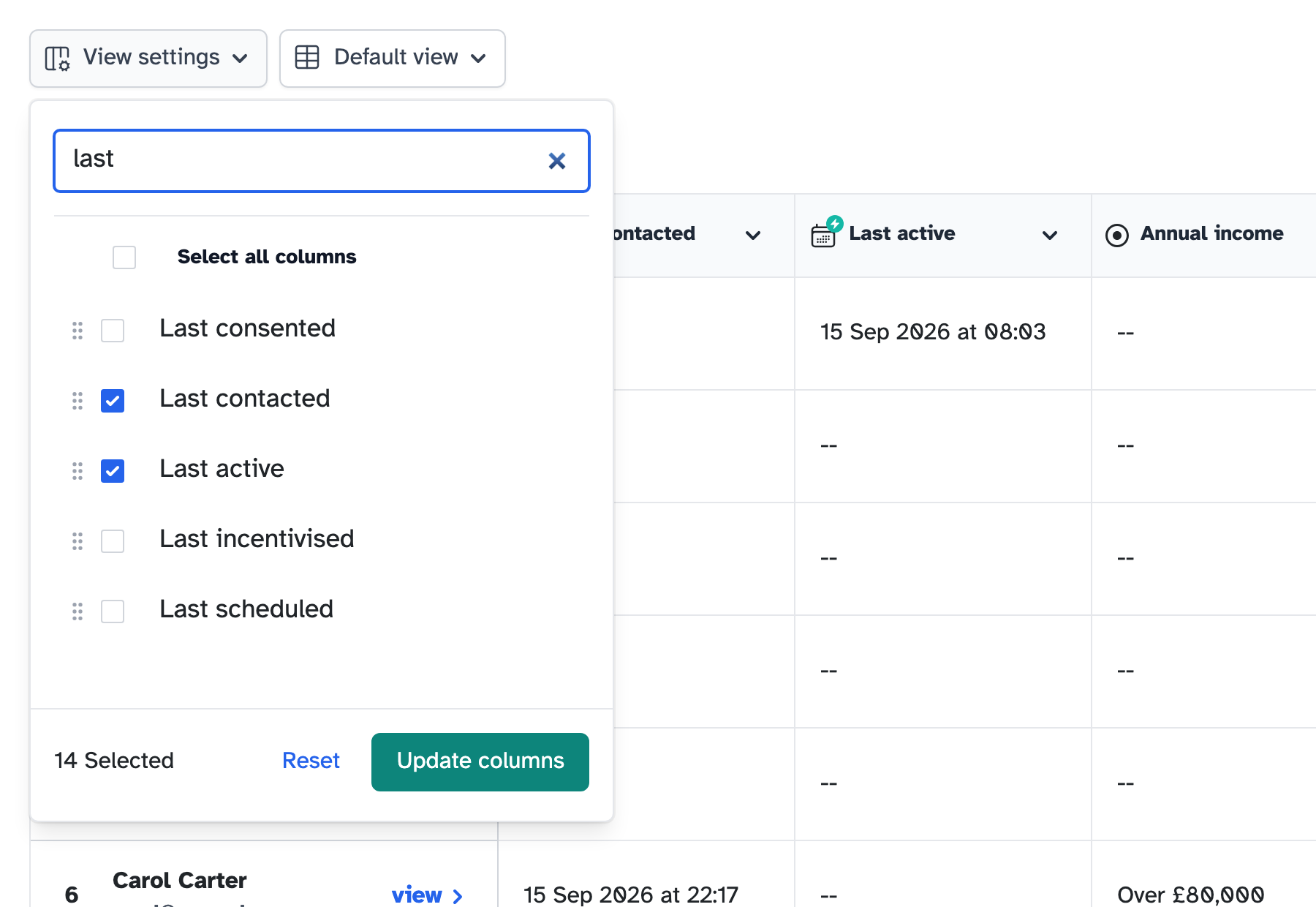
<p>Three dates are now available as columns and as filters: <strong>Last consented</strong>, <strong>Last incentivised</strong> and <strong>Last scheduled</strong>. They join <strong>Last contacted</strong> and <strong>Last active</strong>, and they all cover every study someone has taken part in, not just the one in front of you.</p>

<p>The one most people want first is the opposite: everyone who hasn’t done anything yet. Filter for people with no activity and you have a list of panellists who are fresh to ask, rather than the same faces you invited last time.</p>

<p>They’re not visible by default, so select them in <strong>View settings</strong>.</p>

<p><img src="/assets/images/updates/friday-drop-005-date-columns.png" alt="The View settings menu with &quot;last&quot; typed in the column search, showing Last consented, Last contacted, Last active, Last incentivised and Last scheduled" class="shadow rounded-sm" /></p>

<h2 id="filters-that-handle-and-as-well-as-or">Filters that handle “and” as well as “or”</h2>

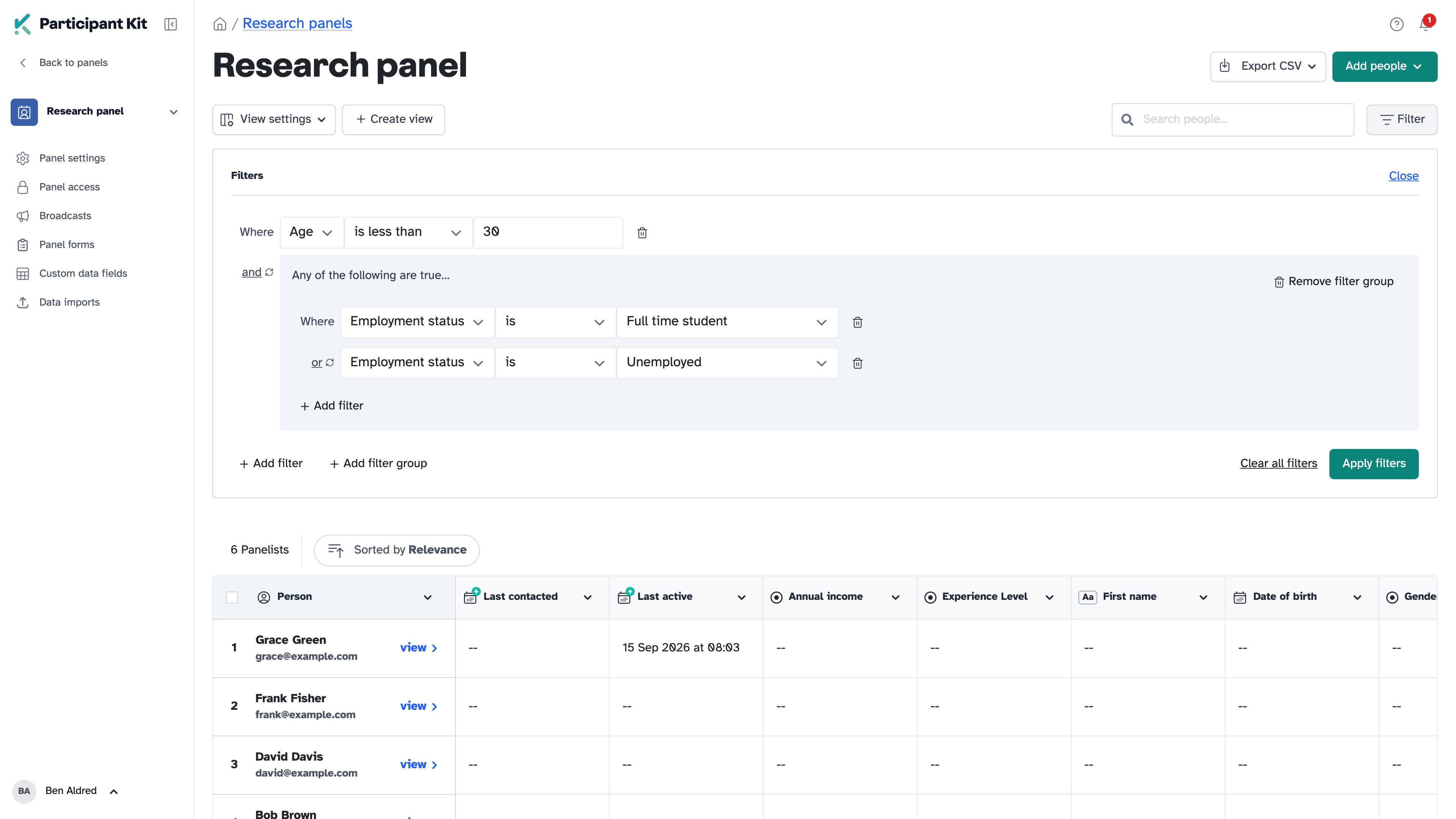
<p>The advanced filter used to join every condition with “and”. Now you can switch it to “or”, and group conditions together, so one filter can say “under 30, and either a student or unemployed”.</p>

<p><img src="/assets/images/help/filters/filter-group.png" alt="A filter for Age is less than 30, and a group reading Any of the following are true, with Employment status is Full time student or Employment status is Unemployed" class="shadow rounded-sm" /></p>

<p>The property picker searches, so you can type the field you want rather than scrolling for it. This is the filter you get on your panel, on <strong>Add from panel</strong>, on shortlists and when you choose who gets a broadcast.</p>

<h2 id="help-articles">Help articles</h2>

<ul>
  <li><a href="/help/courses/how-to/filtering-your-panel">Filtering your panel to find the right people</a></li>
  <li><a href="/help/courses/how-to/saving-panel-views">Saving views of your panel table</a></li>
  <li><a href="/help/courses/how-to/smart-fields">What the smart fields mean</a></li>
  <li><a href="/help/courses/how-to/adding-people-from-your-panel">Add people from your panel to a study</a></li>
</ul>

<p>New to Participant Kit? <a href="/book-demo">Book a call</a> and we’ll show you round.</p>
]]></content>
    <media:thumbnail xmlns:media="http://search.yahoo.com/mrss/" url="https://participantkit.com/assets/images/updates/friday-drop-2026-09-25.png"/>
  </entry>
  <entry>
    <title type="html">Messaging participants: see every email before it sends, and broadcasts</title>
    <link href="https://participantkit.com/updates/messaging-participants-see-every-email-before-it-sends-and-broadcasts" rel="alternate" type="text/html" title="Messaging participants: see every email before it sends, and broadcasts"/>
    <link href="https://participantkit.com/updates/messaging-participants-see-every-email-before-it-sends-and-broadcasts.md" rel="alternate" type="text/markdown"/>
    <published>2026-09-18T00:00:00+00:00</published>
    <updated>2026-09-18T00:00:00+00:00</updated>
    <id>https://participantkit.com/updates/messaging-participants-see-every-email-before-it-sends-and-broadcasts</id>
    <category term="Friday Drop" />
    <summary type="html"><![CDATA[Friday Drop 004. Preview each participant's email side by side before you send, reuse messages you've already sent and email your whole panel with broadcasts.]]></summary>
    <content type="html" xml:base="https://participantkit.com/updates/messaging-participants-see-every-email-before-it-sends-and-broadcasts"><![CDATA[<p><img src="/assets/images/updates/friday-drop-2026-09-18.png" alt="Friday Drop, batch number 004. A single message fans out to a column of five envelopes, one of them filled in gold. Underneath: Messaging participants, see every email before it sends" class="shadow rounded-sm" /></p>

<p>Friday Drop, batch 004. This week is all about sending messages to participants. Pressing send is a nervous moment, which is why so many of you send yourselves a test first. So we’ve rebuilt the composer around seeing exactly what each person will get.</p>

<blockquote>
  <p>I really like being able to click to send them the same message I sent previously invited participants, and the message preview on the side is very nice too.</p>
</blockquote>

<p>Participant Kit customer - Lead Researcher at EdTech company.</p>

<div style="position: relative; padding-bottom: 57.1%">
  <iframe allow="clipboard-write; encrypted-media; picture-in-picture" allowfullscreen="" mozallowfullscreen="" webkitallowfullscreen="" frameborder="0" src="https://supercut.ai/embed/participantkit/TkmmrGnzM0HUuvMhccqKqt?embed=full" style="position:absolute; width:100%; height:100%; top:0; left:0; border-radius:16px;" title="Friday Drop 004: the rebuilt email composer"></iframe>
</div>

<p><a href="https://supercut.ai/share/participantkit/TkmmrGnzM0HUuvMhccqKqt" target="_blank">Watch video with transcript</a></p>

<h2 id="see-what-each-person-gets">See what each person gets</h2>

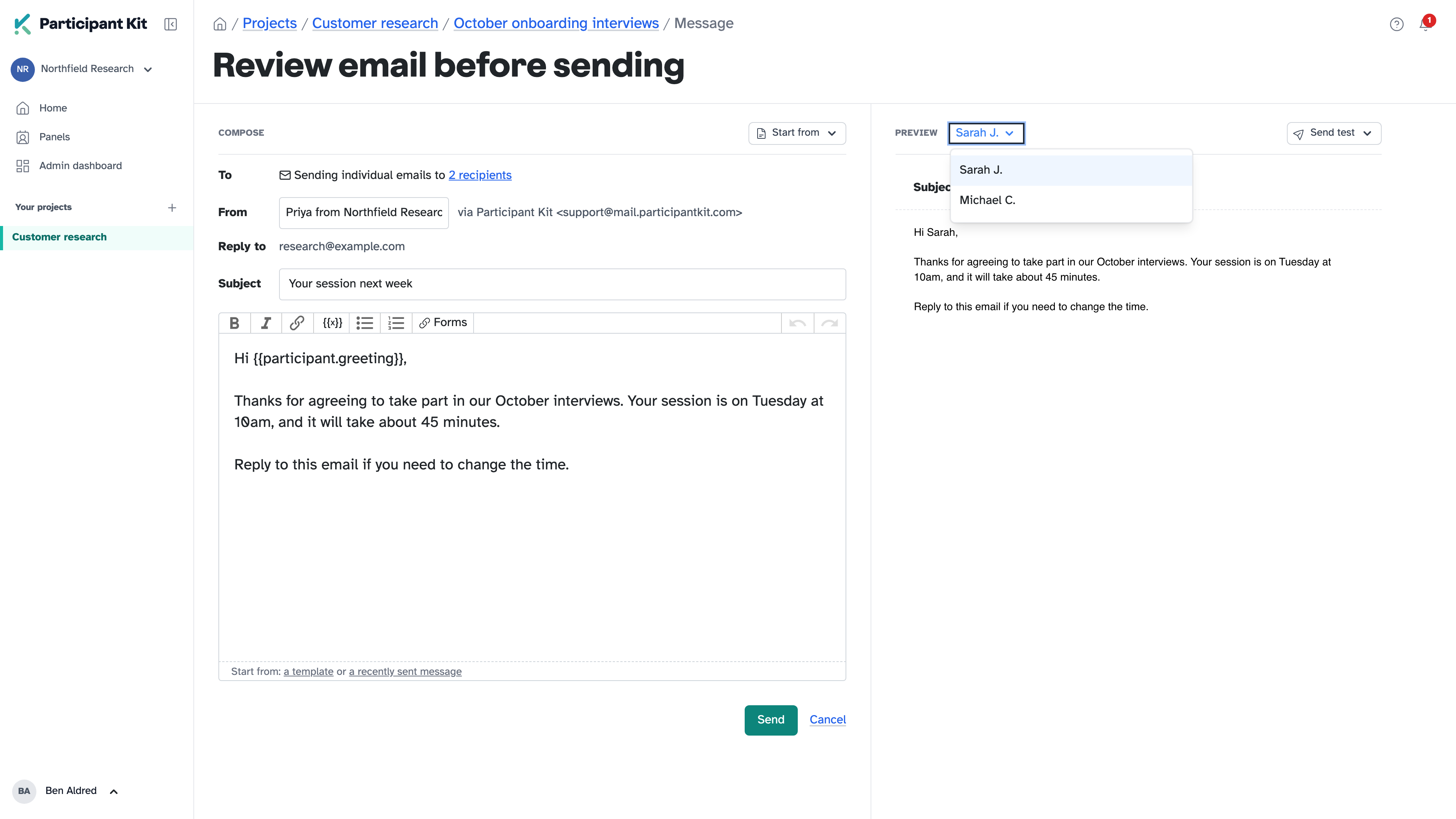
<p>Select the participants you want to message and click <strong>Message</strong>. On a wide screen, the preview sits beside your message. On a smaller one, it’s a tab.</p>

<p>Switch between recipients at the top of the preview and it updates with their details filled in. Add the greeting name, and Sarah sees “Hi Sarah” while Michael, who told us he prefers Mike, sees “Hi Mike”. Greeting names are new: your forms can now ask people what they’d like to be called. You find out what the personalisation looks like before anyone gets it, not after.</p>

<p><img src="/assets/images/help/sending-messages/preview.png" alt="The message on the left and the preview on the right, with the recipient picker open" class="shadow rounded-sm" /></p>

<p>You can still send yourself a test to see how it looks in your inbox.</p>

<p>When you send, each person’s last contacted date updates, and the email appears in their activity feed.</p>

<h2 id="reuse-a-message-youve-already-sent">Reuse a message you’ve already sent</h2>

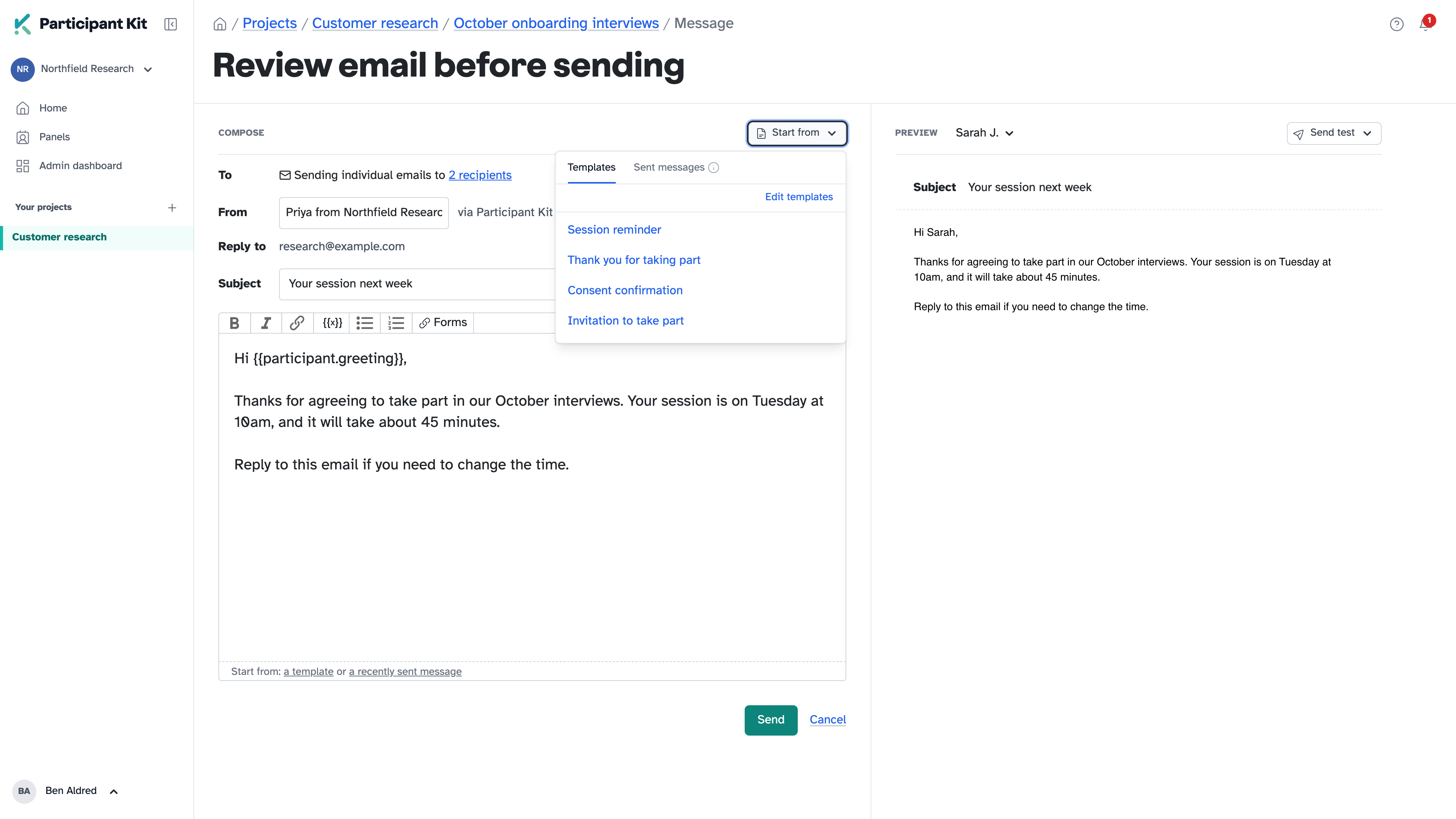
<p><strong>Start from</strong>, top right, has your organisation’s templates and the last 10 messages you’ve sent in the study. If you’re inviting people in waves, send the second group the same message you sent the first.</p>

<p><img src="/assets/images/help/sending-messages/start-from.png" alt="The Start from menu open, with Templates and Sent messages tabs" class="shadow rounded-sm" /></p>

<h2 id="email-your-whole-panel-with-broadcasts">Email your whole panel with broadcasts</h2>

<p>While we’re on the subject of sending emails: you can also email your whole panel, and you have been able to for a while. We just never told you. That’s exactly why the Friday Drop exists.</p>

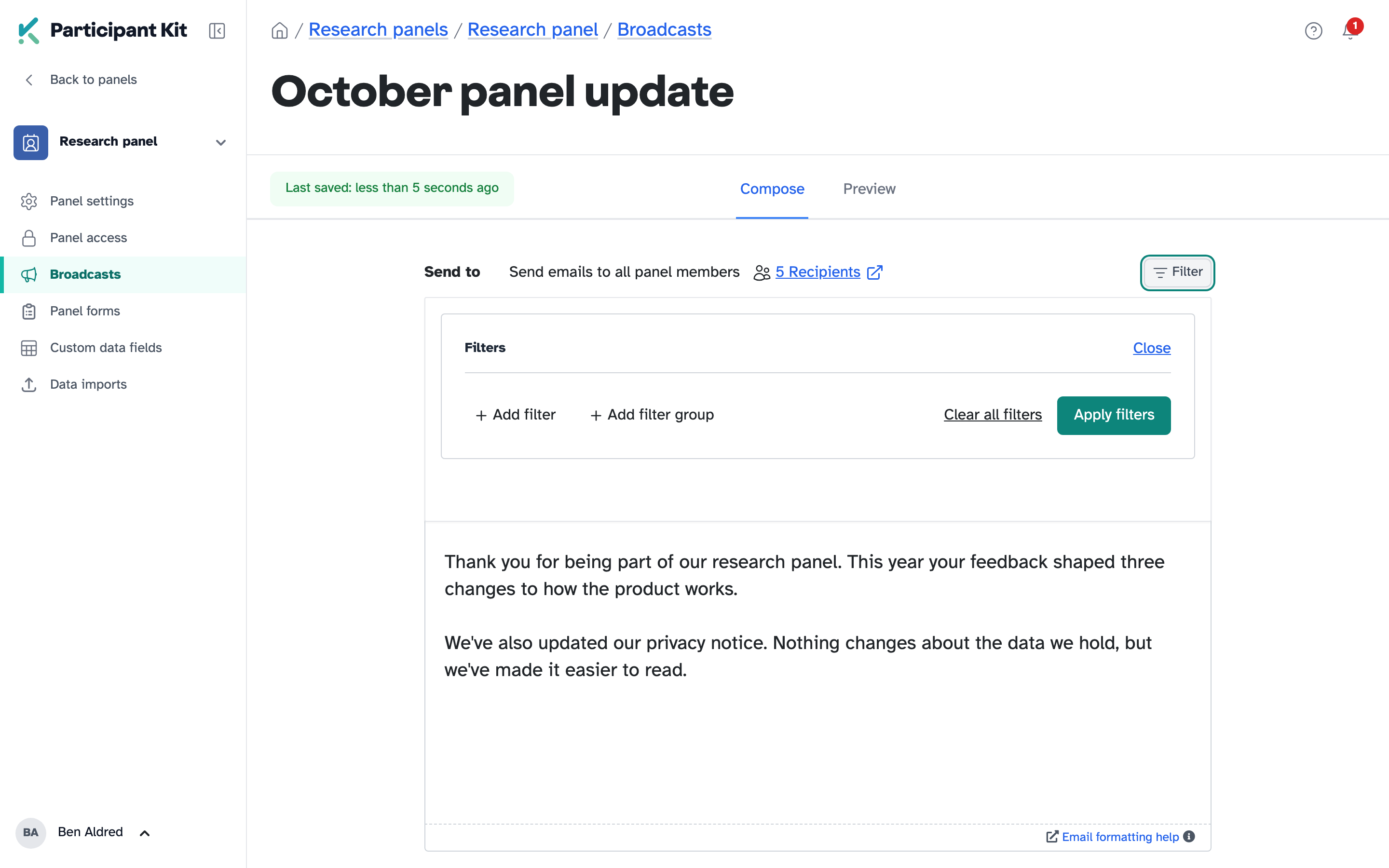
<p>Messaging participants is for the people in a study. A broadcast is for everyone on your panel, or a filtered group of them, when you have something to say that isn’t an invitation to research:</p>

<ul>
  <li>an announcement, like thanking your panel and sharing what their feedback changed this year</li>
  <li>a policy update, like a change to your privacy notice or how long you keep their data</li>
  <li>a short survey, with a link to a few questions in your own survey tool</li>
</ul>

<p>Each person still gets their own email with their greeting name filled in, and nobody’s address is shared with anyone else.</p>

<p><img src="/assets/images/help/broadcasts/choose-recipients.png" alt="The broadcast composer, with Send emails to all panel members, the recipient count and the filter builder" class="shadow rounded-sm" /></p>

<p>Preview it as any of your panellists, send yourself a test, then send. Larger broadcasts go out in batches so they don’t trip spam filters, and every broadcast has a footer so people can withdraw from the panel or opt out. Afterwards, filter your panel for people a broadcast wasn’t sent to, and follow up with just them.</p>

<p>Broadcasts are for organisation admins. They’re under <strong>Broadcasts</strong> on any panel.</p>

<h2 id="also-this-week">Also this week</h2>

<p>On Tuesday we released a way to <a href="/updates/record-contact-outside-participant-kit/">record contact you make outside Participant Kit</a>, so a participant’s last contacted date stays accurate when you email them from your own inbox.</p>

<h2 id="help-articles">Help articles</h2>

<ul>
  <li><a href="/help/courses/how-to/sending-messages">Sending messages to participants</a></li>
  <li><a href="/help/courses/admin/sending-broadcasts">Sending a broadcast to your panel</a></li>
</ul>

<p>New to Participant Kit? <a href="/book-demo">Book a call</a> and we’ll show you round.</p>
]]></content>
    <media:thumbnail xmlns:media="http://search.yahoo.com/mrss/" url="https://participantkit.com/assets/images/updates/friday-drop-2026-09-18.png"/>
  </entry>
  <entry>
    <title type="html">Record contact you make outside Participant Kit</title>
    <link href="https://participantkit.com/updates/record-contact-outside-participant-kit/" rel="alternate" type="text/html" title="Record contact you make outside Participant Kit"/>
    <link href="https://participantkit.com/updates/record-contact-outside-participant-kit.md" rel="alternate" type="text/markdown"/>
    <published>2026-09-14T00:00:00+00:00</published>
    <updated>2026-09-14T00:00:00+00:00</updated>
    <id>https://participantkit.com/updates/record-contact-outside-participant-kit/</id>
    <category term="New feature" />
    <summary type="html"><![CDATA[Emailed someone from your own inbox, or a list from another email platform? Record it, and their last contacted date updates for your whole team.]]></summary>
    <content type="html" xml:base="https://participantkit.com/updates/record-contact-outside-participant-kit/"><![CDATA[<p>Every message you send from Participant Kit updates that person’s last contacted date. It’s how your team can see who has heard from you recently, and it’s what stops people being contacted too often.</p>

<p>Not every conversation happens in Participant Kit, though. Sometimes you already have a thread going with someone in your own inbox, or you want an invitation to come straight from you. Until now, those emails left no trace. Participant Kit still showed the old date, and nobody else on your team knew you’d been in touch.</p>

<p>The bigger the team, the bigger that gap gets. Someone on your panel might be taking part in a colleague’s study at the same time, and each of you would think they were free to contact.</p>

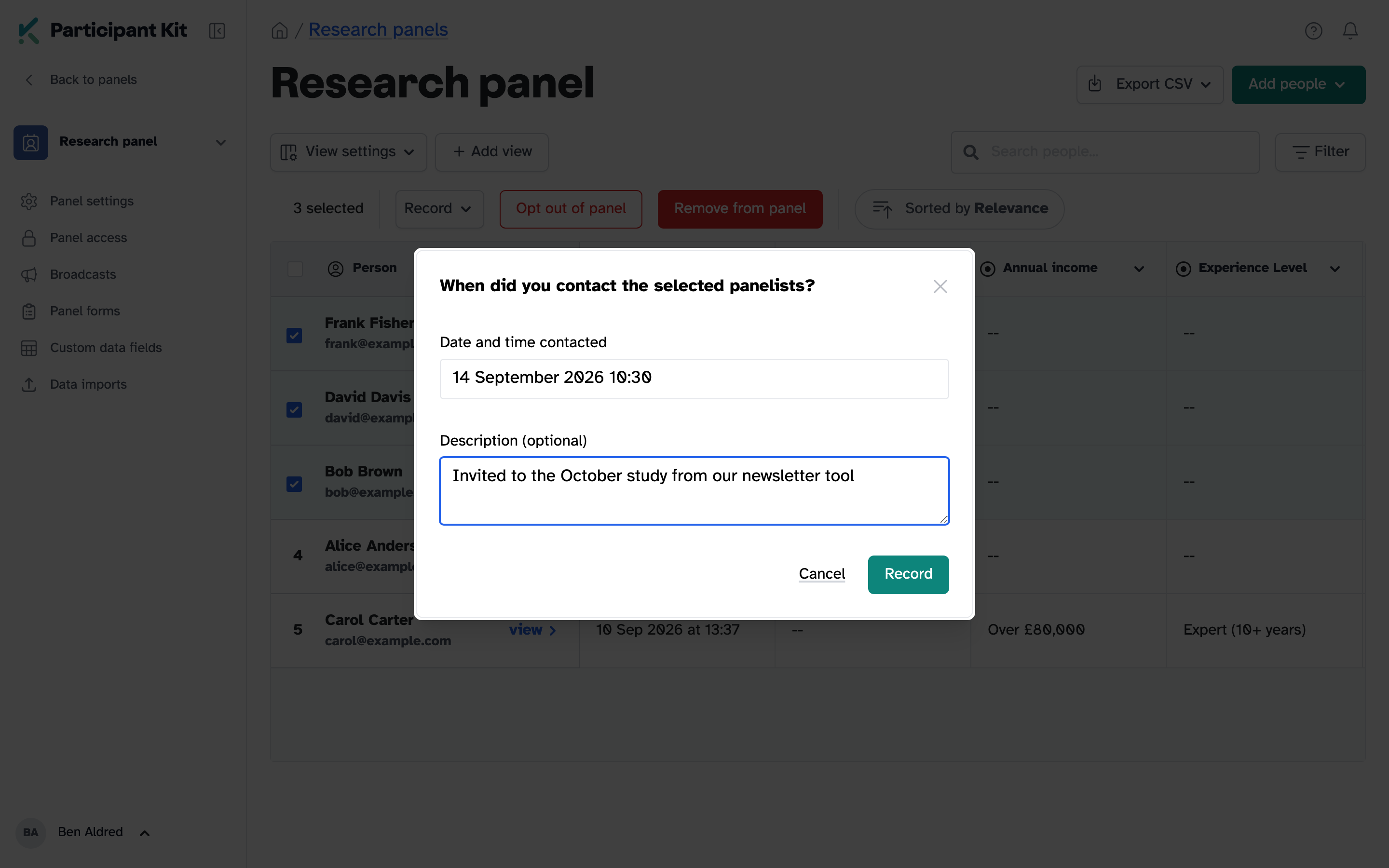
<p>Now you can record contact you made elsewhere. Add when it happened and a note about what it was, and their last contacted date moves forward for everyone.</p>

<p><img src="/assets/images/updates/record-external-contact.png" alt="The External contact dialog, with a date and time and a description filled in" class="shadow border border-gray-200 rounded-sm" /></p>

<h2 id="how-it-works">How it works</h2>

<ul>
  <li><strong>The date updates everywhere.</strong> If your panel holds back people who were contacted recently, anyone you record is held back too.</li>
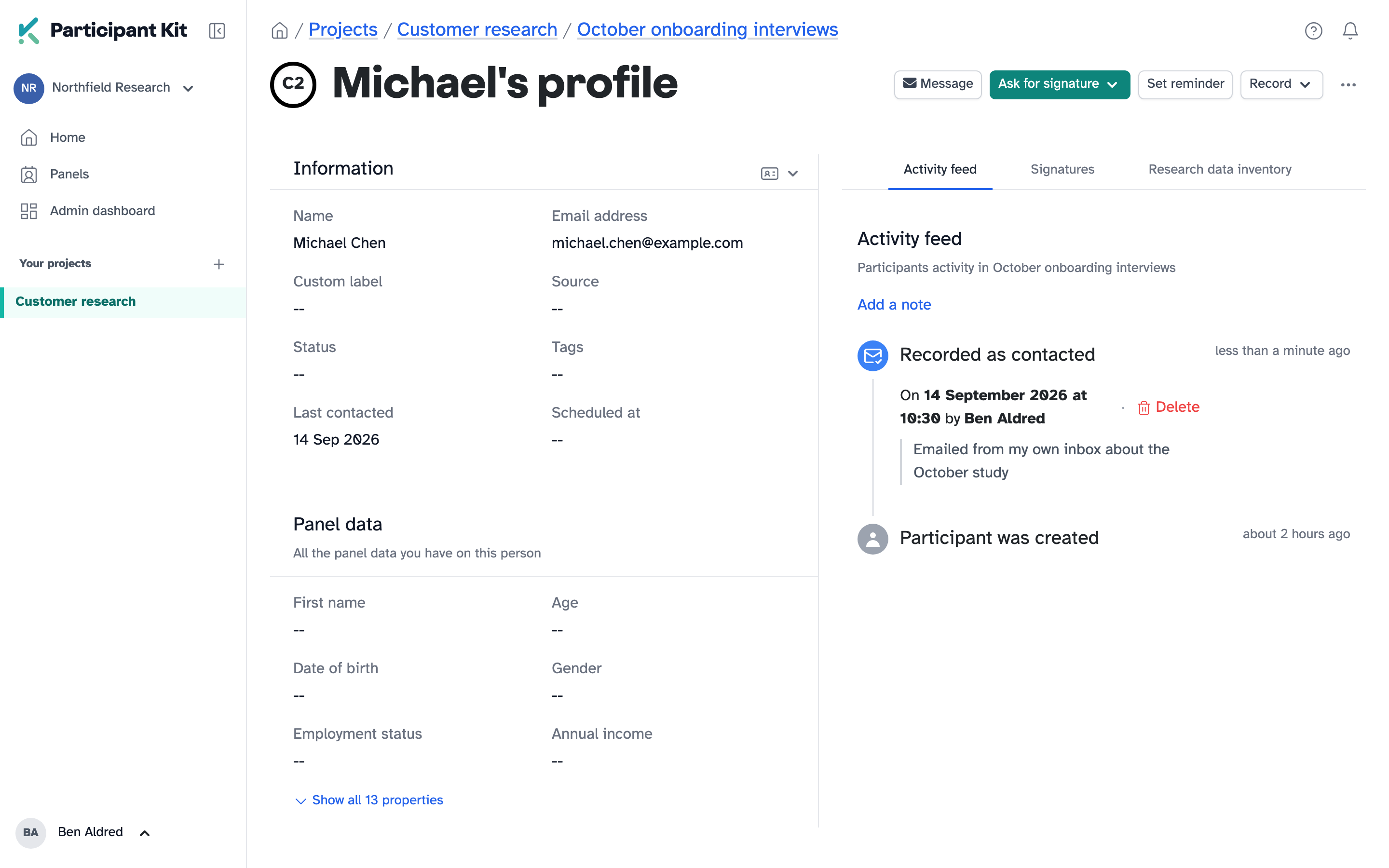
  <li><strong>The note says what happened.</strong> “Emailed from my own inbox about the October study” tells the next person exactly why the date changed.</li>
  <li><strong>It sits in their activity feed.</strong> Alongside everything else, with who recorded it. Recorded the wrong person? Delete it from there.</li>
</ul>

<p><img src="/assets/images/updates/record-external-contact-feed.png" alt="A recorded contact in a person's activity feed, showing the date, who recorded it and the note" class="shadow border border-gray-200 rounded-sm" /></p>

<h2 id="how-to-use-it">How to use it</h2>

<p>In a study, record it from the participant’s profile, one person at a time. On your panel, select as many people as you need and record them all at once. The help article walks through both: <a href="/help/courses/how-to/recording-contact-outside-participant-kit">Recording contact made outside Participant Kit</a>.</p>
]]></content>
    <media:thumbnail xmlns:media="http://search.yahoo.com/mrss/" url="https://participantkit.com/assets/images/updates/record-external-contact.png"/>
  </entry>
  <entry>
    <title type="html">Shortlists: screen your own panel before you commit</title>
    <link href="https://participantkit.com/updates/shortlists-screen-your-own-panel-before-you-commit" rel="alternate" type="text/html" title="Shortlists: screen your own panel before you commit"/>
    <link href="https://participantkit.com/updates/shortlists-screen-your-own-panel-before-you-commit.md" rel="alternate" type="text/markdown"/>
    <published>2026-09-11T00:00:00+00:00</published>
    <updated>2026-09-11T00:00:00+00:00</updated>
    <id>https://participantkit.com/updates/shortlists-screen-your-own-panel-before-you-commit</id>
    <category term="Friday Drop" />
    <summary type="html"><![CDATA[Friday Drop 003. A proper three-stage process for recruiting from your own panel: shortlist the people you might want, send them a screener, review their answers as candidates, then decide. If you've been adding panellists straight into a study, this is your cue to stop.]]></summary>
    <content type="html" xml:base="https://participantkit.com/updates/shortlists-screen-your-own-panel-before-you-commit"><![CDATA[<p><img src="/assets/images/updates/friday-drop-2026-09-11.png" alt="Friday Drop, batch number 003. Three rows of circles narrowing like a funnel: a wide row of outlined circles, a shorter row beneath it, and two filled circles at the bottom. Underneath: Shortlists, screen your own panel, then decide" class="shadow rounded-sm" /></p>

<p>Friday Drop, batch 003. Screeners started life as a way to qualify people you don’t know yet. You share a link, with your email list or a group you already know, they answer a few questions, and you decide whether they’re right for the study. What we hadn’t really considered was teams screening their own panellists, and plenty of you do. So we’ve rebuilt the route from panel to study. If you’ve been adding panellists straight into a study and then sending them a screener, this is the week to switch.</p>

<div style="position: relative; padding-bottom: 46.3%">
  <iframe allow="clipboard-write; encrypted-media; picture-in-picture" allowfullscreen="" mozallowfullscreen="" webkitallowfullscreen="" frameborder="0" src="https://supercut.ai/embed/participantkit/otjKnDN9T7LDecK0URfl5P?embed=sidebar" style="position:absolute; width:100%; height:100%; top:0; left:0; border-radius:16px;" title="Shortlist drop"></iframe>
</div>

<p><a href="https://supercut.ai/share/participantkit/otjKnDN9T7LDecK0URfl5P" target="_blank">Watch video with transcript</a></p>

<h2 id="what-was-happening">What was happening</h2>

<p>You have a panel of hundreds of people and a new study. You want to screen all or some of them to see who’s a good fit. So you’d add them to the study and send them a screener.</p>

<p>That’s where it fell apart. The moment someone is in the Participants tab, they’re in. When they filled in the screener there was nowhere for their answers to land where you could review them. The process had no middle.</p>

<h2 id="shortlist-candidates-participants">Shortlist, candidates, participants</h2>

<p>Every study now has three tabs in that order, and the order is the process.</p>

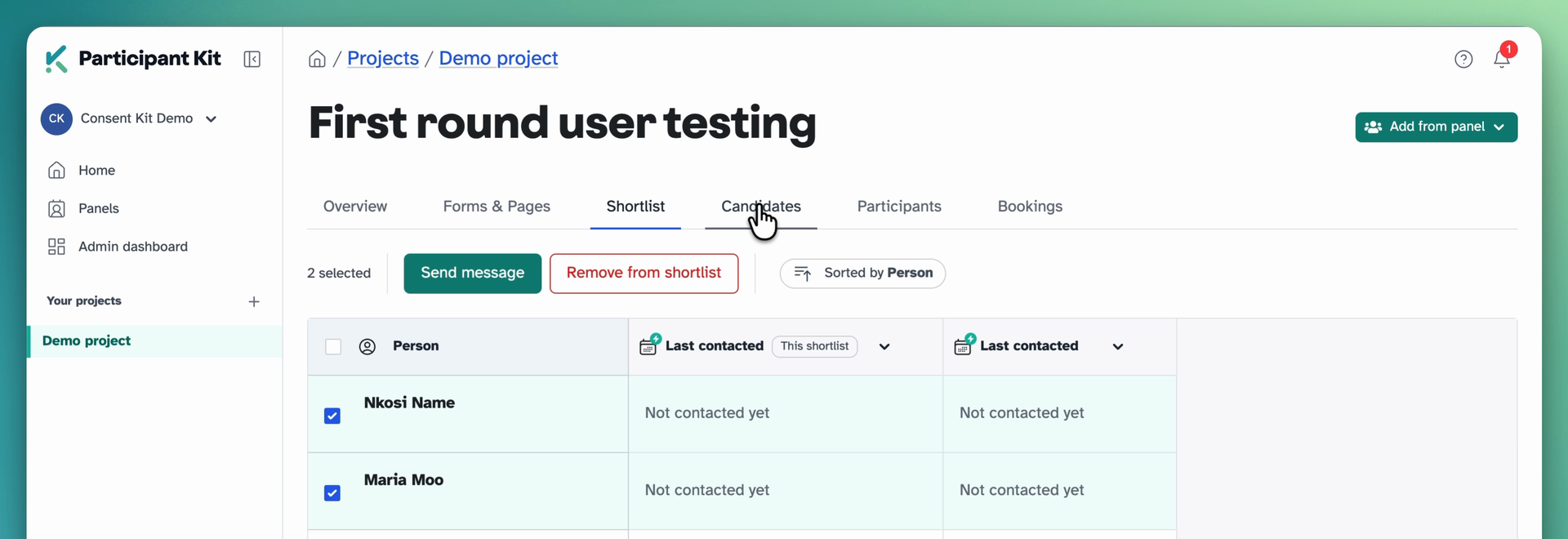
<p><strong>Shortlist</strong> is people you might want. Add from panel, filter it down the same way you filter anywhere else, and pull them in. Nobody has been contacted. It’s a list of people you’re thinking about.</p>

<p><img src="/assets/images/updates/shortlist-send-message.png" alt="The Shortlist tab on a study, two people selected, with Send message and Remove from shortlist buttons" class="shadow rounded-sm" /></p>

<p>When you’re happy with the list, send the screener from here. Everyone gets their own personal link. Anyone on your do not contact list or who has a bouncing email address is skipped.</p>

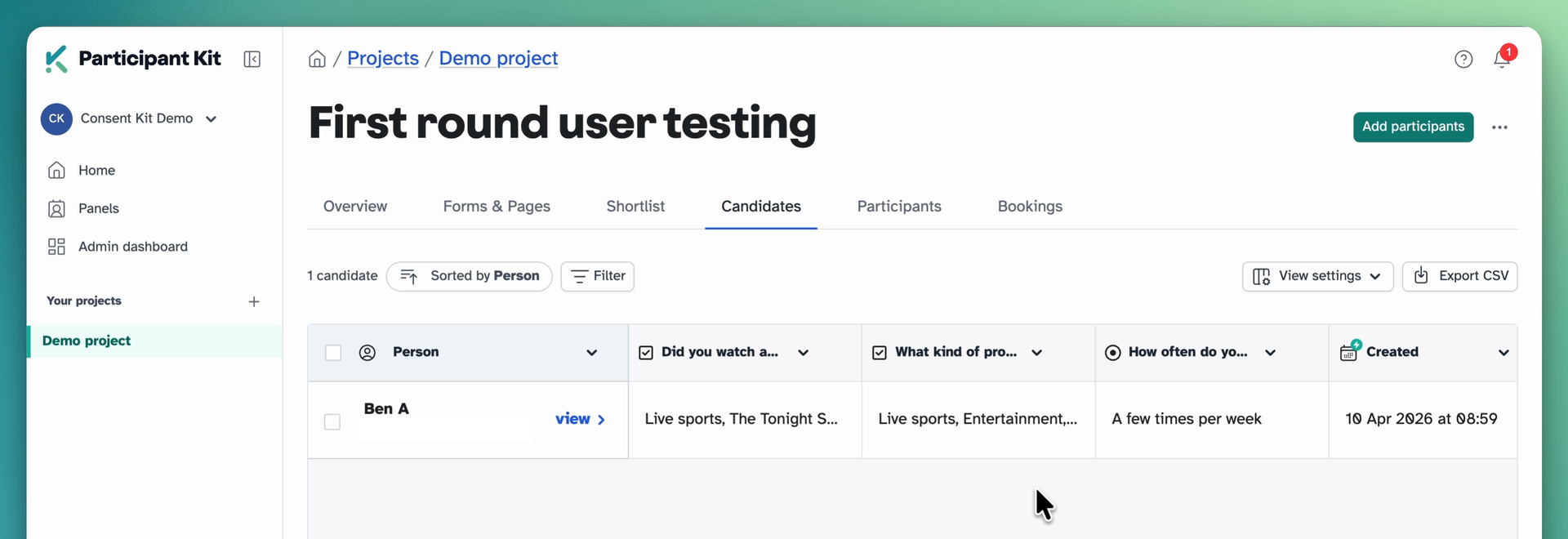
<p><strong>Candidates</strong> is where people go when they complete the screener and we capture their answers. Review their answers and see if they’re right for the study.</p>

<p><img src="/assets/images/updates/shortlist-candidates-tab.png" alt="The Candidates tab showing a candidate's screener answers as columns" class="shadow rounded-sm" /></p>

<p><strong>Participants</strong> is everyone who qualified, ready to do research.</p>

<p class="callout"><strong>If you’ve been doing it the old way.</strong> Adding people from your panel straight into Participants and then sending them a screener still works. Their answers are saved to their profile, but because they’re already past the candidate stage they never appear in the Candidates tab, so there’s no one place to review everyone. Start on the Shortlist tab instead. Same people, same screener, and you can see who said what before you decide.</p>

<h2 id="review-answers-next-to-panel-data">Review answers next to panel data</h2>

<p>We’ve made two enhancements to the Candidates area.</p>

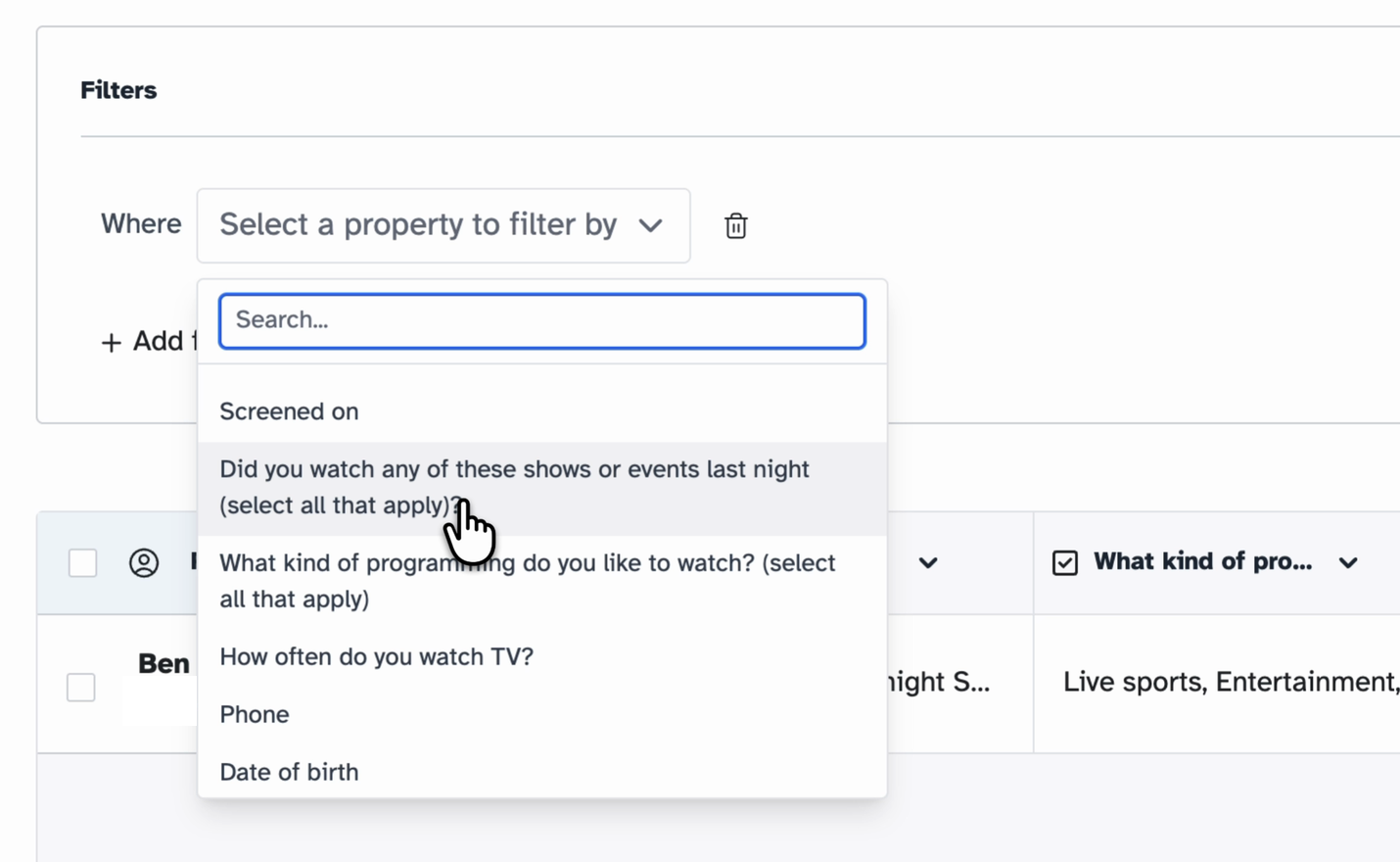
<p>You can filter by what people said. Pick a screener question, pick the answer you’re after, and the list narrows to the people who match. You can filter by date too.</p>

<p><img src="/assets/images/updates/shortlist-candidate-filter.png" alt="The filter builder on the Candidates tab, with screener questions listed as properties to filter by" class="shadow rounded-sm" /></p>

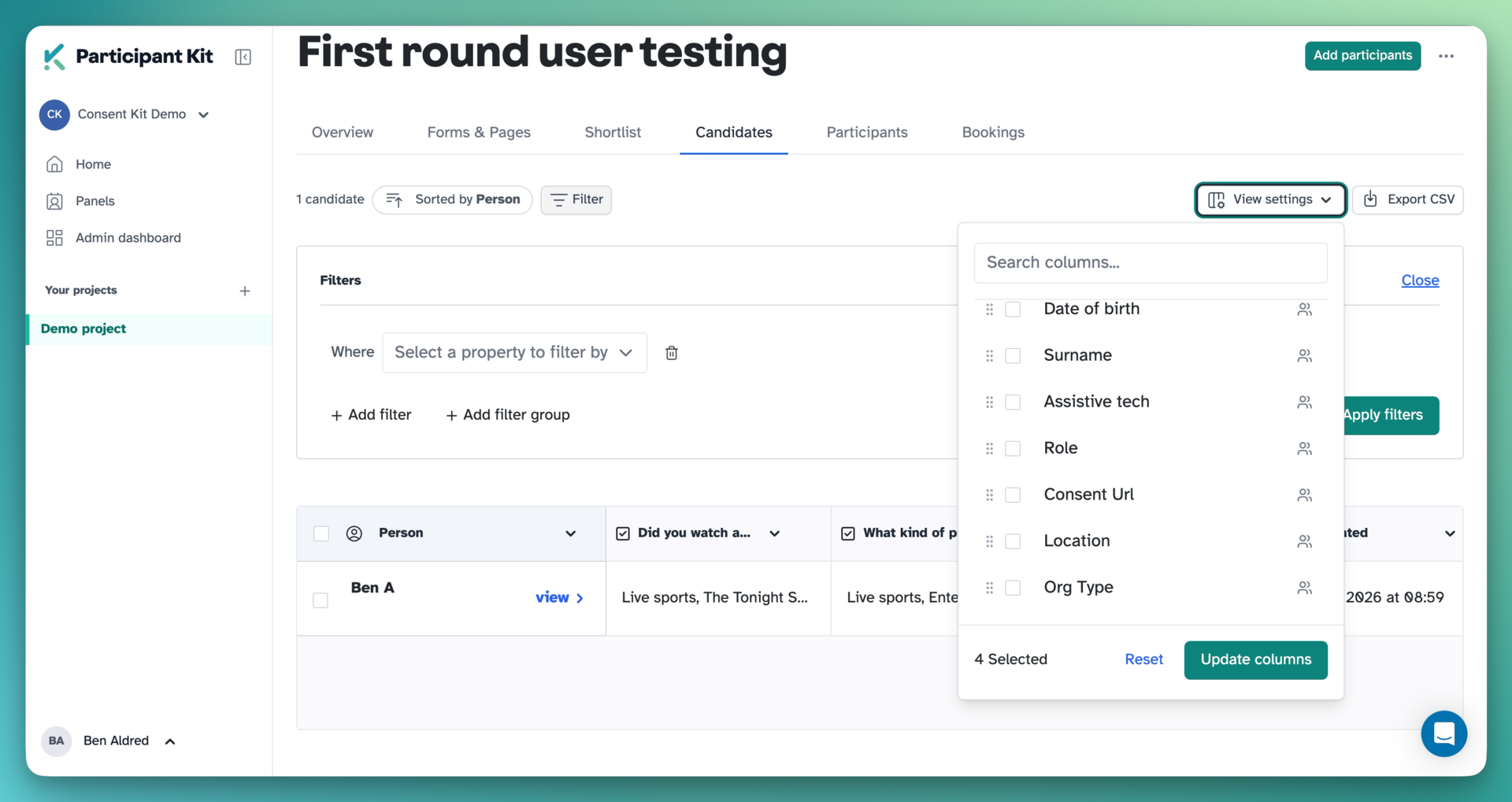
<p>And if someone came from a panel, you can see their panel data alongside. Open View settings and switch on any panel field as a column. It’s off by default and it remembers your choice.</p>

<p><img src="/assets/images/updates/shortlist-view-settings-columns.png" alt="The View settings column chooser on the Candidates tab, listing panel fields that can be switched on as columns" class="shadow rounded-sm" /></p>

<h2 id="move-them-on-or-keep-them-in-reserve">Move them on, or keep them in reserve</h2>

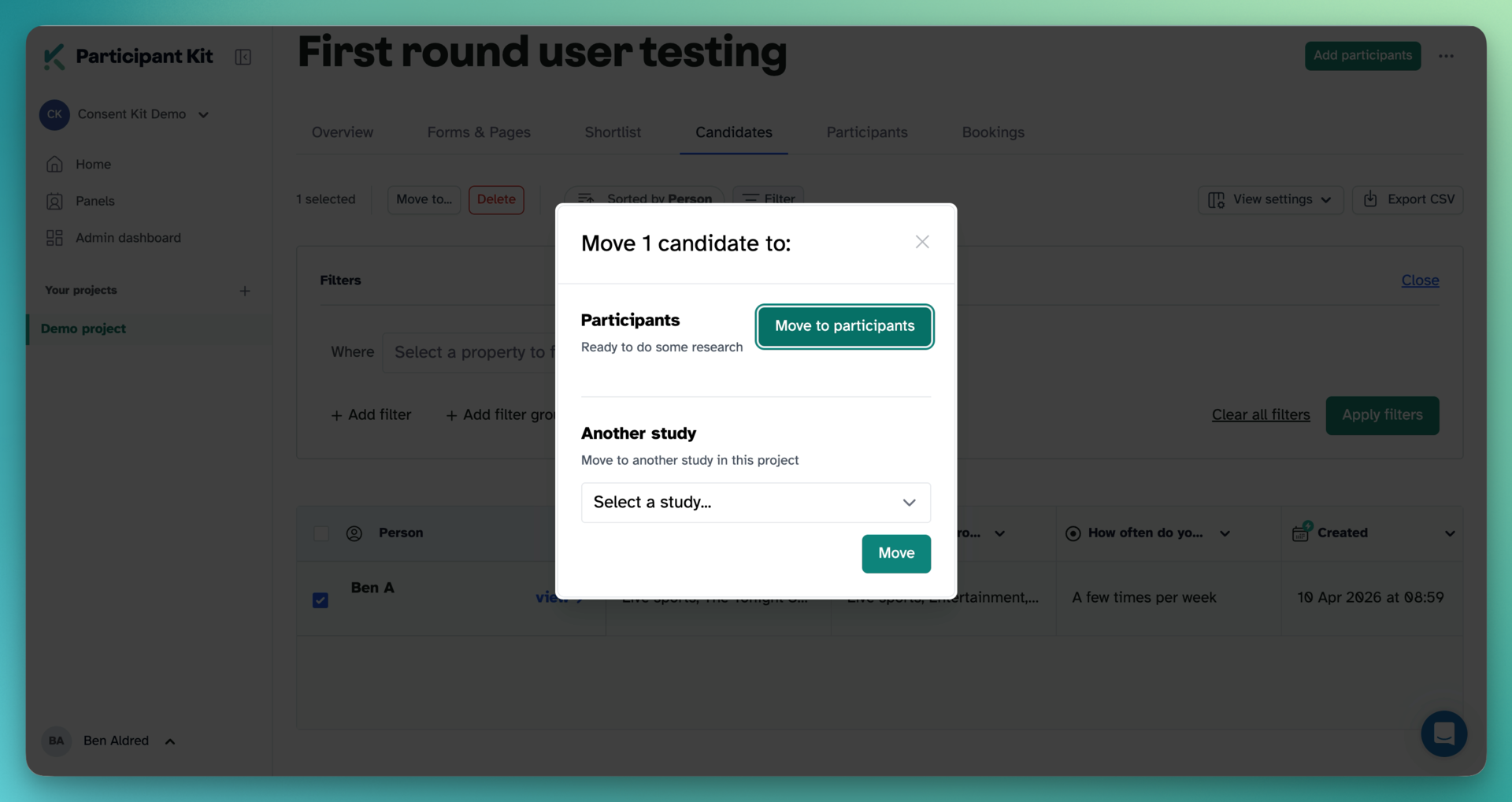
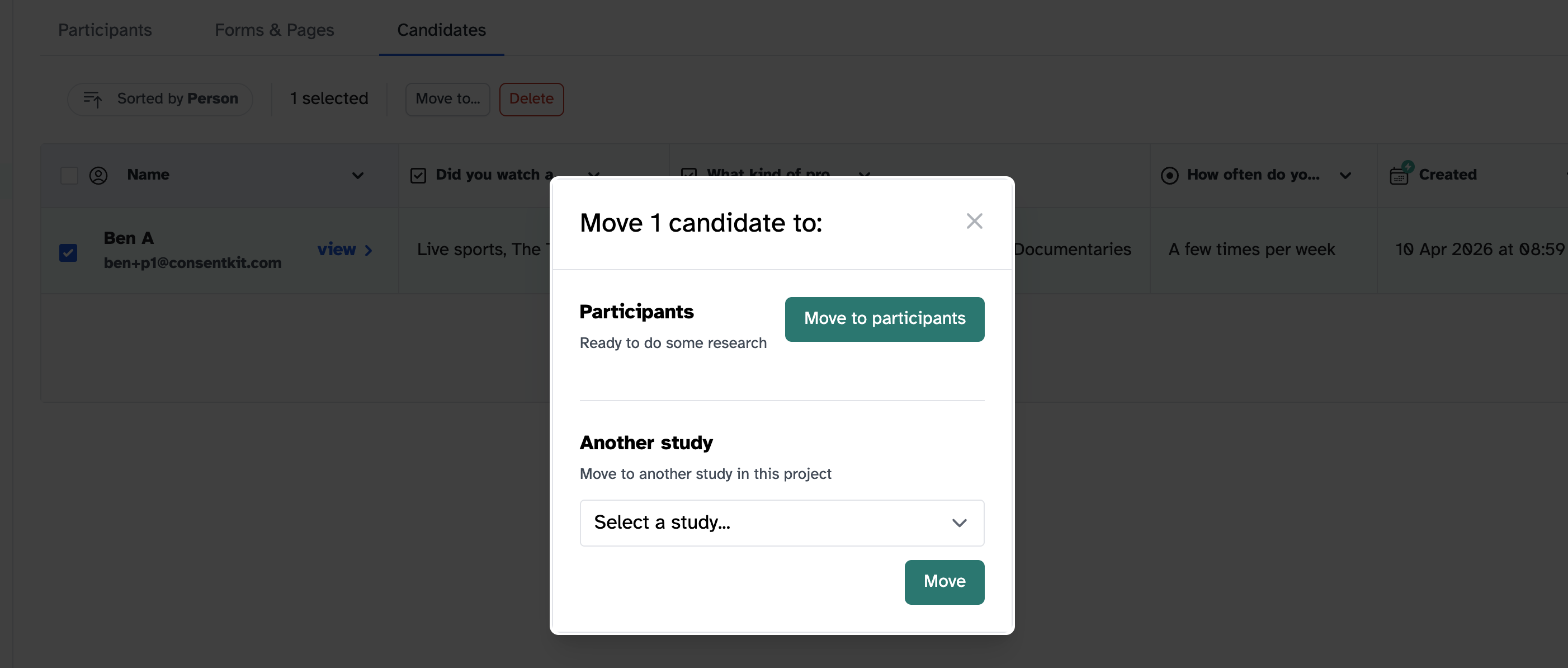
<p>When you’ve found the people you want, select them and move them to Participants.</p>

<p><img src="/assets/images/updates/shortlist-move-candidate.png" alt="The move dialog for a candidate, offering Move to participants or another study in the project" class="shadow rounded-sm" /></p>

<p>If you’ve got more good fits than you have bandwidth for, move them to another study in the project instead. They sit there as candidates, answers intact, until you’re ready.</p>

<p>There’s a help article that walks through the whole thing: <a href="/help/courses/how-to/shortlisting-and-screening-your-panel">Shortlisting and screening people from your panel</a>.</p>

<p>New to Participant Kit? <a href="/book-demo">Book a call</a> and we’ll show you round.</p>
]]></content>
    <media:thumbnail xmlns:media="http://search.yahoo.com/mrss/" url="https://participantkit.com/assets/images/updates/friday-drop-2026-09-11.png"/>
  </entry>
  <entry>
    <title type="html">Scheduling: time zones for participants, availability for your team</title>
    <link href="https://participantkit.com/updates/scheduling-time-zones-for-participants-availability-for-your-team" rel="alternate" type="text/html" title="Scheduling: time zones for participants, availability for your team"/>
    <link href="https://participantkit.com/updates/scheduling-time-zones-for-participants-availability-for-your-team.md" rel="alternate" type="text/markdown"/>
    <published>2026-09-04T00:00:00+00:00</published>
    <updated>2026-09-04T00:00:00+00:00</updated>
    <id>https://participantkit.com/updates/scheduling-time-zones-for-participants-availability-for-your-team</id>
    <category term="Friday Drop" />
    <summary type="html"><![CDATA[Friday Drop 002. Two bookings features, both from early access feedback: participants see times in their own time zone, and researchers control when they can be booked. Early access is open for more teams.]]></summary>
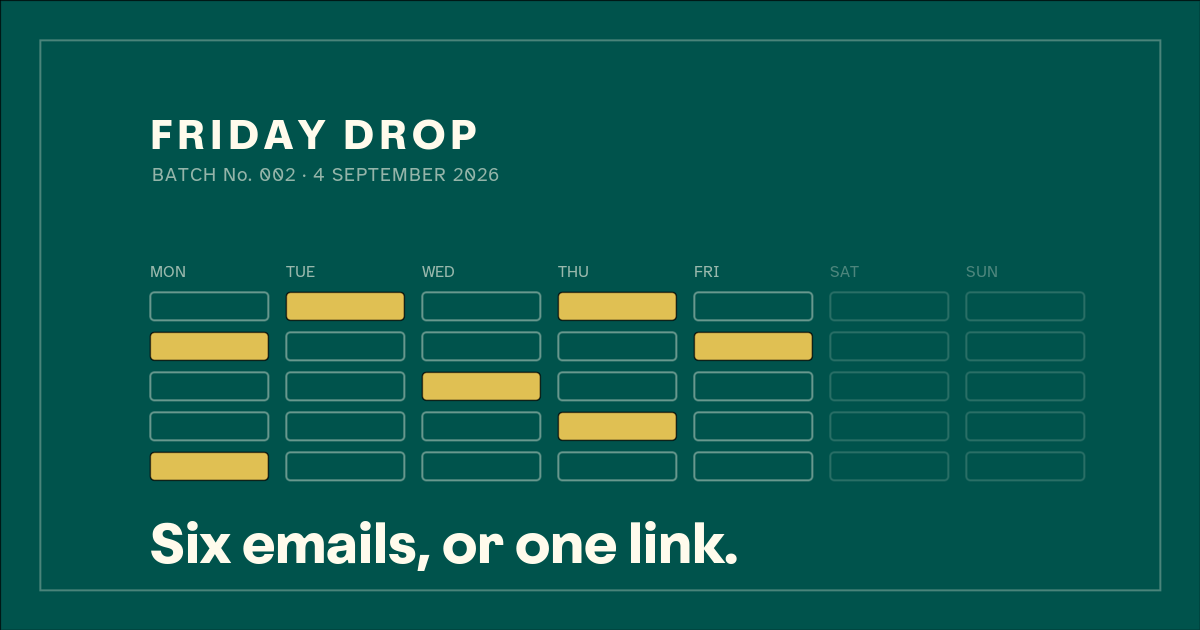
    <content type="html" xml:base="https://participantkit.com/updates/scheduling-time-zones-for-participants-availability-for-your-team"><![CDATA[<p><img src="/assets/images/updates/friday-drop-2026-09-04.png" alt="Friday Drop, batch number 002. A stylised week calendar, Monday to Sunday, with seven slots filled in across the working week and the weekend left empty. Underneath: six emails, or one link" class="shadow rounded-sm" /></p>

<p>Friday Drop, batch 002. Back in April we said we were building native calendaring into Participant Kit. It has been quietly real for a while now, with teams booking actual sessions through it. Two more things landed this week, and both came straight from early access feedback.</p>

<h2 id="participants-see-times-where-they-are">Participants see times where they are</h2>

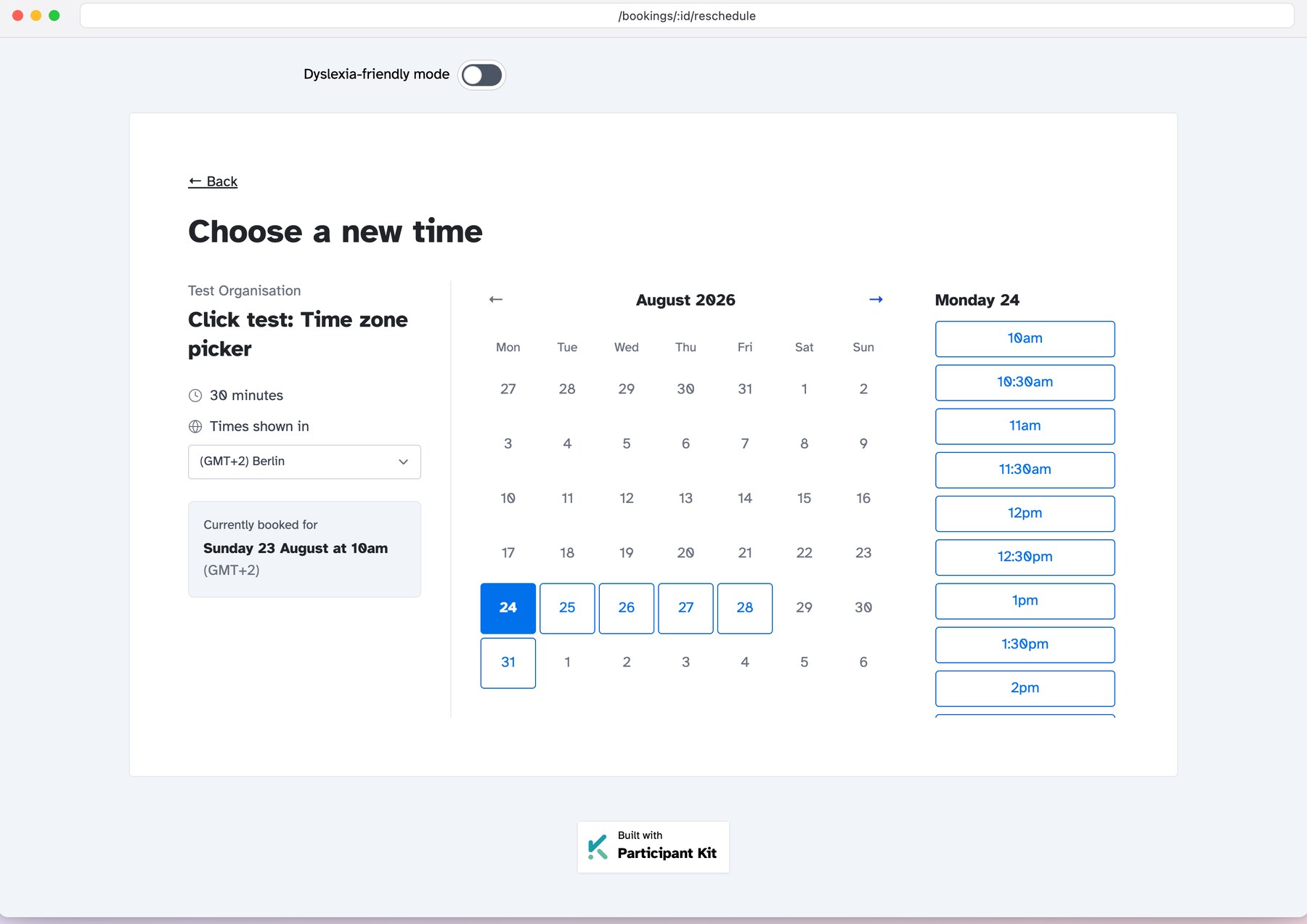
<p>The booking page now works out where a participant is and shows every slot in their own time zone, with a “Times shown in” menu if they want a different one. The zone is saved with the booking, so the confirmation email and the reschedule page show the time they chose, not the time you happen to be in.</p>

<p>Nobody does the maths. Nobody turns up an hour late. And if you only ever run UK research, nothing changes.</p>

<p><img src="/assets/images/scheduling/timezone-picker.jpg" alt="Choosing a new time on the booking page, with every slot shown in the participant's own time zone and a menu to pick a different one" class="shadow rounded-sm" /></p>

<h2 id="you-decide-when-you-can-be-booked">You decide when you can be booked</h2>

<p>A confession: until this week, bookings assumed everyone worked Monday to Friday, nine to five. That window was the same for every researcher on every study.</p>

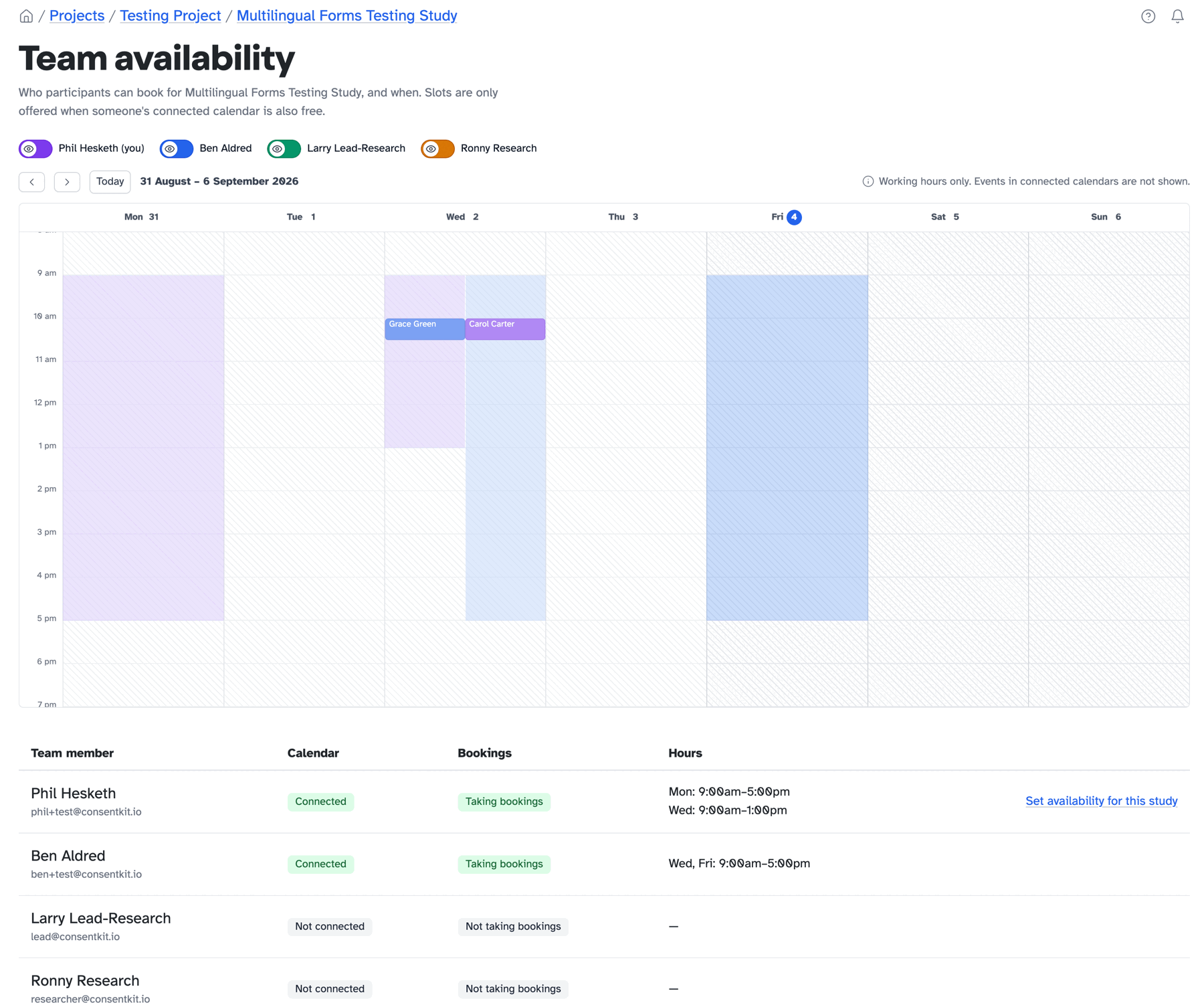
<p>Now it’s yours to set. Every researcher has their own weekly hours, each study can override them or opt out of bookings entirely, and a new team availability calendar shows who participants can book, and when, with booked sessions drawn on top. Research is a team sport, and now the calendar knows it.</p>

<p><img src="/assets/images/scheduling/team-availability-2026-09-04.png" alt="The new team availability calendar for a study: each researcher's connected calendar, whether they are taking bookings, their hours, and the combined bookable time across a week with booked sessions drawn on top" class="shadow rounded-sm" /></p>

<h2 id="early-access-is-open-for-more-teams">Early access is open for more teams</h2>

<p>Nearly everything in Participant Kit was designed with a customer looking over our shoulder, and bookings is being built the same way. Both of the features above went to the top of the list because early access teams put them there.</p>

<p>We have also given bookings a proper home this week. Have a look at <a href="/scheduling">the shiny new scheduling page</a> for the whole picture, then <a href="/book-demo">book a call</a> and we’ll switch it on for your organisation.</p>
]]></content>
    <media:thumbnail xmlns:media="http://search.yahoo.com/mrss/" url="https://participantkit.com/assets/images/updates/friday-drop-2026-09-04.png"/>
  </entry>
  <entry>
    <title type="html">We have been building a lot and telling you almost nothing</title>
    <link href="https://participantkit.com/updates/we-have-been-building-a-lot-and-telling-you-almost-nothing" rel="alternate" type="text/html" title="We have been building a lot and telling you almost nothing"/>
    <link href="https://participantkit.com/updates/we-have-been-building-a-lot-and-telling-you-almost-nothing.md" rel="alternate" type="text/markdown"/>
    <published>2026-08-28T00:00:00+00:00</published>
    <updated>2026-08-28T00:00:00+00:00</updated>
    <id>https://participantkit.com/updates/we-have-been-building-a-lot-and-telling-you-almost-nothing</id>
    <category term="Friday Drop" />
    <summary type="html"><![CDATA[We got better at building things this year and no better at talking about them. 56 new things in two years, 12 posts about them. The Friday Drop starts next week.]]></summary>
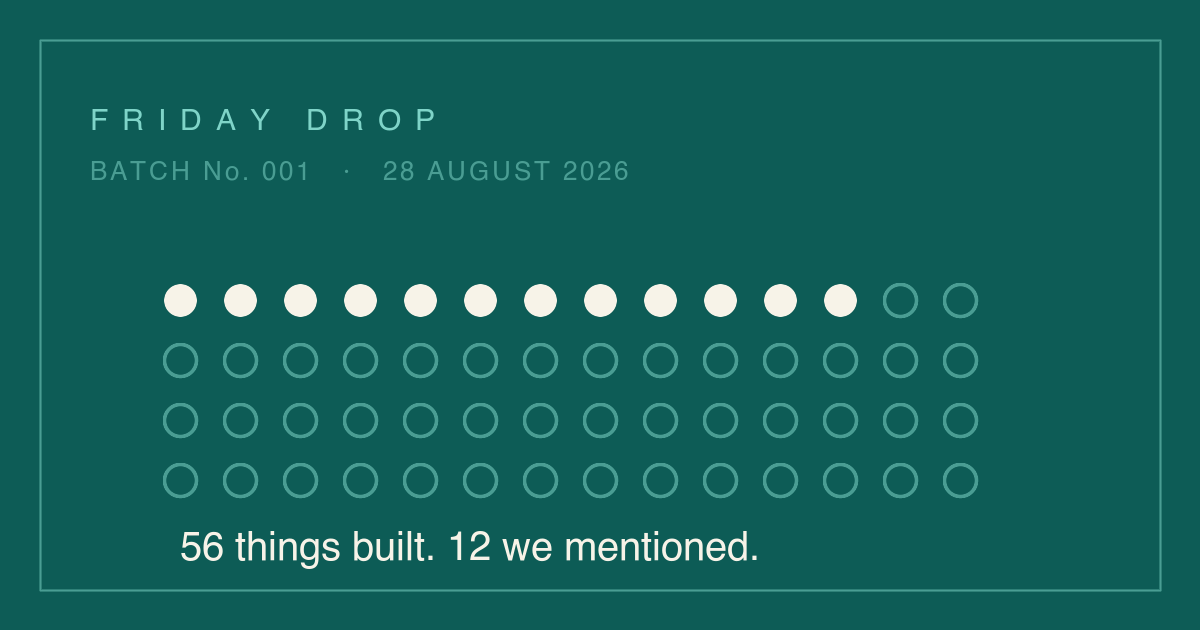
    <content type="html" xml:base="https://participantkit.com/updates/we-have-been-building-a-lot-and-telling-you-almost-nothing"><![CDATA[<p><img src="/assets/images/updates/friday-drop-2026-08-28.png" alt="Friday Drop, batch number 001. Fifty six dots, twelve of them filled in, showing the twelve updates we published against the fifty six new things we built" class="shadow rounded-sm" /></p>

<p>The last time we posted anything on this page was 74 days ago. Not because nothing has changed.</p>

<p>Some of you have found things in Participant Kit that we haven’t announced. A setting that was not there last month. A column that appeared in your panel. Something that used to be irritating and is not any more.</p>

<p>Some of you have not found things, because we haven’t announced them.</p>

<p>This came up on a call in July, with a customer who checks Participant Kit against their own GDPR processes:</p>

<blockquote>
  <p>When I go in and I’m reviewing GDPR and our processes, I’m completely missing the new functionality, and I need to look at the new functionality against our processes and make sure that they align.</p>
</blockquote>

<h2 id="56-new-things-in-two-years-12-posts-about-them-">56 new things in two years. 12 posts about them. 😬</h2>

<p>The gap has been getting steadily worse. In the last six months we have been building about three times faster, and over half of those 56 arrived since March. We got a lot better at building things, and no better at talking about them.</p>

<p>Since December, we’ve been using AI to help how we build. That’s why the pace changed. The talking is just us, and marketing hasn’t kept up with development, which is a fixable problem rather than an interesting one.</p>

<p><em>A note from the author. When I am talking about AI, I mean how we build the product. It is not AI inside the product. There is no AI touching your customer data. If you have any worries, I am happy to talk you through it. ~ Ben</em></p>

<p>Three things follow.</p>

<p><strong>From next week, there’s a Friday Drop.</strong> Every Friday, sometimes more often. What changed that week, however small. Some weeks that will be a proper feature with screenshots and a help article, most weeks it will be a handful of smaller things, and it won’t go quiet again.</p>

<p><strong>We’re going back through the backlog.</strong> There’s a lot in the product we never announced: broadcasts, do-not-contact, self-serve DPAs, the public API. Over the next couple of months we will work through them properly, one story a week, with the help documentation each one should have had at the time.</p>

<p><strong>And if something is wrong, tell us.</strong> Building faster means we have more room to fix things. If something in Participant Kit is broken, awkward or just irritating, say so. The gap between you mentioning it and us fixing it is a lot shorter than it used to be.</p>

<h2 id="and-now-an-ask-bookings-early-access">And now an ask: bookings early access</h2>

<p>We’ve got native bookings in Participant Kit. There’s no separate booking tool to set up. You plug in your calendar, Google or Outlook, and it already knows your study and the consent you have collected. You can ditch Calendly. 😉</p>

<p>It’s not switched on for everyone yet, which is why we’re looking for volunteers to come and test it out. Please <a href="https://participantkit.com/book-demo">get in touch</a>! 🧪</p>
]]></content>
    <media:thumbnail xmlns:media="http://search.yahoo.com/mrss/" url="https://participantkit.com/assets/images/updates/friday-drop-2026-08-28.png"/>
  </entry>
  <entry>
    <title type="html">Build your own templates inside any project</title>
    <link href="https://participantkit.com/updates/project-templates/" rel="alternate" type="text/html" title="Build your own templates inside any project"/>
    <link href="https://participantkit.com/updates/project-templates.md" rel="alternate" type="text/markdown"/>
    <published>2026-06-15T00:00:00+00:00</published>
    <updated>2026-06-15T00:00:00+00:00</updated>
    <id>https://participantkit.com/updates/project-templates/</id>
    <category term="New feature" />
    <summary type="html"><![CDATA[Create form templates scoped to a project and reuse them across every study in it. No admin rights needed.]]></summary>
    <content type="html" xml:base="https://participantkit.com/updates/project-templates/"><![CDATA[<p>A while back we restricted template creation to admins. The thinking was sound: organisation templates should be a small, curated set that everyone can trust, and letting too many pile up makes them harder to rely on, not easier.</p>

<p>But it left a gap. If you weren’t an admin and the closest org template didn’t quite fit your study, you had to rebuild the same changes by hand every time, with no way to save your version or reuse it the following week.</p>

<p>Project templates close that gap.</p>

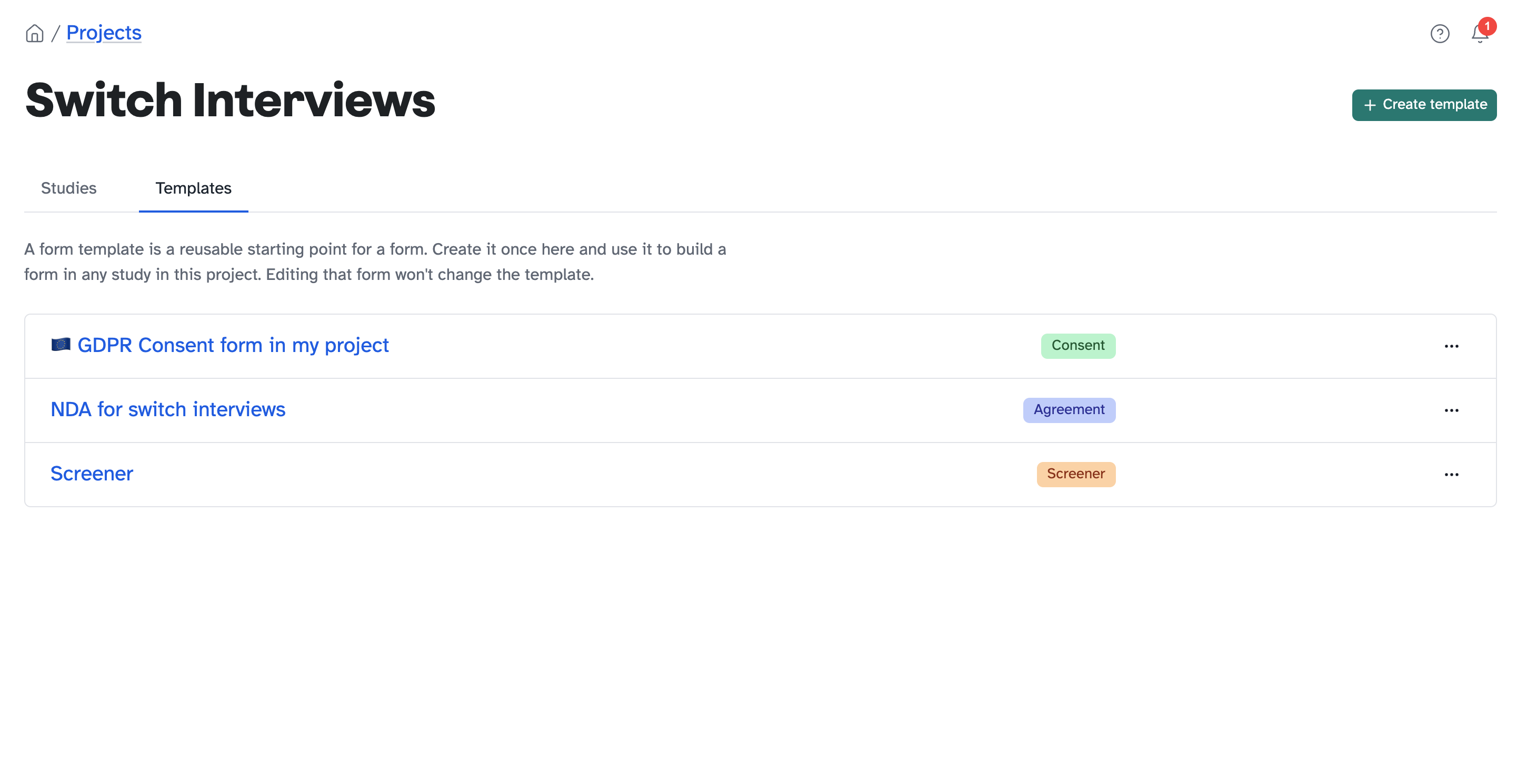
<p><img src="/assets/images/updates/project-templates.png" alt="The Templates tab inside a project, showing project-level consent, NDA and screener templates" class="shadow border border-gray-200 rounded-sm" /></p>

<h2 id="how-it-works">How it works</h2>

<p>You can now create form templates that live inside a project. Build one once and reuse it across every study in that project, with no admin rights required. Editing a form you’ve built from a template won’t touch the template itself, so your starting point stays clean.</p>

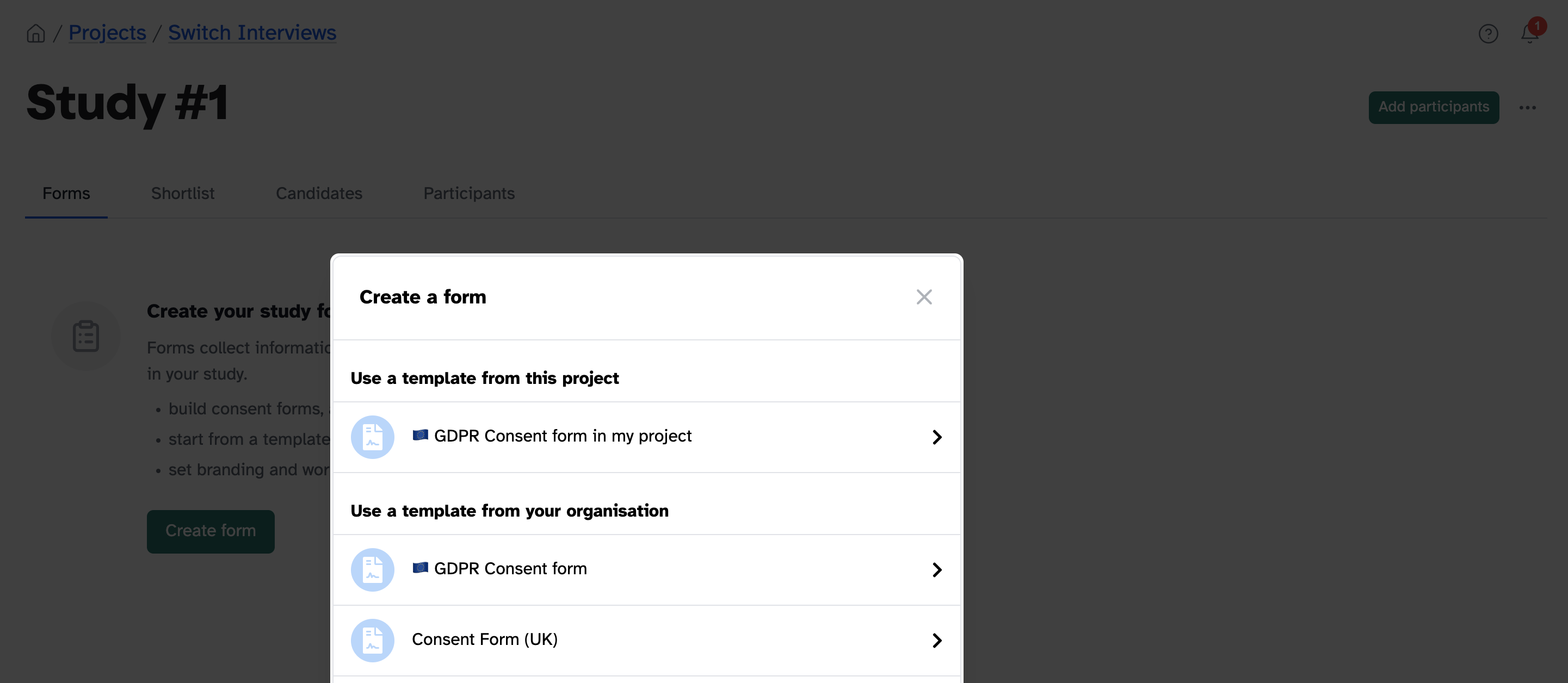
<p>Because they’re scoped to the project they belong to, project templates don’t clutter the organisation-wide list and they don’t show up in other projects. Your org templates stay curated and small, while each project gets its own working set underneath.</p>

<h2 id="where-youll-use-it">Where you’ll use it</h2>

<ul>
  <li><strong>Studies that share a setup.</strong> A research programme running back-to-back studies on the same consent form, screener, or NDA.</li>
  <li><strong>Customising the base template.</strong> Take an org template, adapt it for how your project actually works, and save that as your starting point.</li>
  <li><strong>Repeatable workflows.</strong> Standardise how every study in a project begins, and set up the next one in seconds.</li>
</ul>

<h2 id="how-to-use-it">How to use it</h2>

<ol>
  <li>Open a project and go to the <strong>Templates</strong> tab</li>
  <li>Create a template, or copy an existing form to start from</li>
  <li>When you set up a study in that project, pick your template from the list</li>
</ol>

<p><img src="/assets/images/updates/use-project-template.png" alt="The Create a form modal, with templates grouped into &quot;from this project&quot; and &quot;from your organisation&quot;" class="shadow border border-gray-200 rounded-sm" /></p>

<h2 id="coming-next">Coming next</h2>

<p>We’ve heard that a good project template often deserves to become an organisation one. We’re working on a way to flag a project template to your admins and suggest it gets promoted, so the best ideas can travel upwards without flooding the org list. More on that soon.</p>
]]></content>
    <media:thumbnail xmlns:media="http://search.yahoo.com/mrss/" url="https://participantkit.com/assets/images/updates/project-templates.png"/>
  </entry>
  <entry>
    <title type="html">We&apos;re building native calendaring into Participant Kit</title>
    <link href="https://participantkit.com/updates/native-calendaring/" rel="alternate" type="text/html" title="We&apos;re building native calendaring into Participant Kit"/>
    <link href="https://participantkit.com/updates/native-calendaring.md" rel="alternate" type="text/markdown"/>
    <published>2026-04-28T00:00:00+00:00</published>
    <updated>2026-04-28T00:00:00+00:00</updated>
    <id>https://participantkit.com/updates/native-calendaring/</id>
    <category term="New feature" />
    <summary type="html"><![CDATA[Calendly-level booking experience with EU data residency, built for research. Coming soon.]]></summary>
    <content type="html" xml:base="https://participantkit.com/updates/native-calendaring/"><![CDATA[<p>Spend enough time talking to researchers and research ops people about scheduling, and the same complaints come up over and over.</p>

<p>Microsoft Bookings comes up a lot. One person we spoke to built a PowerPoint deck to teach their colleagues how to use it. That tells you something.</p>

<p>Calendly sets the bar for booking experience. But if you’re an EU-based research team, there’s a catch: it’s US-hosted. We’ve said it ourselves on demos more than once: “It feels odd that we host all our data in the EU, make a big effort to be GDPR compliant, have EU data residency, and then ask participants to schedule on a US-hosted tool.”</p>

<p>The usual EU alternatives are Microsoft Bookings or Google, and that lands you back at the experience problems we started with.</p>

<p>That’s the gap we’re filling. Calendly’s experience, with EU data residency, built natively into Participant Kit.</p>

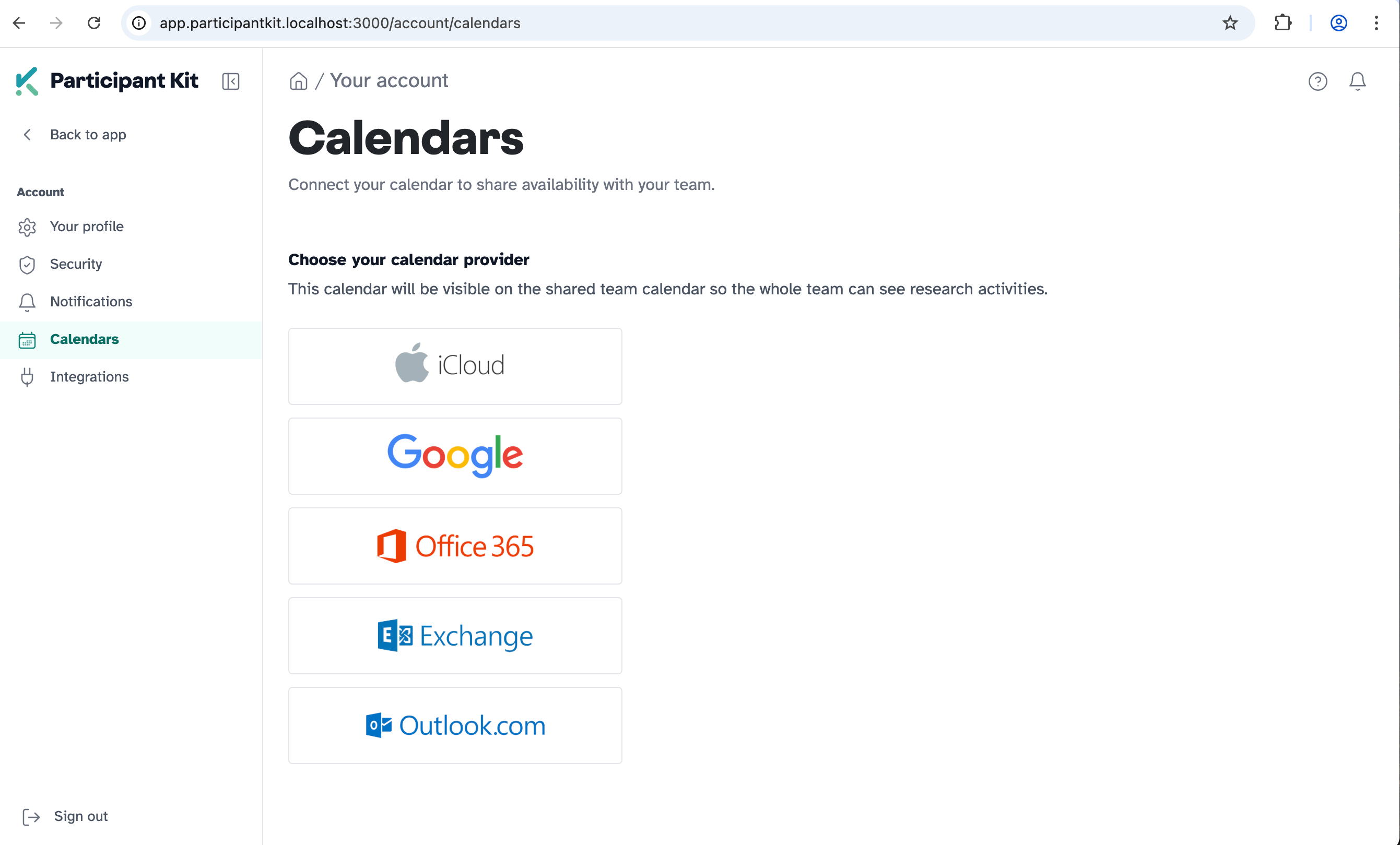
<p><img src="/assets/images/updates/calendars.png" alt="Early look at calendaring in Participant Kit" class="shadow border border-gray-200 rounded-sm" /></p>

<h2 id="built-for-research-not-bolted-on">Built for research, not bolted on</h2>

<p>We’re bringing all our work on inclusive, accessible participant experiences into calendaring built specifically for booking user research sessions. It sits alongside participant management, where it belongs, not added as another third-party integration.</p>

<p>This is early. We’re actively building it and we’ll share more as it takes shape.</p>

<h2 id="want-to-try-it-early">Want to try it early?</h2>

<p>We’re looking for research teams who’d be willing to test this out as we build it. If that sounds like you, drop us a message via the in-app chat or email <a href="mailto:support@participantkit.com">support@participantkit.com</a>.</p>
]]></content>
    <media:thumbnail xmlns:media="http://search.yahoo.com/mrss/" url="https://participantkit.com/assets/images/updates/calendars.png"/>
  </entry>
  <entry>
    <title type="html">Filter, find and track participants</title>
    <link href="https://participantkit.com/updates/filter-find-and-track-participants" rel="alternate" type="text/html" title="Filter, find and track participants"/>
    <link href="https://participantkit.com/updates/filter-find-and-track-participants.md" rel="alternate" type="text/markdown"/>
    <published>2026-04-21T00:00:00+00:00</published>
    <updated>2026-04-21T00:00:00+00:00</updated>
    <id>https://participantkit.com/updates/filter-find-and-track-participants</id>
    <category term="New feature" />
    <summary type="html"><![CDATA[Filter your participant lists by consent status, contact history, tags and more. Plus pipeline timestamps and CSV export.]]></summary>
    <content type="html" xml:base="https://participantkit.com/updates/filter-find-and-track-participants"><![CDATA[<p>Your participant lists just got a lot more useful. You can now filter by the things that actually matter when you’re managing a study, see exactly when people moved through your pipeline, and spot who’s a panellist or has been screened before.</p>

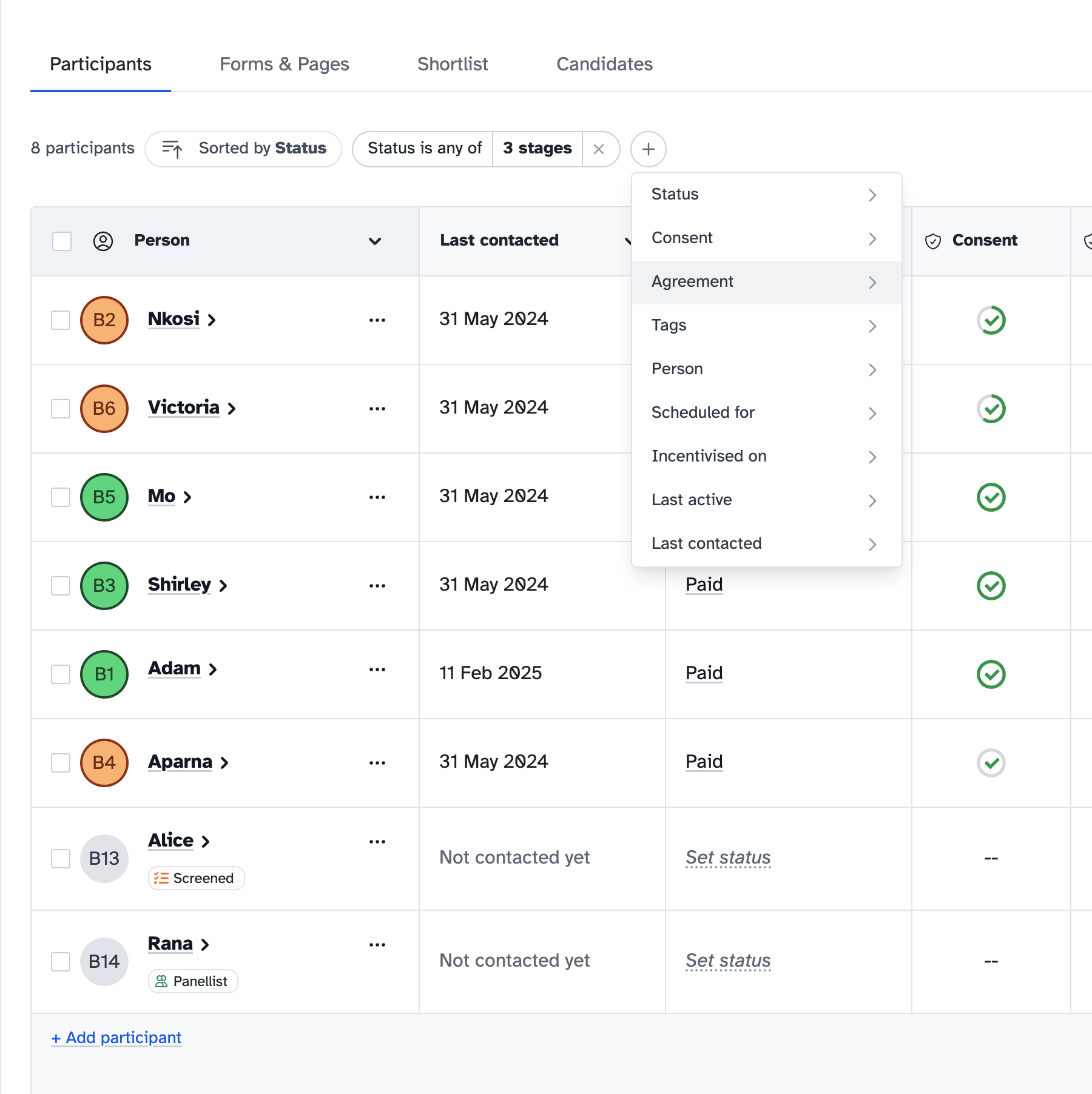
<p><img src="/assets/images/updates/participant-filters@2x.png" alt="Participant filters, timestamps and indicators in action" class="shadow border border-gray-200 rounded-sm" /></p>

<h2 id="filters">Filters</h2>

<p>Hit the <strong>Filter</strong> button at the top of your participants list. A few examples:</p>

<ul>
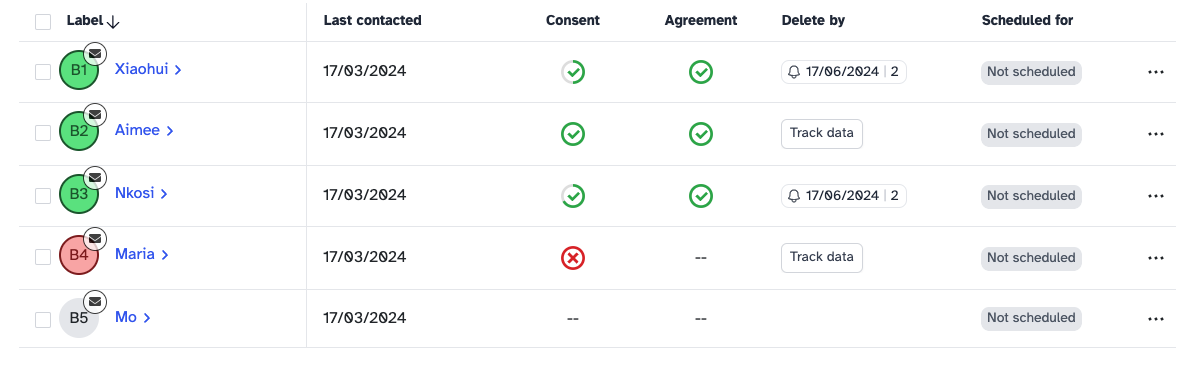
  <li><strong>Consent status</strong> - Find everyone you’re still waiting on</li>
  <li><strong>Last contacted</strong> - See who you’ve never reached out to, or filter by date range</li>
  <li><strong>Tags</strong> - Filter by any tag you’ve set up</li>
  <li><strong>Incentives</strong> - Find people you still need to pay</li>
  <li><strong>Scheduled for</strong> - Filter by upcoming or past session dates</li>
</ul>

<p>Each filter has presets (today, last 7 days, last 30 days) and a custom date range option for when you need something specific.</p>

<h2 id="pipeline-timestamps">Pipeline timestamps</h2>

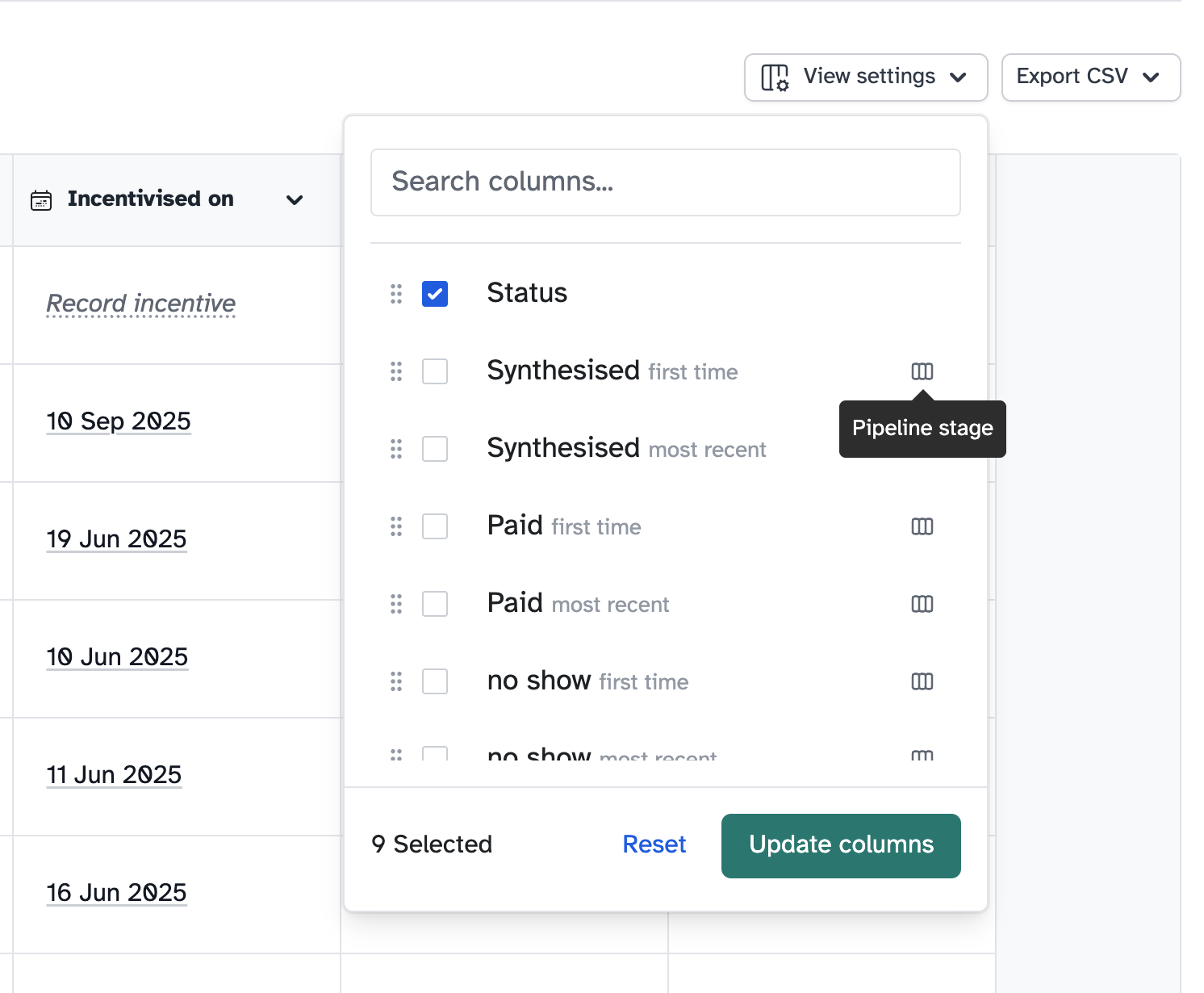
<p>Every custom pipeline stage now tracks when a participant first and last reached it. If someone no-shows twice, you’ll see both timestamps, so you can track the gap between them.</p>

<p>Choose which columns to show via the <strong>View settings</strong> button at the top right, so you only see what’s relevant to your study.</p>

<p><img src="/assets/images/updates/pipeline-timestamp-columns.png" alt="Pipeline timestamp columns" class="shadow border border-gray-200 rounded-sm" /></p>

<h2 id="panellist-and-screener-indicators">Panellist and screener indicators</h2>

<p>Two small additions that save you clicking into profiles:</p>

<ul>
  <li><strong>Panellist badge</strong> - See at a glance if a participant is also on one of your panels</li>
  <li><strong>Screener badge</strong> - Know whether they’ve filled in a screener before</li>
</ul>

<h2 id="dont-forget-csv-export">Don’t forget CSV export</h2>

<p>This one’s been around for a while, but people miss it. You can export your participant list as a CSV, including any visible timestamp columns. Useful for reporting or working with data outside the platform.</p>

<p>See the new additions on your study’s <strong>Participants</strong> tab. Let us know if you need any more filters.</p>
]]></content>
    <media:thumbnail xmlns:media="http://search.yahoo.com/mrss/" url="https://participantkit.com/assets/images/updates/participant-filters@2x.png"/>
  </entry>
  <entry>
    <title type="html">Bulk actions for candidates</title>
    <link href="https://participantkit.com/updates/bulk-actions-for-candidates" rel="alternate" type="text/html" title="Bulk actions for candidates"/>
    <link href="https://participantkit.com/updates/bulk-actions-for-candidates.md" rel="alternate" type="text/markdown"/>
    <published>2026-04-10T00:00:00+00:00</published>
    <updated>2026-04-10T00:00:00+00:00</updated>
    <id>https://participantkit.com/updates/bulk-actions-for-candidates</id>
    <category term="New feature" />
    <summary type="html"><![CDATA[Move extra candidates to another study, delete the ones who aren't right, and see screener responses on profiles.]]></summary>
    <content type="html" xml:base="https://participantkit.com/updates/bulk-actions-for-candidates"><![CDATA[<p>People fill out your screener and land in the candidates tab. Got more candidates than you need for this round of research? Now you can do something with them - select the extras and move them to another study. Their screener responses come with them.</p>

<p><img src="/assets/images/updates/bulk-actions-candidates@2x.png" alt="Bulk actions menu for candidates" class="shadow border border-gray-200 rounded-sm" /></p>

<h2 id="what-you-can-do">What you can do</h2>

<ul>
  <li><strong>Move to another study</strong> - Transfer candidates who’d be a better fit elsewhere. Screener responses travel with them.</li>
  <li><strong>Bulk delete</strong> - Remove candidates who aren’t right. No more letting them sit there with nothing you can do.</li>
</ul>

<h2 id="screener-responses-on-profiles">Screener responses on profiles</h2>

<p>When someone fills out a screener, their profile now shows a badge marking them as screened. You can also view their screener responses directly on their profile.</p>

<h2 id="how-to-use-bulk-actions">How to use bulk actions</h2>

<ol>
  <li>Go to your study’s candidates list</li>
  <li>Select the candidates you want to act on</li>
  <li>Choose <strong>Move to study</strong> or <strong>Delete</strong> from the bulk actions menu</li>
</ol>
]]></content>
    <media:thumbnail xmlns:media="http://search.yahoo.com/mrss/" url="https://participantkit.com/assets/images/updates/bulk-actions-candidates@2x.png"/>
  </entry>
  <entry>
    <title type="html">We&apos;ve refreshed the design. Here&apos;s what moved and why.</title>
    <link href="https://participantkit.com/updates/design-refresh/" rel="alternate" type="text/html" title="We&apos;ve refreshed the design. Here&apos;s what moved and why."/>
    <link href="https://participantkit.com/updates/design-refresh.md" rel="alternate" type="text/markdown"/>
    <published>2026-03-25T00:00:00+00:00</published>
    <updated>2026-03-25T00:00:00+00:00</updated>
    <id>https://participantkit.com/updates/design-refresh/</id>
    <category term="Improvement" />
    <summary type="html"><![CDATA[We've given the app a design refresh. New sidebar navigation, clearer wayfinding, and the start of a proper design system.]]></summary>
    <content type="html" xml:base="https://participantkit.com/updates/design-refresh/"><![CDATA[<p>The top navigation was getting crowded. Panels, projects, settings, all in one bar, and more features on the way with nowhere to put them. So we’ve reorganised the app (not the participant-facing portal, that’s untouched). As part of the refresh to Participant Kit, we’ve rethought how the app is laid out and tidied things up.</p>

<p>Nothing has functionally changed. This is about making the experience clearer and easier to navigate.</p>

<p><em>Before</em>
<img src="/assets/images/updates/design-refresh-before.png" alt="The old layout" class="shadow border border-gray-200 rounded-sm" /></p>

<p><em>After</em>
<img src="/assets/images/updates/design-refresh-after.png" alt="The new layout" class="shadow border border-gray-200 rounded-sm" /></p>

<h2 id="the-sidebar">The sidebar</h2>

<p>Navigation now lives in a collapsible sidebar on the left. Your projects are listed there, your user menu is at the bottom, and there’s room for what’s coming next without everything fighting for space.</p>

<h2 id="knowing-where-you-are">Knowing where you are</h2>

<p>Previously, all studies within a project sat on the same page in a concertina pattern. You’d expand one, collapse another, and it was easy to lose your place. <em>I can feel the designers among you rolling your eyes.</em> 🙄</p>

<p>Each study now has its own page. You can see them as a list within a project, click into one, and focus on it without the clutter. The breadcrumbs have been reworked too, so you always know whether you’re in a project, a study, or a settings area. The structure is simpler and the navigation is consistent. No guessing.</p>

<p>Over time, this gives us space to add things like usage statistics and study overviews that would have been too crowded before.</p>

<h2 id="a-proper-design-system">A proper design system</h2>

<p>Every screen is starting to follow the same structure: consistent headers, page titles, descriptions, and button styles. We’re documenting the design system as we go, so you should see more consistency creeping in over the coming weeks.</p>

<h2 id="accessibility">Accessibility</h2>

<p>Participant-facing pages remain WCAG 2.2 AA compliant, as audited by the RNIB. We’re also working towards WCAG 2.2 AA on the researcher-facing side, and this refresh gives us a solid starting point. More detail in our <a href="/accessibility-statement">accessibility statement</a>.</p>

<p>One thing to note: some help docs still have older screenshots. We’re updating those over the next few weeks.</p>
]]></content>
    <media:thumbnail xmlns:media="http://search.yahoo.com/mrss/" url="https://participantkit.com/assets/images/updates/design-refresh-after.png"/>
  </entry>
  <entry>
    <title type="html">Full Form Preview</title>
    <link href="https://participantkit.com/updates/full-form-preview" rel="alternate" type="text/html" title="Full Form Preview"/>
    <link href="https://participantkit.com/updates/full-form-preview.md" rel="alternate" type="text/markdown"/>
    <published>2026-02-04T00:00:00+00:00</published>
    <updated>2026-02-04T00:00:00+00:00</updated>
    <id>https://participantkit.com/updates/full-form-preview</id>
    <category term="Improvement" />
    <summary type="html"><![CDATA[No more using live links to test forms. Preview the full flow, branching and all, without locking anything.]]></summary>
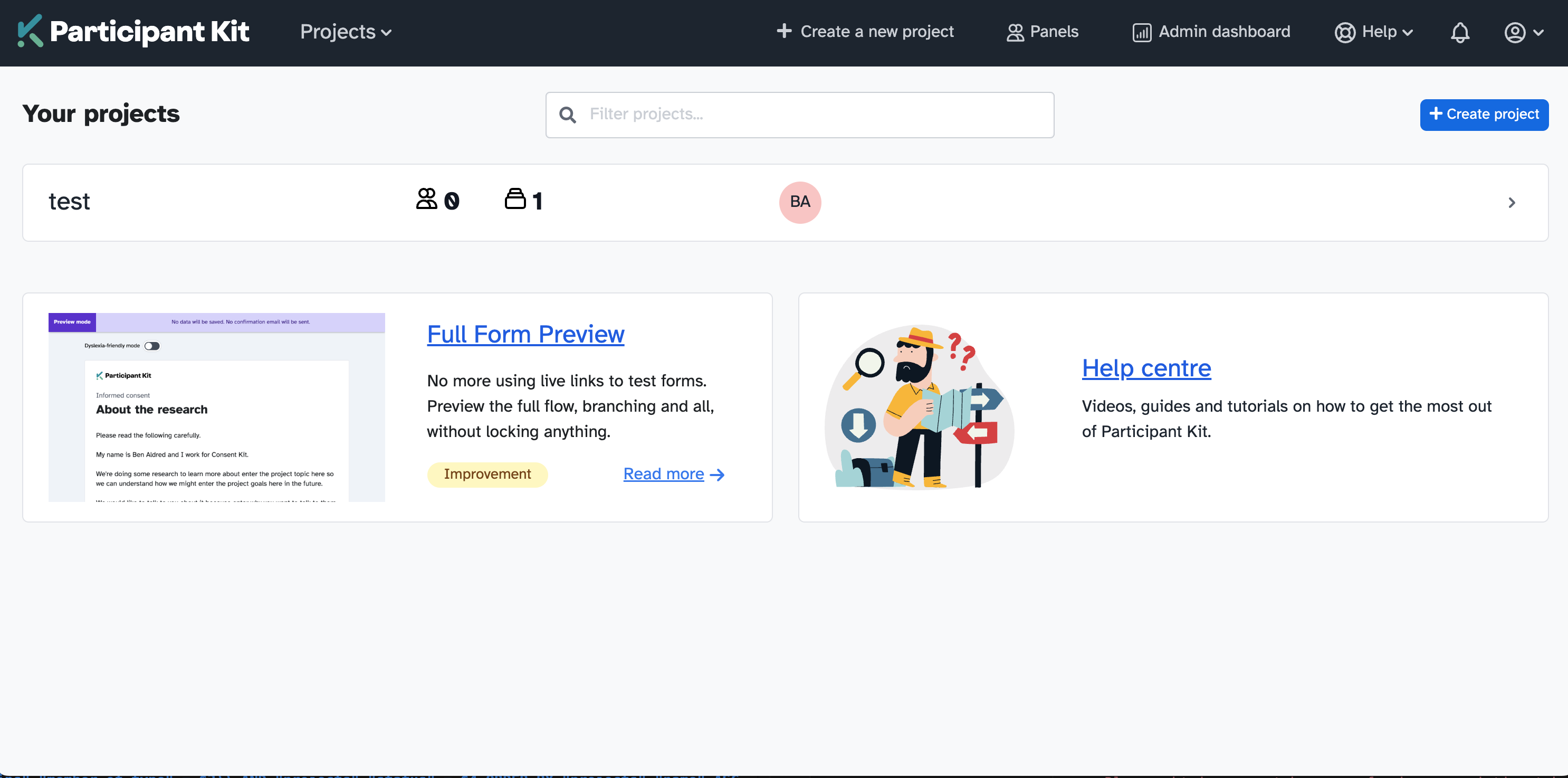
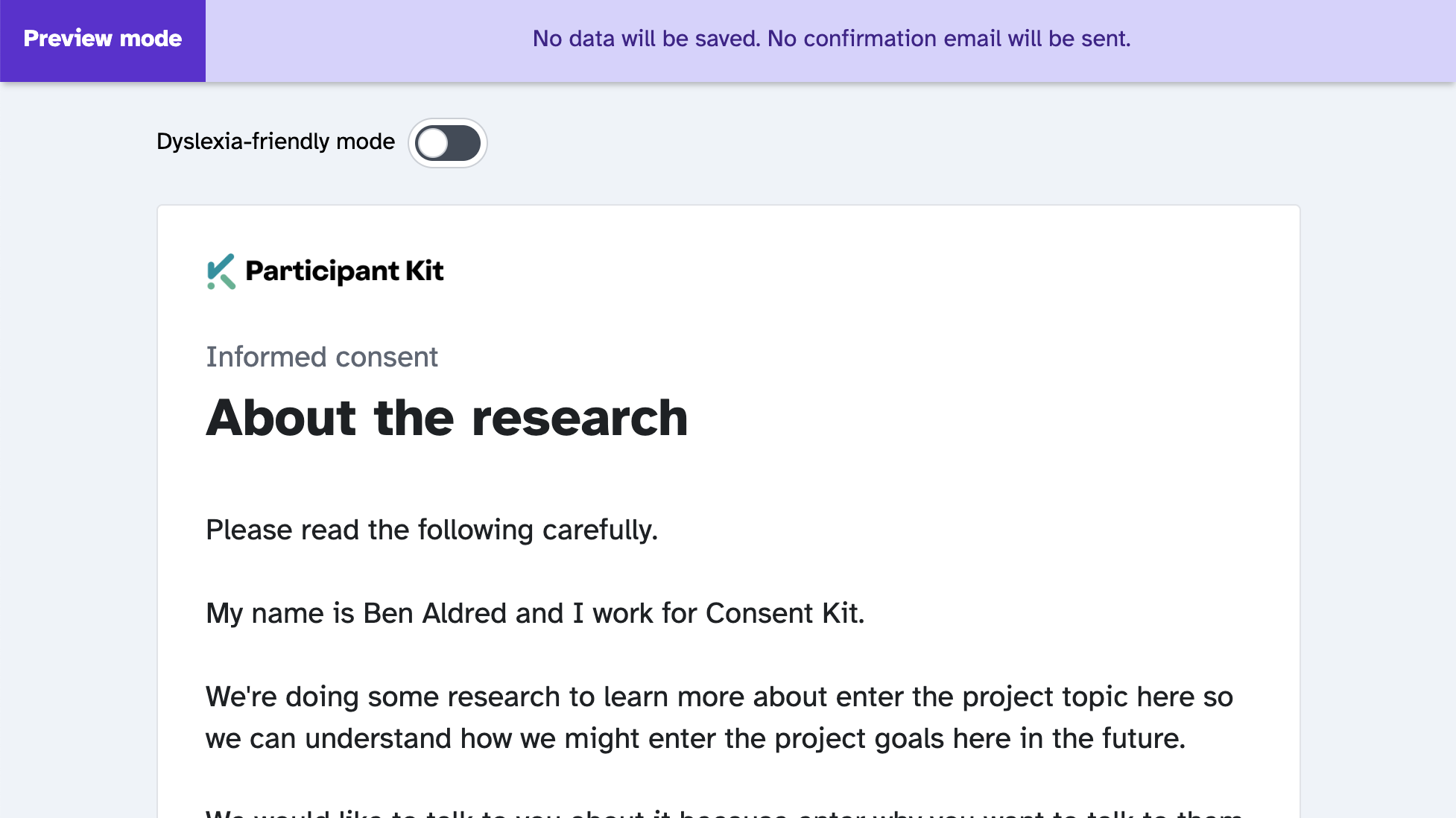
    <content type="html" xml:base="https://participantkit.com/updates/full-form-preview"><![CDATA[<p>Preview any form in full, exactly as participants will see it. Click through every page, test your branching logic, submit at the end. No data saved. No emails sent. No forms locked.</p>

<p>Single-page preview was already there, but testing the full flow meant sharing the real link. For consent forms and NDAs, that locked the form for editing once submitted. Now you don’t need the workaround.</p>

<p><img src="/assets/images/updates/preview-mode2x.png" alt="Full form preview mode" class="shadow border border-gray-200 rounded-sm" /></p>

<h2 id="share-previews-with-your-team">Share previews with your team</h2>

<p>Preview links aren’t just for you. Share them with colleagues who need to review a form, or stakeholders who want to give feedback before you go live. They can click through the full experience without affecting your real data.</p>

<p>No more sending out live links and hoping nobody submits.</p>

<h2 id="how-to-use-form-preview">How to use form preview</h2>

<ol>
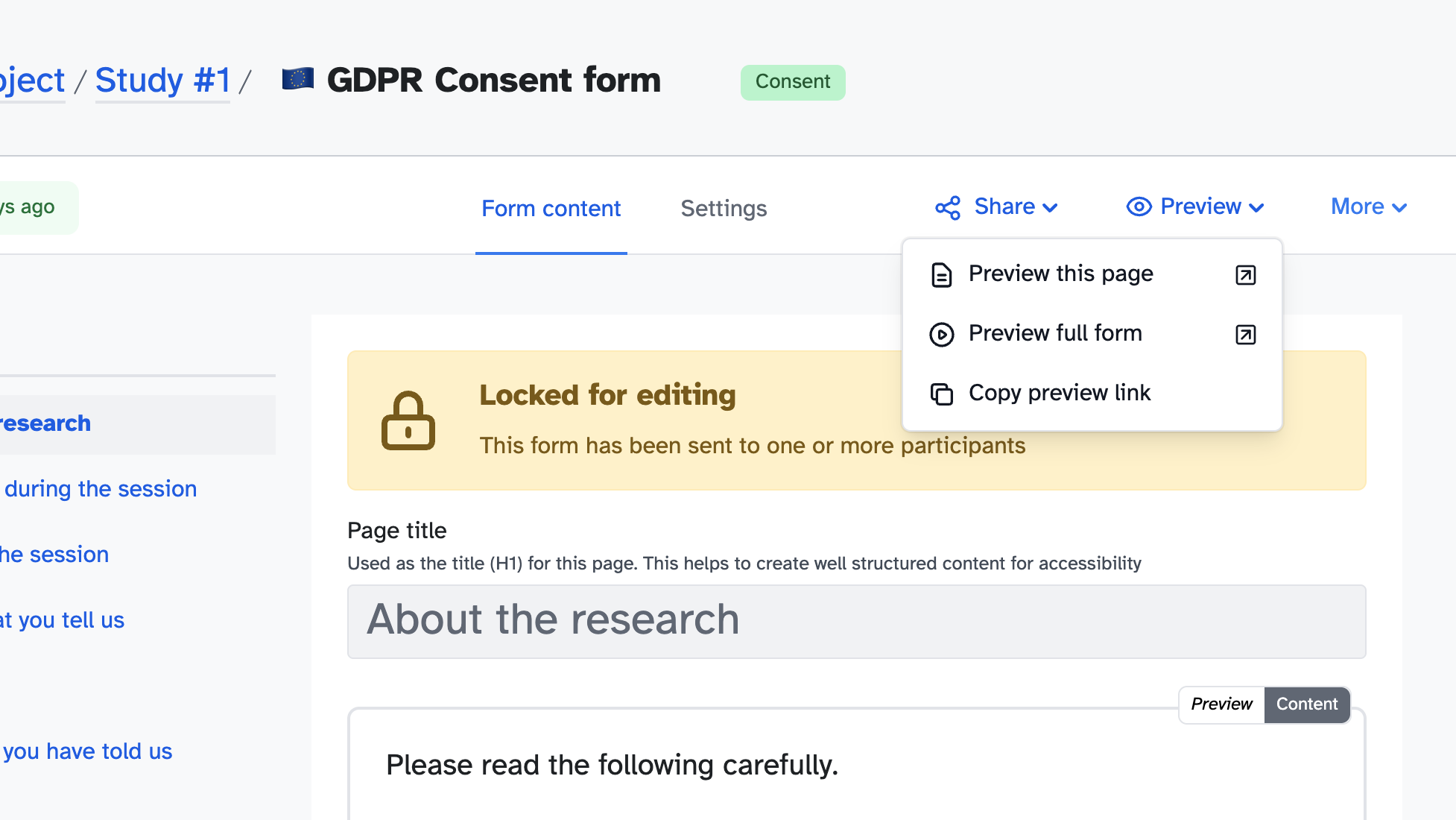
  <li>Open any form and click the <strong>Preview</strong> dropdown</li>
  <li>Select <strong>Preview full form</strong></li>
  <li>Click through as a participant would, then submit to complete the test</li>
</ol>

<p><img src="/assets/images/updates/preview-form-dropdown.png" alt="Where to find preview" class="shadow border border-gray-200 rounded-sm" /></p>

<p>The single-page preview is still there for when you’re working on individual pages.</p>
]]></content>
    <media:thumbnail xmlns:media="http://search.yahoo.com/mrss/" url="https://participantkit.com/assets/images/updates/preview-mode2x.png"/>
  </entry>
  <entry>
    <title type="html">Four form builder improvements you might have missed</title>
    <link href="https://participantkit.com/updates/form-builder-polish" rel="alternate" type="text/html" title="Four form builder improvements you might have missed"/>
    <link href="https://participantkit.com/updates/form-builder-polish.md" rel="alternate" type="text/markdown"/>
    <published>2026-02-03T00:00:00+00:00</published>
    <updated>2026-02-03T00:00:00+00:00</updated>
    <id>https://participantkit.com/updates/form-builder-polish</id>
    <category term="Improvement" />
    <summary type="html"><![CDATA[Move blocks up and down, add help text to questions, align options inline, and add "none of the above" to checkboxes.]]></summary>
    <content type="html" xml:base="https://participantkit.com/updates/form-builder-polish"><![CDATA[<p>A few form builder improvements that should have been there from the start.</p>

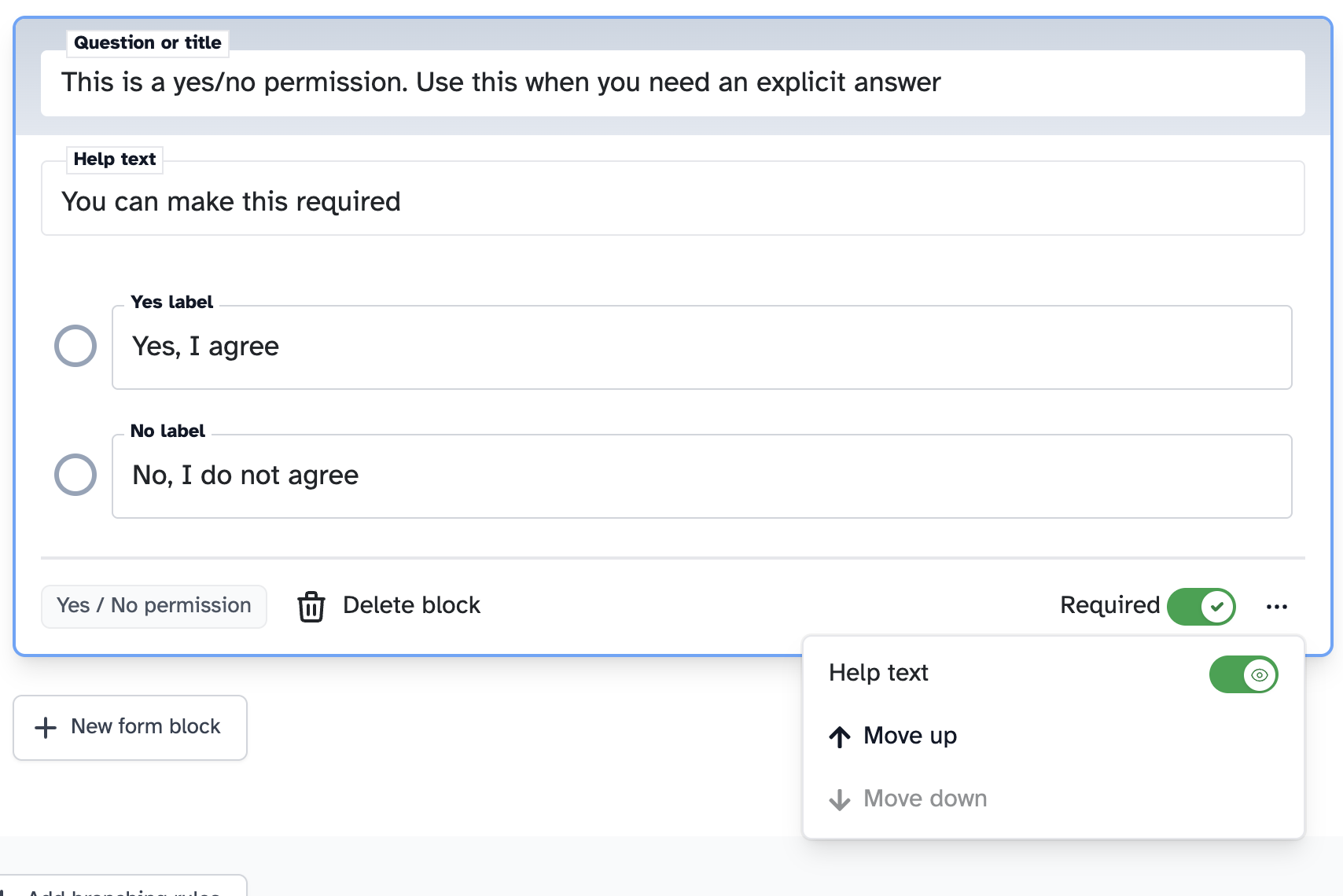
<p><img src="/assets/images/updates/help-text-on-opt-in.png" alt="Help text field on a yes/no permission question" class="shadow border border-gray-200 rounded-sm" /></p>

<h2 id="move-blocks-up-and-down">Move blocks up and down</h2>

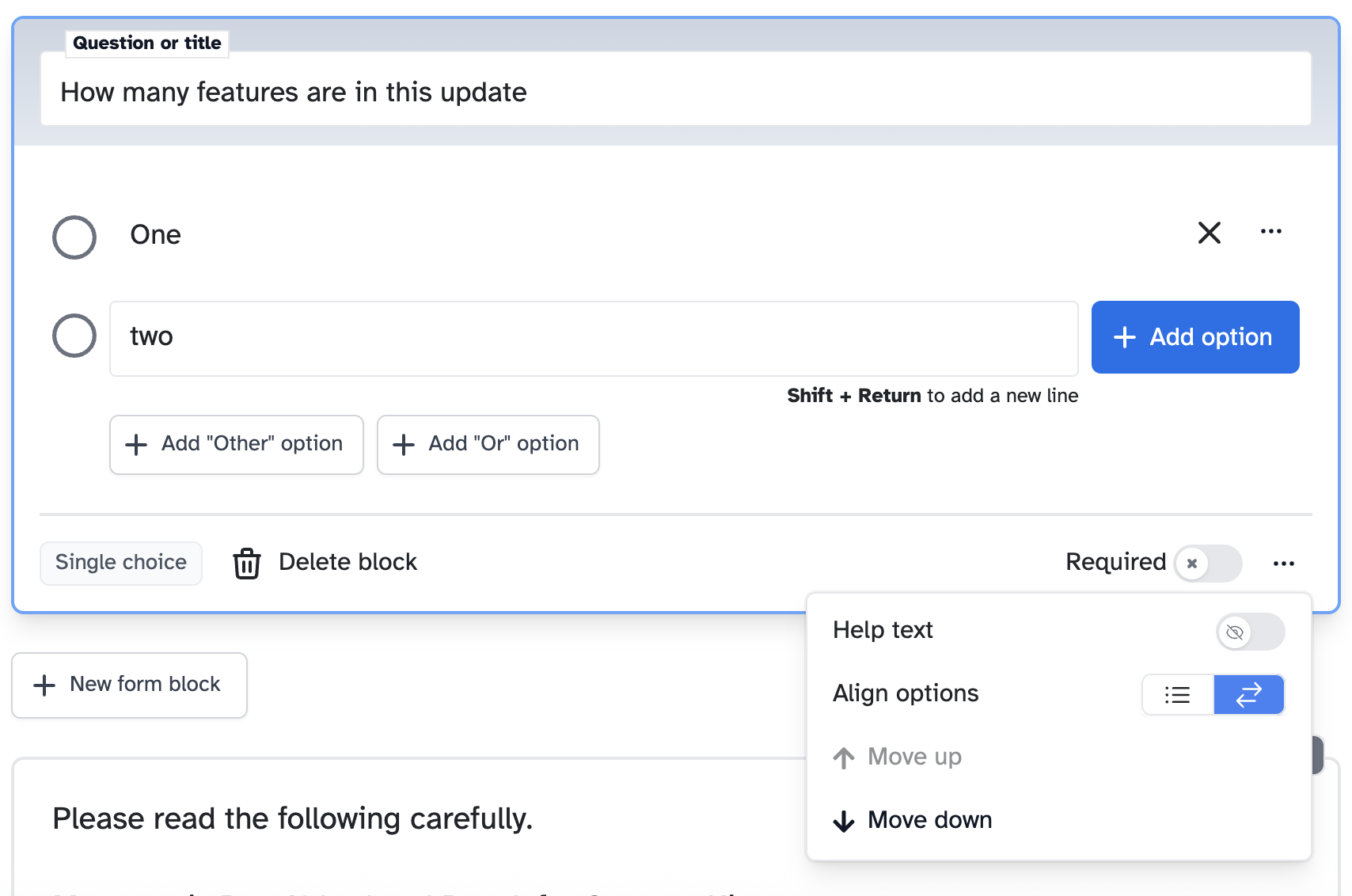
<p>Previously, reordering blocks meant deleting and recreating them. Now you can move blocks up or down from the block menu.</p>

<h2 id="help-text-on-questions">Help text on questions</h2>

<p>Add supporting text below any question to give participants extra context. Enable it from the block menu, then type your help text.</p>

<h2 id="align-options-inline">Align options inline</h2>

<p>Short options that don’t need a full line each? Switch from stacked to inline alignment in the block menu.</p>

<p><img src="/assets/images/updates/align-options.png" alt="Block menu showing align options, help text toggle, and move up/down" class="shadow border border-gray-200 rounded-sm" /></p>

<h2 id="other-and-none-options">“Other” and “None” options</h2>

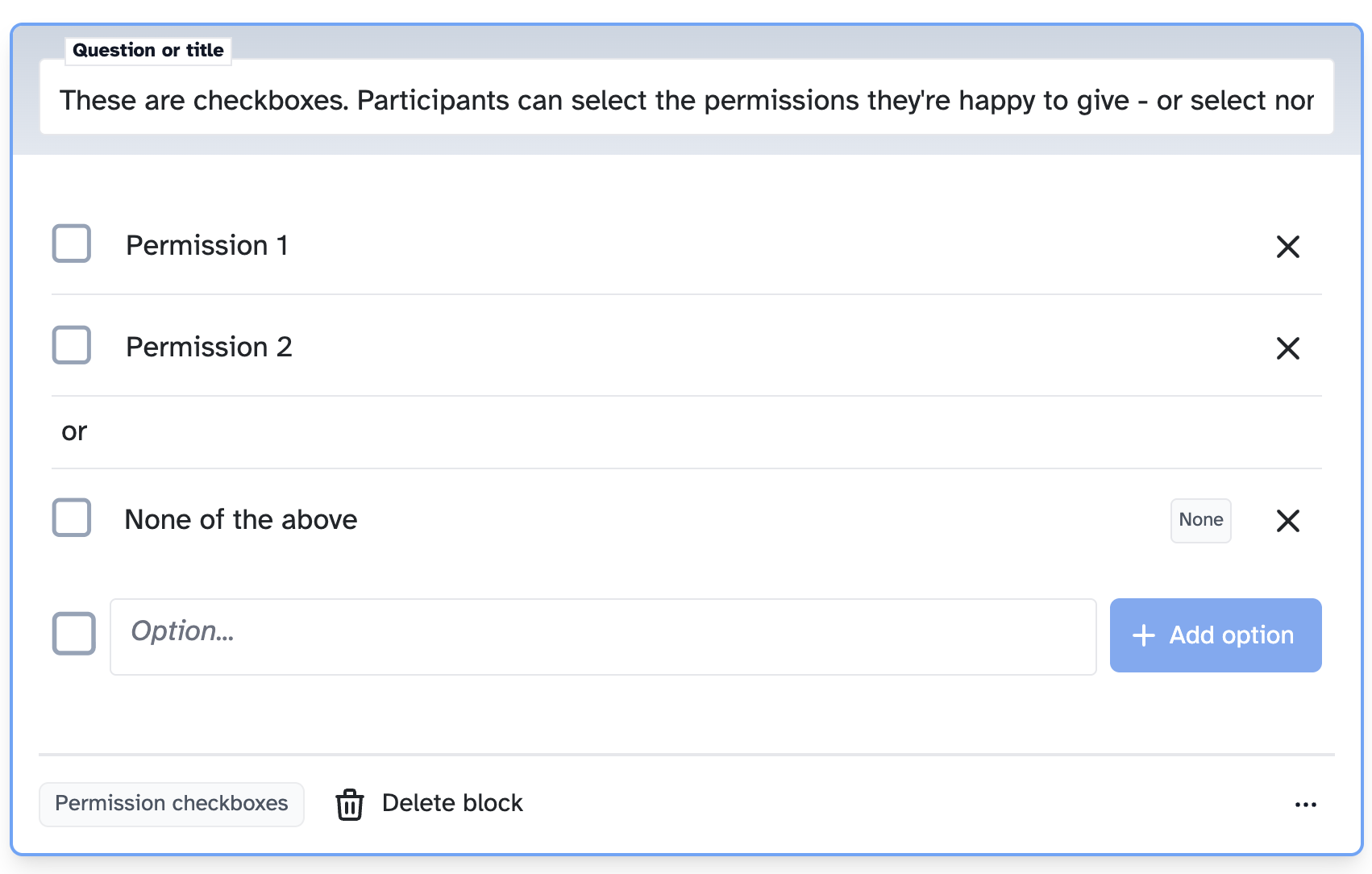
<p>Add an editable “Other” option or a “None of the above” to checkbox and radio questions. The “or” separator makes it clear these are distinct from the main options.</p>

<p><img src="/assets/images/updates/none-of-the-above.png" alt="Checkbox question with &quot;None of the above&quot; option" class="shadow border border-gray-200 rounded-sm" /></p>
]]></content>
    <media:thumbnail xmlns:media="http://search.yahoo.com/mrss/" url="https://participantkit.com/assets/images/updates/align-options.png"/>
  </entry>
  <entry>
    <title type="html">QR Code Sharing for Forms</title>
    <link href="https://participantkit.com/updates/qr-code-sharing-for-forms" rel="alternate" type="text/html" title="QR Code Sharing for Forms"/>
    <link href="https://participantkit.com/updates/qr-code-sharing-for-forms.md" rel="alternate" type="text/markdown"/>
    <published>2025-12-10T00:00:00+00:00</published>
    <updated>2025-12-10T00:00:00+00:00</updated>
    <id>https://participantkit.com/updates/qr-code-sharing-for-forms</id>
    <category term="New feature" />
    <summary type="html"><![CDATA[Generate QR codes for any form. Participants scan, land on the form, no typing required.]]></summary>
    <content type="html" xml:base="https://participantkit.com/updates/qr-code-sharing-for-forms"><![CDATA[<p>Generate a QR code for any form. Find it in the share dropdown, click, download. Done.</p>

<div class="relative">
  
  <div style="position: relative; padding-bottom: 60.67415730337079%; height: 0;" class="bg-slate-100 rounded-md">

    <div class="absolute top-1/2 left-1/2 -translate-x-1/2 -translate-y-1/2">Loading the video...</div>
    <iframe src="https://www.loom.com/embed/0707eb0e25f445838be5482077954c6c?hideEmbedTopBar=true" title="Video" allowfullscreen="" style="position: absolute; top: 0; left: 0; width: 100%; height: 100%; border: 0;">

    </iframe>
  </div>

  
  <a href="https://www.loom.com/share/0707eb0e25f445838be5482077954c6c" target="_blank">Watch video with transcript</a>
  
</div>

<h2 id="where-youll-use-it">Where you’ll use it</h2>

<ul>
  <li><strong>Conference talks</strong> — stick the code on your slides, let attendees sign up from their seats</li>
  <li><strong>Events and meetups</strong> — pop it on a poster, a banner, even a business card</li>
  <li><strong>Guerrilla research</strong> — have it ready on your phone or printed out for quick sign-ups</li>
  <li><strong>Office recruitment</strong> — put posters around the building for internal panel recruitment</li>
  <li><strong>In-person sessions</strong> — participant turned up without signing their consent form? Show the QR code, they sign on their phone, you start the session</li>
</ul>

<p>Anywhere you’d normally say “go to this URL”, you can now just show the code.</p>

<h2 id="why-it-matters">Why it matters</h2>

<p>Research shows participants are more comfortable filling in forms on their own device. They’re in their zone, on their phone, and completion rates go up. QR codes make this handoff seamless — no typing, no friction, straight to the form.</p>

<p>It’s a small thing. But small things matter when you’re running research.</p>

<h2 id="how-to-use-qr-code-sharing">How to use QR code sharing</h2>

<ol>
  <li>Open any form and click the <strong>Share</strong> dropdown</li>
  <li>Click <strong>QR Code</strong></li>
  <li>Download the image or display it directly</li>
</ol>
]]></content>
    <media:thumbnail xmlns:media="http://search.yahoo.com/mrss/" url="https://images.ctfassets.net/mi58xuyq2cki/5I04K6meYmOUgYD4lAqc7f/ff1af960174cae9865ea8e3e38578e9e/Share-qr-code.png"/>
  </entry>
  <entry>
    <title type="html">Run research in 38 languages</title>
    <link href="https://participantkit.com/updates/run-research-in-38-languages" rel="alternate" type="text/html" title="Run research in 38 languages"/>
    <link href="https://participantkit.com/updates/run-research-in-38-languages.md" rel="alternate" type="text/markdown"/>
    <published>2025-09-17T00:00:00+00:00</published>
    <updated>2025-09-17T00:00:00+00:00</updated>
    <id>https://participantkit.com/updates/run-research-in-38-languages</id>
    <category term="Improvement" />
    <summary type="html"><![CDATA[Forms are now fully localised in 38 languages - from Arabic to Welsh.]]></summary>
    <content type="html" xml:base="https://participantkit.com/updates/run-research-in-38-languages"><![CDATA[<p>That multi-market study just got easier. Forms are now fully localised in 38 languages - from Arabic to Welsh.</p>

<p>When you select a language, all system text appears in that language: error messages, confirmation emails, button labels, and form navigation. Your custom content stays as you wrote it, while everything Participant Kit controls is properly localised for your participants.</p>

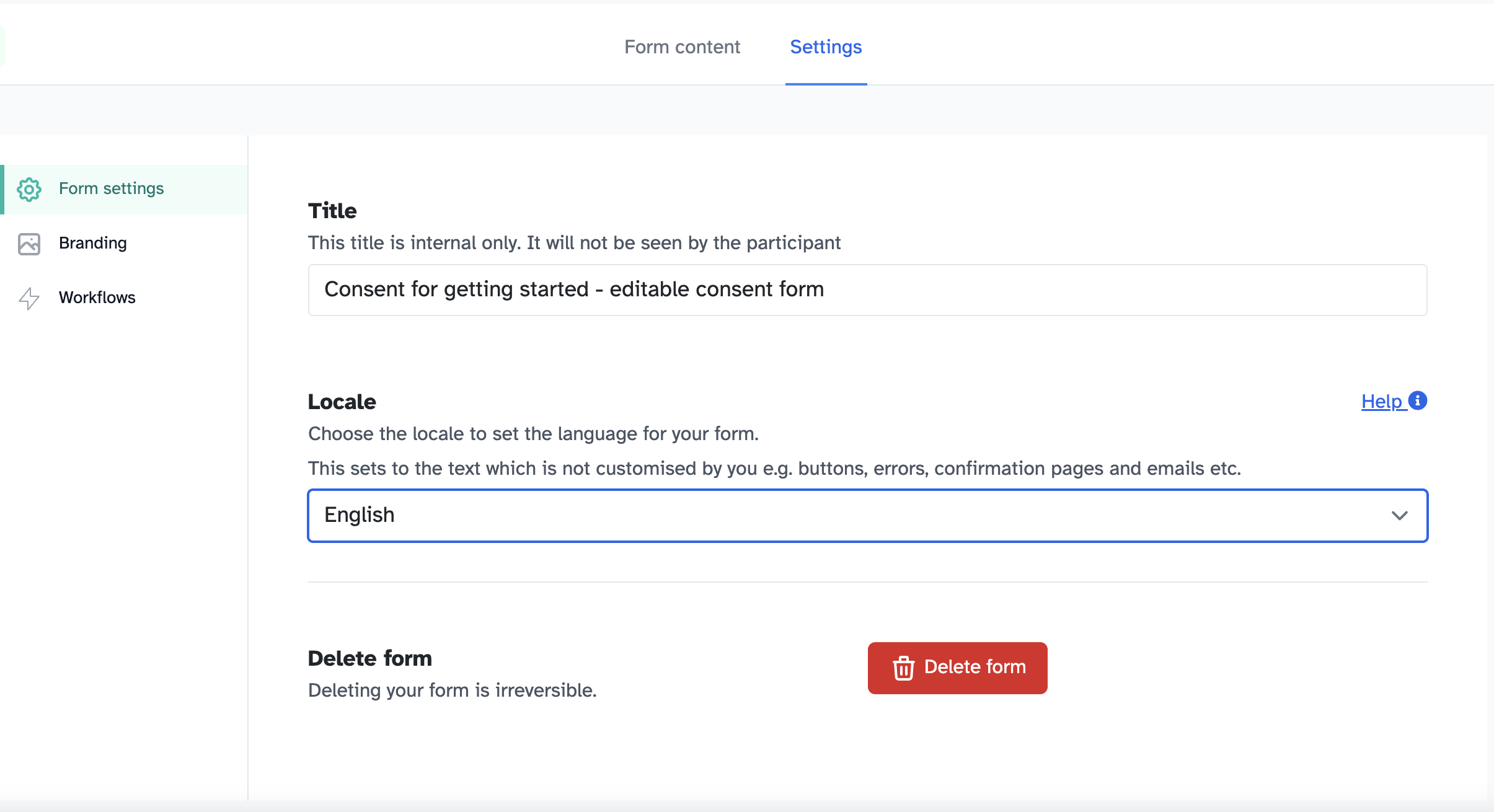
<p><strong>How it works:</strong> Go into your form, click Settings, then select your language from the dropdown. The entire participant experience switches to that language, including dates, times, and all system messages.</p>

<p><img src="https://images.ctfassets.net/mi58xuyq2cki/pFH5wkM7dUEe9FZEWTfnX/91c9ea52deff1c00af0148e6918c0809/Screenshot_2025-09-17_at_09.31.41.png" alt="Screenshot showing language selection in the form builder" class="shadow border border-gray-200 rounded-sm" /></p>

<p><strong>Key benefits:</strong></p>

<ul>
  <li>Better response rates from non-English speakers</li>
  <li>Properly localised research across European markets</li>
  <li>Support for UK diversity (Urdu, Bengali, Polish)</li>
  <li>Right-to-left language support for Arabic and Hebrew</li>
</ul>

<p>Perfect for multi-market research, Welsh Government bilingual requirements, or simply making your research more inclusive. (A researcher at a global company even reviewed our Swedish translation to make sure we got it right.)</p>

<p>Missing a language you need? Get in touch - we’re always adding more, and we’d love your help getting the translations spot on.</p>

]]></content>
    <media:thumbnail xmlns:media="http://search.yahoo.com/mrss/" url="https://images.ctfassets.net/mi58xuyq2cki/pFH5wkM7dUEe9FZEWTfnX/91c9ea52deff1c00af0148e6918c0809/Screenshot_2025-09-17_at_09.31.41.png"/>
  </entry>
  <entry>
    <title type="html">See who has 2FA enabled (and who doesn&apos;t)</title>
    <link href="https://participantkit.com/updates/see-who-has-2fa-enabled-and-who-doesnt" rel="alternate" type="text/html" title="See who has 2FA enabled (and who doesn&apos;t)"/>
    <link href="https://participantkit.com/updates/see-who-has-2fa-enabled-and-who-doesnt.md" rel="alternate" type="text/markdown"/>
    <published>2025-06-30T00:00:00+00:00</published>
    <updated>2025-06-30T00:00:00+00:00</updated>
    <id>https://participantkit.com/updates/see-who-has-2fa-enabled-and-who-doesnt</id>
    <category term="New feature" />
    <summary type="html"><![CDATA[See at a glance which team members have 2FA turned on (and gently nudge the ones who haven't).]]></summary>
    <content type="html" xml:base="https://participantkit.com/updates/see-who-has-2fa-enabled-and-who-doesnt"><![CDATA[<p>You know that moment when you’re trying to tick boxes for SOC 2, Cyber Essentials, or your annual security review… and you have absolutely no idea who actually has two-factor authentication enabled?</p>

<p><img src="https://images.ctfassets.net/mi58xuyq2cki/1ukXTHa0evxbHBkn0NhIC3/04c23a8e24b4b085b958da80703cb768/2FA.png" alt="Screenshot showing no 2FA enabled" class="shadow border border-gray-200 rounded-sm" /></p>

<p>Now you can see at a glance which team members have 2FA turned on (and gently nudge the ones who haven’t).</p>

<p>Head to manage team to see everyone’s 2FA status in one place. No more hoping everyone followed that setup email or wondering who’s actually secured their account.</p>

<p>One of our customers was going through Cyber Essentials. They needed to prove that 2FA was enabled, and they can just screenshot the page and all sorted!</p>

]]></content>
    <media:thumbnail xmlns:media="http://search.yahoo.com/mrss/" url="https://images.ctfassets.net/mi58xuyq2cki/1ukXTHa0evxbHBkn0NhIC3/04c23a8e24b4b085b958da80703cb768/2FA.png"/>
  </entry>
  <entry>
    <title type="html">Incentive tracking - Keep track of who you&apos;ve paid (and when)</title>
    <link href="https://participantkit.com/updates/incentive-tracking-keep-track-of-whove-been-paid-and-when" rel="alternate" type="text/html" title="Incentive tracking - Keep track of who you&apos;ve paid (and when)"/>
    <link href="https://participantkit.com/updates/incentive-tracking-keep-track-of-whove-been-paid-and-when.md" rel="alternate" type="text/markdown"/>
    <published>2025-06-30T00:00:00+00:00</published>
    <updated>2025-06-30T00:00:00+00:00</updated>
    <id>https://participantkit.com/updates/incentive-tracking-keep-track-of-whove-been-paid-and-when</id>
    <category term="New feature" />
    <summary type="html"><![CDATA[Not everyone needs a complex integration with Tremendous. Sometimes you just need simple tracking - amount, currency, date paid. Done.]]></summary>
    <content type="html" xml:base="https://participantkit.com/updates/incentive-tracking-keep-track-of-whove-been-paid-and-when"><![CDATA[<p>Anyone else constantly juggling separate spreadsheets to track who you’ve paid research incentives to? Or desperately trying to remember if you already sent Dave his £25 voucher?</p>

<p>Not everyone needs a fancy integration with Tremendous or other payment platforms. Sometimes you need a simple way to track who you’ve paid and when, without the complexity.</p>

<p><img src="https://images.ctfassets.net/mi58xuyq2cki/2eAzLzo1tUEJWnygADYyZ4/8aa572ed37f17207f535fe909904b70f/Screenshot_2025-06-30_at_12.37.45.png" alt="Screenshot of incentive tracking within participant dashboard" class="shadow border border-gray-200 rounded-sm" /></p>

<p>Now you can record incentives directly in your study dashboard. Simply add the amount, currency, and date paid directly in the participants tab - no more juggling separate lists or relying on your memory.</p>

<p><img src="https://images.ctfassets.net/mi58xuyq2cki/4AD2rAn2c3WOwk4ZLamIXv/c4ebb683ddc1e86493eefad09627e1d0/Screenshot_2025-06-30_at_12.38.06.png" alt="Screenshot of model open allowing tracking of inventives" class="shadow border border-gray-200 rounded-sm" /></p>

<p>Every incentive gets automatically logged in the participant’s activity feed, so you’ve got a proper audit trail without any extra effort.</p>

<p>This is part one of our incentive features - reporting and spend tracking across studies is coming next, but even now it solves the immediate “wait, did I pay them already?” problem.</p>

<p><strong>How to use it:</strong></p>

<ul>
  <li>Go to your study dashboard and click the Participants tab</li>
  <li>Find the “Incentivised on” column in your participants table</li>
  <li>Click “Not set” for any participant you’ve paid</li>
  <li>Enter the amount, currency, and date paid</li>
  <li>The payment will automatically appear in their activity feed</li>
  <li>You can edit it and delete it if you need to</li>
</ul>

]]></content>
    <media:thumbnail xmlns:media="http://search.yahoo.com/mrss/" url="https://images.ctfassets.net/mi58xuyq2cki/4lCpNtS8qhuZAquPy9HcKD/407c12ff843c580d306068c4f396ca8b/Simple_incentive_-_3__1_.png"/>
  </entry>
  <entry>
    <title type="html">Automated Scheduling with Calendly</title>
    <link href="https://participantkit.com/updates/automated-scheduling-with-calendly" rel="alternate" type="text/html" title="Automated Scheduling with Calendly"/>
    <link href="https://participantkit.com/updates/automated-scheduling-with-calendly.md" rel="alternate" type="text/markdown"/>
    <published>2024-10-16T00:00:00+00:00</published>
    <updated>2024-10-16T00:00:00+00:00</updated>
    <id>https://participantkit.com/updates/automated-scheduling-with-calendly</id>
    <category term="Improvement" />
    <summary type="html"><![CDATA[Updated Calendly integration. Automates scheduling post-form signing. Reduces back-and-forth and keep your dashboard updated in real time]]></summary>
    <content type="html" xml:base="https://participantkit.com/updates/automated-scheduling-with-calendly"><![CDATA[<p>This is an existing feature that we have improved. We’ve updated our integration with Calendly. It’s designed to streamline the scheduling process for participants and enhance overall efficiency after form submissions.</p>

<ul>
  <li><strong>Time-saving</strong> - Eliminate manual scheduling steps after form completion</li>
  <li><strong>Improved participant experience</strong> - Provide a smooth transition from form signing to appointment booking</li>
  <li><strong>Flexibility</strong> - Choose between on-page booking or redirect options to suit your workflow</li>
  <li><strong>Reduced back-and-forth</strong> - Say goodbye to lengthy email exchanges for scheduling</li>
  <li><strong>Automatic dashboard updates</strong> - Your dashboard is instantly updated when a session is booked, rescheduled, or cancelled</li>
</ul>

<h2 id="how-it-works">How it works</h2>

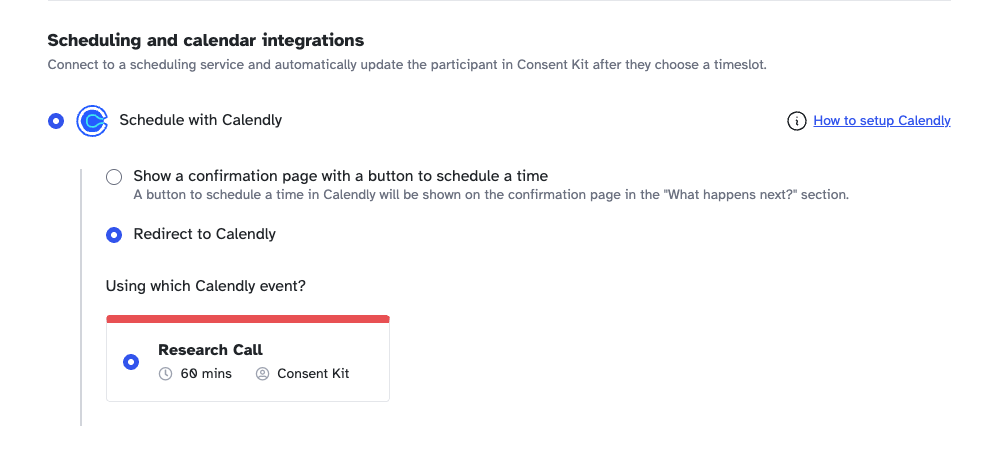
<p><img src="https://images.ctfassets.net/mi58xuyq2cki/VgVpWfw1aBEabgiStKLs5/d7d346eb171d67f39c5aced92d6ba810/Screenshot_2024-10-16_at_09.19.17.png" alt="Setting up Calendly in a form" class="shadow border border-gray-200 rounded-sm" /></p>

<ol>
  <li>
    <p>After signing a form, participants can immediately book a session using either:</p>

    <p><strong>Redirect option</strong> - participants can be redirected to a Calendly booking page</p>

    <p><strong>Book Session Button</strong> - A “Book Session” button will appear on the confirmation page. So you can show a confirmation with a clear next action.</p>
  </li>
  <li>
    <p>The booking is automatically synchronised with your Participant Kit dashboard.</p>
  </li>
  <li>
    <p>Any changes (reschedules or cancellations) are reflected in real-time.</p>
  </li>
</ol>

<h2 id="how-to-enable">How to enable</h2>

<p>Follow the <a href="/help/calendly-integration">steps on the help guide</a>.</p>

<p>Using this will significantly improve efficiency for both you and your participants. As always, we welcome your feedback and suggestions for further enhancements.</p>

<p>Happy scheduling!</p>

]]></content>
    <media:thumbnail xmlns:media="http://search.yahoo.com/mrss/" url="https://images.ctfassets.net/mi58xuyq2cki/VgVpWfw1aBEabgiStKLs5/d7d346eb171d67f39c5aced92d6ba810/Screenshot_2024-10-16_at_09.19.17.png"/>
  </entry>
  <entry>
    <title type="html">Build your own panel with Participant Kit</title>
    <link href="https://participantkit.com/updates/build-your-own-panel-with-participant-kit" rel="alternate" type="text/html" title="Build your own panel with Participant Kit"/>
    <link href="https://participantkit.com/updates/build-your-own-panel-with-participant-kit.md" rel="alternate" type="text/markdown"/>
    <published>2024-07-25T00:00:00+00:00</published>
    <updated>2024-07-25T00:00:00+00:00</updated>
    <id>https://participantkit.com/updates/build-your-own-panel-with-participant-kit</id>
    <category term="New feature" />
    <summary type="html"><![CDATA[Build your own panel. Create a list of hard to source participants, ditch that recruitment spreadsheet. Reduce external recruitment costs.]]></summary>
    <content type="html" xml:base="https://participantkit.com/updates/build-your-own-panel-with-participant-kit"><![CDATA[<p>We’re very proud to share with you a new feature we’ve been working on for a long time: <strong>Panels</strong>. Manage and build your own panels within Participant Kit.</p>

<div style="position: relative; padding-bottom: 56.25%; height: 0; overflow: hidden; max-width: 100%;">
  <iframe src="https://www.loom.com/embed/7764a277c18c4343bde77d8eec53481e?sid=06f85f13-5b71-458f-8b66-a7d4a1a031ac" title="Build your own panel with Participant Kit" allowfullscreen="" style="position: absolute; top: 0; left: 0; width: 100%; height: 100%; border: 0;"></iframe>
</div>

<p>We recently worked with a major UK government department who switched from Airtable to Participant Kit for panel management. This change addressed their need for a more controlled, compliant system to handle sensitive data. It allows them to recruit panellists then invite them to do research all in one place.</p>

<p>Don’t use Airtable? Don’t worry, we don’t discriminate. We can also replace Google Sheets, Excel or survey tools less suited to building a panel like Qualtrics and Survey Monkey.</p>

<h2 id="so-why-use-panels">So, why use Panels?</h2>

<ul>
  <li><strong>Build your own panel</strong>: Deploy fully accessible forms that add respondents to your panel. Prevent duplicates and spammers from messing up your data.</li>
  <li><strong>Know your candidates from your can’t-didates</strong>: Screen and segment to find the right people for research before you add them to your project.</li>
  <li><strong>Built specifically for User Research and to scale</strong>: Not a tool you’ve bent, patched and DIYed to your needs.</li>
  <li><strong>Reduce costs</strong> - Bring recruiting in-house stop spending precious budget on buying from external panel providers.</li>
</ul>

<p>Explore Panels by logging into your account and <a href="https://app.participantkit.com/panel">heading to Panel</a> to get started or <a href="/book-demo?ref=whats-new">contact us</a> to book a demo.</p>

]]></content>
    <media:thumbnail xmlns:media="http://search.yahoo.com/mrss/" url="https://images.ctfassets.net/mi58xuyq2cki/4MzgUtIPVlC0MUCGmU4sGb/62ec7c76818cc45d951fd5b7612b377d/7764a277c18c4343bde77d8eec53481e-with-play.gif"/>
  </entry>
  <entry>
    <title type="html">Enhanced form management. Close forms with a click!</title>
    <link href="https://participantkit.com/updates/enhanced-form-management-close-forms-with-a-click" rel="alternate" type="text/html" title="Enhanced form management. Close forms with a click!"/>
    <link href="https://participantkit.com/updates/enhanced-form-management-close-forms-with-a-click.md" rel="alternate" type="text/markdown"/>
    <published>2024-05-08T00:00:00+00:00</published>
    <updated>2024-05-08T00:00:00+00:00</updated>
    <id>https://participantkit.com/updates/enhanced-form-management-close-forms-with-a-click</id>
    <category term="New feature" />
    <summary type="html"><![CDATA[You can you share your forms via a link to gather consent, agreements and data. Then close them once you've gathered enough responses.]]></summary>
    <content type="html" xml:base="https://participantkit.com/updates/enhanced-form-management-close-forms-with-a-click"><![CDATA[<p>We’ve introduced a new feature that enhances the flexibility and control you have over your forms.</p>

<p>Now, not only can you share your forms via a link, making it super easy to gather consent, agreements and data from anywhere, but you can also close these forms once you’ve gathered enough responses.</p>

<p>This is especially useful for managing response volumes and concluding data collection at the right time, maybe you’ve recruited enough people into your study.</p>

<p>All manageable with just a single click within the forms settings area. You can even set a title and message to customise how the form looks when closed.</p>

<p><img src="https://images.ctfassets.net/mi58xuyq2cki/RfGfAZhzqSmjyYnbgqcqI/113fee02559a5d2e983d126a343d80d4/Screenshot_2024-05-08_at_13.26.47.png" alt="Screenshot of access setting on form" class="shadow border border-gray-200 rounded-sm" /></p>

<p>If you’re already sharing forms via links, this added feature will help streamline your workflow even further.</p>

]]></content>
    <media:thumbnail xmlns:media="http://search.yahoo.com/mrss/" url="https://images.ctfassets.net/mi58xuyq2cki/7GK0Um2mjSajmBChCsQ4Go/64b2d90a965377ef3566626a4015c7b3/Screenshot_2024-03-21_at_11.44.27.png"/>
  </entry>
  <entry>
    <title type="html">Beyond consent. Add NDAs and other agreements</title>
    <link href="https://participantkit.com/updates/beyond-consent-add-ndas-and-other-agreements" rel="alternate" type="text/html" title="Beyond consent. Add NDAs and other agreements"/>
    <link href="https://participantkit.com/updates/beyond-consent-add-ndas-and-other-agreements.md" rel="alternate" type="text/markdown"/>
    <published>2024-03-21T00:00:00+00:00</published>
    <updated>2024-03-21T00:00:00+00:00</updated>
    <id>https://participantkit.com/updates/beyond-consent-add-ndas-and-other-agreements</id>
    <category term="New feature" />
    <summary type="html"><![CDATA[Manage and send NDAs and other agreements with the same ease and efficiency as consents. Keep all your research agreements in one place.]]></summary>
    <content type="html" xml:base="https://participantkit.com/updates/beyond-consent-add-ndas-and-other-agreements"><![CDATA[<p>Our mission is to streamline your research processes, making them as efficient and hassle-free as possible.</p>

<p>Create, send, and manage NDAs and other agreements with the same ease and efficiency as consents.</p>

<p><img src="https://images.ctfassets.net/mi58xuyq2cki/RfGfAZhzqSmjyYnbgqcqI/113fee02559a5d2e983d126a343d80d4/Screenshot_2024-05-08_at_13.26.47.png" alt="Screenshot of access setting on form" class="shadow border border-gray-200 rounded-sm" /></p>

<p><strong>All in one place compliance</strong>. Keep all your research agreements in one place and see at a glance who has signed the agreements on the project dashboard.</p>

<p><img src="https://images.ctfassets.net/mi58xuyq2cki/4QZO7MxcEG4WiKXMbysYYv/5870d650f3b9dfc5807be0f6d9be56d3/Screenshot_2024-03-21_at_11.59.45.png" alt="Screenshot of dashboard with agreements column" class="shadow border border-gray-200 rounded-sm" /></p>

]]></content>
    <media:thumbnail xmlns:media="http://search.yahoo.com/mrss/" url="https://images.ctfassets.net/mi58xuyq2cki/7GK0Um2mjSajmBChCsQ4Go/64b2d90a965377ef3566626a4015c7b3/Screenshot_2024-03-21_at_11.44.27.png"/>
  </entry>
  <entry>
    <title type="html">Support for other languages for more inclusive research</title>
    <link href="https://participantkit.com/updates/support-for-other-languages-for-more-inclusive-research" rel="alternate" type="text/html" title="Support for other languages for more inclusive research"/>
    <link href="https://participantkit.com/updates/support-for-other-languages-for-more-inclusive-research.md" rel="alternate" type="text/markdown"/>
    <published>2023-08-12T00:00:00+00:00</published>
    <updated>2023-08-12T00:00:00+00:00</updated>
    <id>https://participantkit.com/updates/support-for-other-languages-for-more-inclusive-research</id>
    <category term="New feature" />
    <summary type="html"><![CDATA[We have added support for languages other than English so you can do inclusive research in your participant's native language.]]></summary>
    <content type="html" xml:base="https://participantkit.com/updates/support-for-other-languages-for-more-inclusive-research"><![CDATA[<p>We have added support for languages other than English.</p>

<p><img src="https://images.ctfassets.net/mi58xuyq2cki/4lMMiCsl2C139BW11KZnI5/bcd70426285be24825c1d9b5cd2e548f/Screenshot_2023-08-12_at_15.38.33.png" alt="Screenshot of setting the language for a form" class="shadow border border-gray-200 rounded-sm" /></p>

<p>When you change the language on a form, Participant Kit will use the locale to set the language for all the fixed text that is not customised by you.</p>

<p>This includes the following:</p>

<ul>
  <li>Any confirmation emails that are sent to participants</li>
  <li>Form buttons, error messages, form labels, form hints and other fixed text</li>
  <li>It will also localise dates and times</li>
</ul>

<h2 id="more-inclusive-research">More inclusive research</h2>

<p>We now support Spanish, French, Dutch and Arabic (with BETA support for right-to-left (RLT) languages).</p>

<p>We plan to add more languages in the near future so you can conduct research in the native language of your participants.</p>

<h2 id="are-we-missing-a-language-you-need">Are we missing a language you need?</h2>

<p>If you are thinking about doing research in a particular language and need it added get in touch.</p>

]]></content>
    <media:thumbnail xmlns:media="http://search.yahoo.com/mrss/" url="https://images.ctfassets.net/mi58xuyq2cki/4lMMiCsl2C139BW11KZnI5/bcd70426285be24825c1d9b5cd2e548f/Screenshot_2023-08-12_at_15.38.33.png"/>
  </entry>
  <entry>
    <title type="html">New form builder</title>
    <link href="https://participantkit.com/updates/new-form-builder" rel="alternate" type="text/html" title="New form builder"/>
    <link href="https://participantkit.com/updates/new-form-builder.md" rel="alternate" type="text/markdown"/>
    <published>2022-09-06T00:00:00+00:00</published>
    <updated>2022-09-06T00:00:00+00:00</updated>
    <id>https://participantkit.com/updates/new-form-builder</id>
    <category term="Improvement" />
    <content type="html" xml:base="https://participantkit.com/updates/new-form-builder"><![CDATA[<p>We have been hard at work rebuilding the form builder from the ground up.</p>

<p><img src="https://images.ctfassets.net/mi58xuyq2cki/i3uVpOhyZYudwM7g0Ghpc/9f44987bd66c952670a1be82fd807a00/2022-09-06-form-builder-v2.png" alt="Screenshot of the new form builder interface" class="shadow border border-gray-200 rounded-sm" /></p>

<p>We have big plans for many improvements within Participant Kit. The form builder is a core part of the product and was becoming a big blocker to some of the things that we wanted to add. So it was time for a major update.</p>

<p>It now has a new design which is easier to use and cleaner. The underlying technology has been completely rewritten.</p>

<p>In the coming months, we will be adding lots of extra things into the form builder to make your lives easier.</p>

<!-- more -->

<h2 id="next-up">Next Up?</h2>

<ul>
  <li>Extra question types to enrich your participant’s data</li>
  <li>Different types of forms - NDAs and other Agreements (already in Alpha and being used by a few of our customers)</li>
  <li>Form specific workflows and automations</li>
  <li>More advanced form builder features like branching and skip logic</li>
</ul>

<h2 id="help-decide-our-roadmap">Help decide our roadmap?</h2>

<p>Our product roadmap is almost 100% created by and prioritised from customer feedback.</p>

<p>If you have any ideas, or suggestions or want us to prioritise something, please let us know. We can’t guarantee it’ll be part of our software, but we promise to consider and talk it through internally.</p>

<p>We have setup a special email address that goes <a href="mailto:founders@participantkit.com">direct to the founders</a>.</p>

]]></content>
    <media:thumbnail xmlns:media="http://search.yahoo.com/mrss/" url="/assets/images/opengraph/default.png"/>
  </entry>
  <entry>
    <title type="html">More insight into email deliverability when sending to participants 👀</title>
    <link href="https://participantkit.com/updates/more-insight-into-email-deliverability-when-sending-to-participants" rel="alternate" type="text/html" title="More insight into email deliverability when sending to participants 👀"/>
    <link href="https://participantkit.com/updates/more-insight-into-email-deliverability-when-sending-to-participants.md" rel="alternate" type="text/markdown"/>
    <published>2022-07-19T00:00:00+00:00</published>
    <updated>2022-07-19T00:00:00+00:00</updated>
    <id>https://participantkit.com/updates/more-insight-into-email-deliverability-when-sending-to-participants</id>
    <category term="New feature" />
    <content type="html" xml:base="https://participantkit.com/updates/more-insight-into-email-deliverability-when-sending-to-participants"><![CDATA[<p>Email delivery is both an art and a science. We try to do as much as possible behind the scenes to make sure your emails hit the inbox.</p>

<p>We have written a few guides about this in our help centre. The best one to start with (if you are interested) is the <a href="/help/email-deliverability">Email Delivery Guide</a>.</p>

<p>Along with the guides, we have added deliverability activities to the participant’s activity feed.</p>

<p>They are pretty small changes but can really help give a better insight into how your emails are being sent.</p>

<p><img src="https://images.ctfassets.net/mi58xuyq2cki/1y4bbQozSqJ9Yb13C1YkN9/fb3a5166603f0a3831f62dda1a14af10/2022-07-19-feed-updates.png" alt="Screenshot of the new features on the participant's activity feed" class="shadow border border-gray-200 rounded-sm" /></p>

<h2 id="see-when-a-participant-has-viewed-a-form">See when a participant has viewed a form</h2>

<p>If a link within an email is clicked and the form viewed we now show this activity in the activity feed.</p>

<p>Sometimes it’s useful to know if a participant has viewed a form. Especially when the participant has problems with their email or opening the form.</p>

<h2 id="more-information-when-an-email-has-not-reached-the-participant-bounced">More information when an email has not reached the participant (bounced)</h2>

<p>Assuming the email address has no typos, bounces are a rare occurrence. But if they happen then you need to know about it.</p>

<p>We now surface the bounce on the activity feed in with more detail and flag the issue in the dashboard.</p>

]]></content>
    <media:thumbnail xmlns:media="http://search.yahoo.com/mrss/" url="/assets/images/opengraph/default.png"/>
  </entry>
  <entry>
    <title type="html">Email contents on a participant&apos;s activity feed ✉️</title>
    <link href="https://participantkit.com/updates/email-contents-on-a-participants-activity-feed" rel="alternate" type="text/html" title="Email contents on a participant&apos;s activity feed ✉️"/>
    <link href="https://participantkit.com/updates/email-contents-on-a-participants-activity-feed.md" rel="alternate" type="text/markdown"/>
    <published>2021-07-15T00:00:00+00:00</published>
    <updated>2021-07-15T00:00:00+00:00</updated>
    <id>https://participantkit.com/updates/email-contents-on-a-participants-activity-feed</id>
    <category term="New feature" />
    <content type="html" xml:base="https://participantkit.com/updates/email-contents-on-a-participants-activity-feed"><![CDATA[<p>Behind the scenes Participant Kit builds an audit trail of evidence for lawful consent.</p>

<p>To comply with data protection laws like GDPR, CCPA, etc.. we need to record it correctly.The ICO states that when recording consent:</p>

<blockquote>
  <p>We keep a record of exactly what they were told at the time</p>
</blockquote>

<p>This includes how consent is asked for via an email.</p>

<p>Participant Kit automates this for you. We capture the contents of emails that are sent asking for consent. Further building up the data in the audit trail.</p>

<p>This is important. The audit trail can be used to show that consent was given freely inline with data protection laws.</p>

<p>Apart from compliance, it is useful to know what has been communicated to a participant. So we have exposed this information on the participant’s activity feed.</p>

<p><img src="https://images.ctfassets.net/mi58xuyq2cki/Lh2gxF7LTVuUtvfNPdO7g/521b95a261e8708404d7f1b42764e533/email-content-in-activity.png" alt="Screenshot of the captured email in the activity feed" class="shadow border border-gray-200 rounded-sm" /></p>

]]></content>
    <media:thumbnail xmlns:media="http://search.yahoo.com/mrss/" url="/assets/images/opengraph/default.png"/>
  </entry>
  <entry>
    <title type="html">Make templates more flexible with event categories</title>
    <link href="https://participantkit.com/updates/make-templates-more-flexible-with-event-categories" rel="alternate" type="text/html" title="Make templates more flexible with event categories"/>
    <link href="https://participantkit.com/updates/make-templates-more-flexible-with-event-categories.md" rel="alternate" type="text/markdown"/>
    <published>2021-05-17T00:00:00+00:00</published>
    <updated>2021-05-17T00:00:00+00:00</updated>
    <id>https://participantkit.com/updates/make-templates-more-flexible-with-event-categories</id>
    <category term="Improvement" />
    <content type="html" xml:base="https://participantkit.com/updates/make-templates-more-flexible-with-event-categories"><![CDATA[<p>We listened to customer feedback and it turned out that event types were too inflexible. So we changed it 🎉</p>

<p>We have renamed <strong>event types</strong> to <strong>event categories</strong> and made the event categories customisable.</p>

<p><img src="https://images.ctfassets.net/mi58xuyq2cki/7F2CC8EHSLOb7feQuoElMX/f634a5caedd19c18d4062213fc7de106/event-categories.jpg" alt="Screenshot of event categories in the templates section on Participant Kit" class="shadow border border-gray-200 rounded-sm" /></p>

<ul>
  <li>You now have more flexibility using event categories within your templates to help generate context specific consent forms.</li>
  <li>Now instead of using a fixed list of event types with events, you can select from a dynamic list</li>
</ul>

<p>Event categories can be anything you want, but for starters we have generated 5 event categories that map to the original event types.</p>

]]></content>
    <media:thumbnail xmlns:media="http://search.yahoo.com/mrss/" url="/assets/images/opengraph/default.png"/>
  </entry>
</feed>